Hi Glide Community! 
I want to share my latest project. I realized many small businesses in LatAm still use static PDFs for menus, making it hard to update prices or manage stock.
I built a complete SaaS-style ordering system designed to bridge the gap between a professional e-commerce experience and the simplicity of WhatsApp checkout.
This isn’t just a list; it’s a dual-system architecture optimized for both mobile PWA and desktop web.
 Key Features (The highlights):
-
 The Client App (Storefront):
-
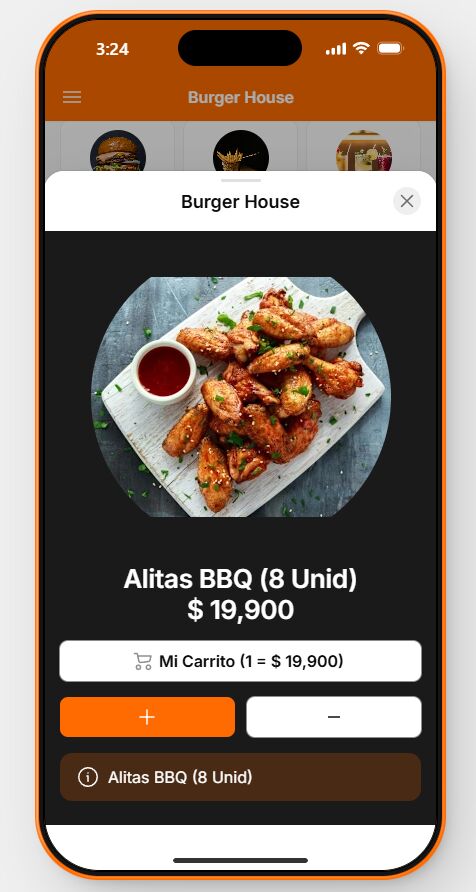
Clean, responsive UI (uses grids effectively on desktop).
-
Live cart calculation with subtotal/shipping.
-
Frictionless Checkout: No login required. It generates a structured WhatsApp message with the order details and sends it directly to the business.
-
Dynamic Status: Shows if the store is “Open” or “Closed” in real-time.
-
-
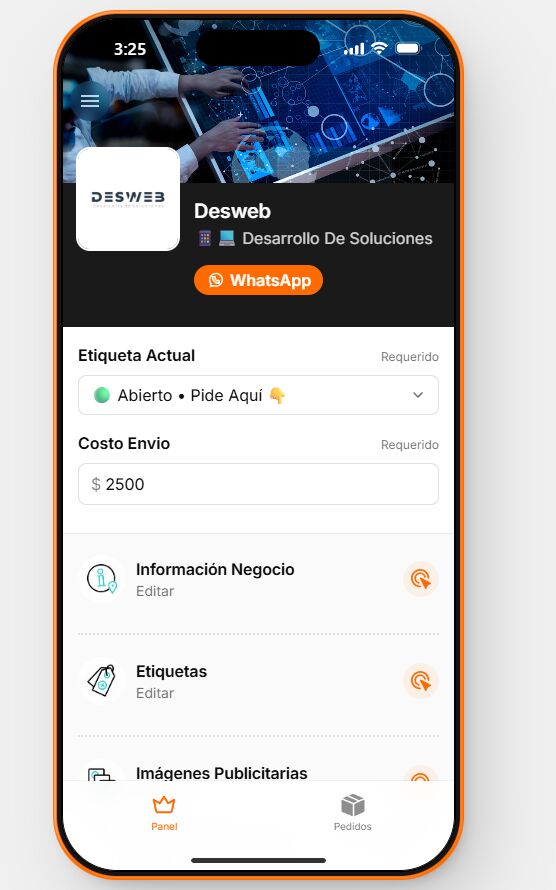
 The Admin App (CMS/Back-office):
-
Zero-Code Management for the Owner: The client can CRUD categories and products from their phone.
-
Inventory Safety Locks: Prevents deleting categories if they contain active products.
-
Marketing Engine: The owner can upload and toggle banner ads in the storefront’s Home or Cart.
-
Business Control: Toggle store status (Open/Closed), manage payment methods, and update social media links instantly.
-
 Check out the Demos (Feel free to test!):
 Client Storefront Demo: https://burger-house-demo-client2.glide.page (Go ahead and create a cart and click “Order via WhatsApp” - it will open a chat with my testing number so you can see the final message structure).
Admin Panel Demo: https://burger-house-demo-dueno2.glide.page (Explore the CRUD capabilities, try changing a price or turning off a banner and see it reflect in the client app).
 Looking for a template or a developer?
This system is developed by Desweb and is available as a template for developers or as a turnkey solution for businesses.
I’d love to hear your feedback on the UX/UI and the dual-app structure!
If you are interested in acquiring this template or need a custom complex Glide build, feel free to reach out:
 WhatsApp: +57 313 437 3474 (Or DM me here in the community)
Thanks for watching!
(App Clientes)


(App Dueños)