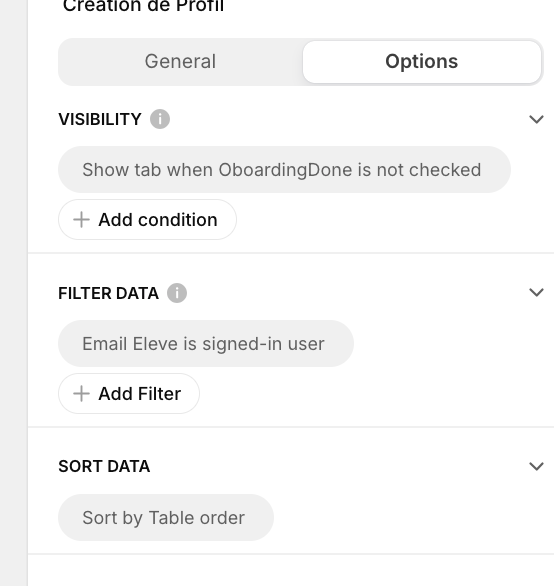
Hi,
I am having difficulties to create new user profiles:
- when a new user connect they only see a blank page explaining the app and asking them to click on a form button. When they click, a form appears and they can type in their information.
I am having two difficulties:
- when a user uses google to connect, two user lines are created in my google spreadsheet: one with the info from google and the other with the info the user has typed in. Does anybody knows how to deal with that?
- the onsubmit event of the form fires a simple workflow with street steps:
- “App interaction”
- show notification with a success message
- redirect the user to another tab
- however the workflow never seems to trigger.
- Has anybody experienced the same issue?
Best,
Aurélien
As you’ve noted, when a user signs into your App for the first time, a User Profile row is automatically generated for them. If you need to gather additional information from the user, you should use an Edit Form that will update the generated row, rather than an Add Form (which generates another row).
Does the target tab have any visibility conditions applied?
You (probably) don’t need an Add form (or Form Container) in the first place.
Vous n’avez (probablement) pas besoin du Add Form (ou Form Container).
Hi,
Thanks a lot for your answer.
I have noticed that by default the On submit action of the edit form is set to “none”, do I have to change it and set it to “set column values” with row being “this item” ?
thanks a lot for your answer!
No, you shouldn’t need an onSubmit action at all. Just add input components to the edit form for the columns you want the user to edit, and they will be updated when the user submits.
FWIW This is how I do onboarding:
Thanks a lot for your answer and for the video.
I feel I have done the same as you do but it seems I can’t feed the user’s profile row with data.
When a new user connects, they see this page:
this screen is linked to the table “élèves” which gathers my users
then when the new user clicks on “Création de profil”, it opens up an edit form
The column I use to capture if a user has completed their profile is “Oboarding” which is a boolean so I have added a workflow which sets Oboarding to True and sends the user to another screen.
However, the workflow does not seem to work and I cannot find the reason why. Do you see a potential explanation?
thanks a lot for your answer. However it seems that when I submit my edit form no data i saved to my google sheet.
yes, a set of fields from the user’s profile has to be filled.