In the Glide dashoard URL, e.g. https://go.glideapps.com/o/ss3WJJDqbqwlJwQjks9W
App ID:
In the Glide builder URL, e.g. https://go.glideapps.com/app/zGpeIVLgXkn3CzKjfNyF/layout
Description
In a detail screen for viewing a job, I have a tabs component and 4 of the tabs have numeric badges. The badge on one of the tabs has always been correct, and I have been able to troubleshoot the badges on two of the tabs. On one tab, the badge is still “sticky.” In other words, changing the job that is viewed will sometimes display an “old” badge. For example, if the current job has a correct badge number of 0, the data table displays 0, but the badge shows a different number.
How to replicate
Open the app in the editor, or in a published version on a phone or computer, or in an incognito browser window, or after clearing the cache (I’ve produced this behavior in all the ways). Open and close various jobs and observe the badge number until one is found that doesn’t match. Usually within 3-5 jobs there will be a mismatch. Check the underlying data table to confirm the badge doesn’t match the column value.
The relation column to the left of the rollup is the source of the count
The screen is the detail screen of a single-row helper table. So there are a lot of lookups. But I tried to re-create any computed columns in the helper table that would have been more than a single layer of lookup, if that makes sense.
Do you find that it’s always related to having a zero for a count? Sounds suspiciously similar but slightly different to this thread. Not sure what came if that one.
Interesting… it does appear to be related. While I don’t want to display a zero, and zero doesn’t show when the tags are empty, it does seem to be that a zero-tag job is what won’t display properly after any job with a non-zero tag count has been viewed.
If the first job I view has no tags, it looks like this
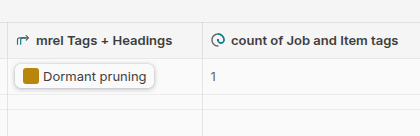
As soon as another job is viewed, a zero-tag job will show the badge for whatever the last non-zero job was. And it’s VERY persistent, even in the data table, which is kind of a second issue. Here are the two columns again, the relation and the rollup that is counting it, when the glitch is going on.
And for the record, I just edited the original post to include clearing the cache in all the things I’ve tried, yet I can always reproduce the problem.
Interesting that it’s happening in the table as well. I thought it was maybe isolated to the badge only. I feel like this is definitely a bug that should be reported to support. There seems to be some code that is not executing when a value is zero or contains zero, so both the badge and rollup end up holding on to a previous value. @Robert_Petitto did you ever get any feedback on your issue?
As a workaround, try creating an IF column that returns the roll-up column value if the relation is not empty, else return 0. See if that helps at all.
I tried adding an if-then with the condition of the relation not empty and the relation empty (with the appropriate else values), and neither solved it.
So for whatever reason, the badge, the rollup AND the relation hold on to the previous value. However, sometimes the data table will be correct when the badge is wrong, and other times the data table will match the incorrect badge. I haven’t found any reliable way to hit the reset button and get it to refresh manually.
No progress on Glide fixing the bug. My workaround is to add a user-specific number column for the count of tags, manage all the ways the number can change through workflows to keep that number correct, and use that for the tab badge.