Hi everyone,
Just started playing around with the new Make integration. Very exciting 
I am currently using it to import email leads into a Contacts table in my Glide app. I would like to set up some kind of filter or similar in make where it checks whether a contact with the same email address (as in the incoming email lead) already exists in my Glide table. If it does not exist, I would like to add a new row to the table, if it already exists I would like it to take a different route in my Make scenario.
Not sure if this is possible for a user who is not on the Business plan in Glide? If there is no way to query a Glide table in Make on my current plan, is there a workaround, for example like “Get Rows” and then search all of them in Make instead? 
Thank you so much for your help 
If you want to “Get All Rows” then I think you’ll need a business plan or higher.
I could help you with that Make scenario
Webhook → get all rows → set variable → rest of flow
Hi, @Eric_Penn thank you for your reply. I’m currently exploring the features available to me with the new native Make integration and it seems like the “Get Rows” module available to me in Make is actually getting all my rows from a table of my choice? And in that case it would only be a matter of me understanding on how to get Make to search through the data and look for a duplicate?
Again, I might be completely wrong about this😎
After the Get All Rows in Make you’ll want to add a “Set Multiple Variables” module. You want something like this. rows is from your Get All Rows Call, 4zMbr is the name of the column in Glide to search, packageid is the Glide row ID.
Scratch that… it’s a little early in the morning for Make scenarios… but i will get back to you with the answer
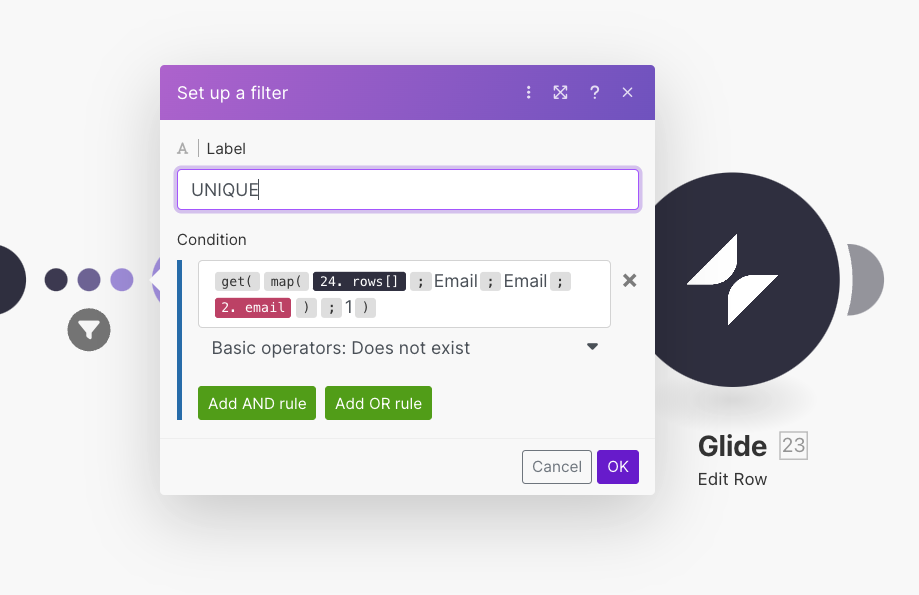
Ok one way to do it is set it up like a filter. You build the flow completely as if you already checked the email and it is a new user. Then come back and put filter in between working steps.
Sweet, this looks great. Thank you so much for taking time to explain this🙏 Will look into this🙂 I don’t fully understand what everything in the “Conditions” field in your example means, but will look in the Make documentation to learn more about it. Will probably be back here with some more questions soon!
You will find the get and map functions in the fly out panel.
rows [ ] - that’s from your Glide get all rows call
Email - by default the name of the Email column in your Glide Users table is ‘Email’… the Email column name could change if you move it. If you have moved the column it my be an unfriendly name like F0123
The red email - is the one we want to search from the webhook
…and be sure to put Basic operators: Does not exist 
Thanks! Can I ask, what is the reason for writing “Email” twice?
It’s because we want to return a primitive array with emails having an email equal to the email from the webhook. I hope that makes sense…
If you ever have any questions how to use a function in Make you can hover over it for more info

Thanks so much for explaining, I will give this a try🙂
My man explained map and get better than I have ever could.
Just for more information, this is basically a lookup, wrapped in Make functions.