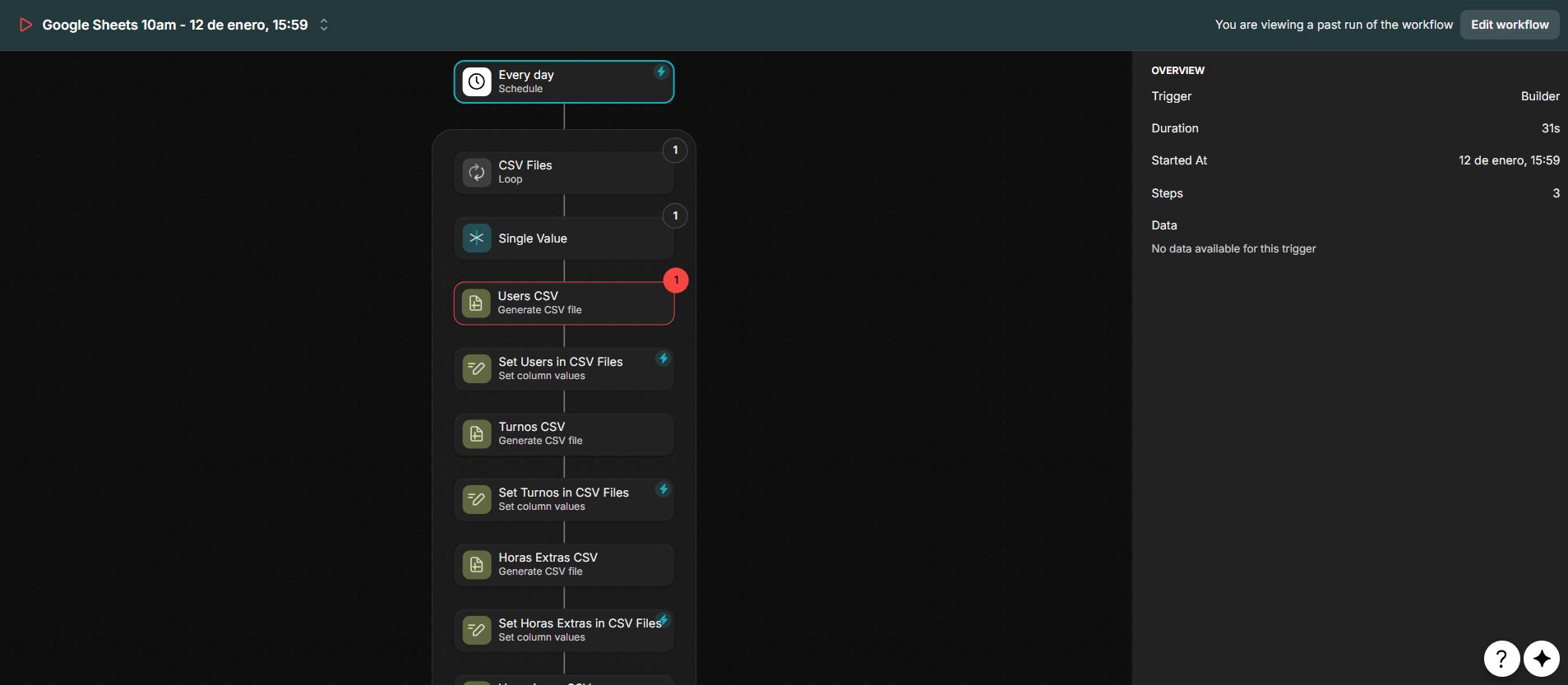
Hi, I need help with an issue when creating a workflow. I want to use a workflow to send some CSV files with data from a few of my tables by email to Zapier, but I’m having problems with the step that generates the CSV file. I always get the same error: “Upload failed with status code 403.”
Does anyone know what could be causing this? I’ve already tried everything I can think of: storing the file first in a column, setting the output file directly in the CSV generation step, but I can’t figure out what the problem is.
That is going to sound weird, but can you try the generate CSV from a User interactive workflow? I am thinking that there might be an issue when running from a backend workflow (like schedule trigger)… I had an issue like that in the past…
Scheduled workflows, and other server-side workflows, can’t access user-specific values/values from the user profile. From the looks of the workflow, it seems posible that the “Users CSV” may be dependent on user profile values in some way.
Are any columns, whether it’s the columns used to build the CSV, or the column used to receive the CSV url, a user specific column? As stated, back end server side actions cannot access user specific columns because they are not ran as a specific user. Also as stated, values from the user profile as opposed to the user table won’t work, again because server side actions are not ran as a specific user. It would be helpful to see the configuration for the action and if any columns used are user specific or using the user profile.