No Richtext needed — everything runs on the avatar-URL fragment trick.
CSS-only approach — UI reacts to hash fragments appended to the user avatar URL in the users table, displaying badge states accordingly. No extra HTML or Richtext elements are needed.
Reference threads (original method sources):
 Richtext-based selector injection
 CSS Hack: Dynamic CSS in Glide
Image-URL fragment listener
 CSS Hack: Dynamic CSS in Glide 2 via URL Fragment
This post focuses only on the merged CSS approach.
Badge will remain hidden when:
Avatar URL contains no fragment tags
→https://cdn.com/avatar.pngBadge is explicitly zero OR empty
→ avatar.png#data-status=unread#data-badge=0
→ avatar.png#data-status=unread#data-badge=Any badge number but status is “read”
→ avatar.png#data-status=read#data-badge=7
Additionally:
When badge > 10, display becomes “10+”.
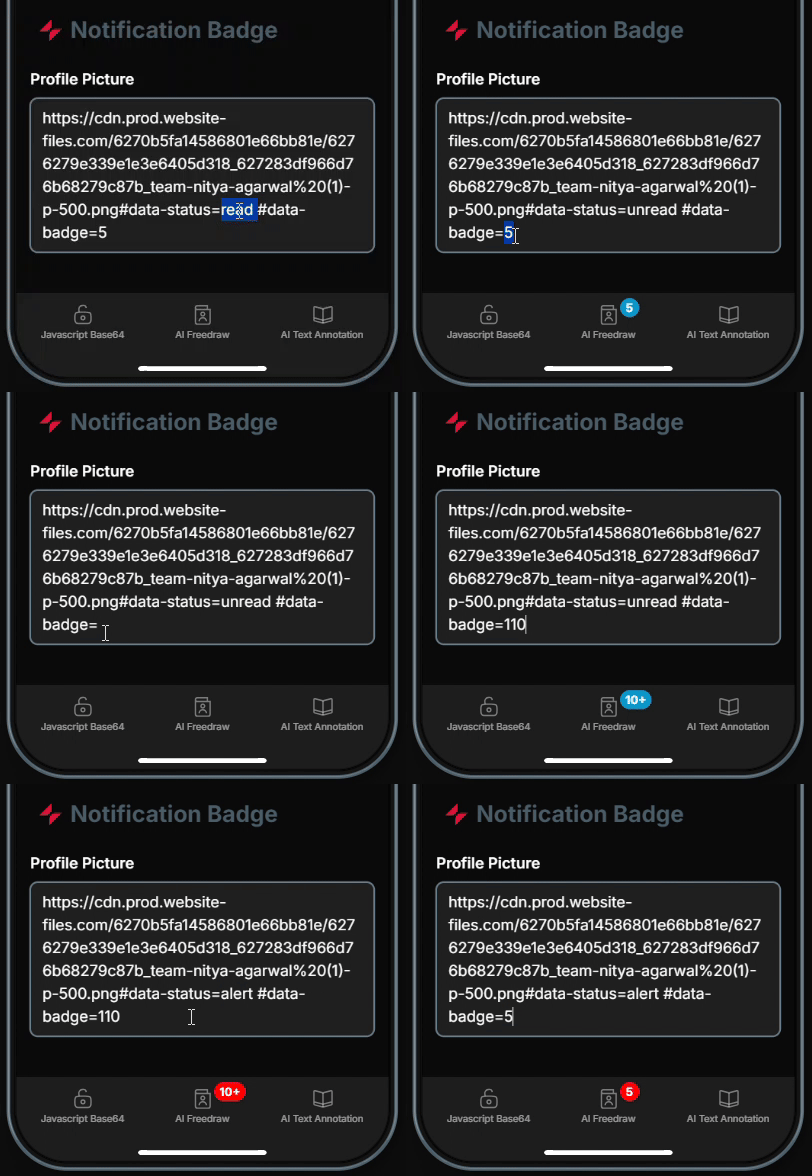
You only need to append #data-status=value#data-badge=value (or any other #tags) to the end of your avatar image URL.
CSS
/* Prep */
:is(.main-nav button, .sidebar-root li) {
  position: relative;
}
:is(.main-nav, .sidebar-root) {
  overflow: visible;
}

/* Mobile positions */
.has-tab-bar > div:last-child .main-nav button:nth-of-type(2)::after {
  top: -2px;
  left: calc(50% + 12px);
}

/* Desktop positions */
nav button:nth-of-type(2)::after,
.sidebar-root li:nth-of-type(2)::after {
  top: -6px;
  right: calc(100% - 20px );
}

/* Default assumption: badge exists → fallback 10+ */
#page-root:has(img[src*="#data-badge="])
  :is(.main-nav button:nth-of-type(2), .sidebar-root li:nth-of-type(2))::after {
  content: "10+";
  position: absolute;
  font-size: 12px;
  font-weight: bold;
  color: white;
  border-radius: 999px;
  min-width: 20px;
  height: 20px;
  line-height: 20px;
  display: flex;
  justify-content: center;
  align-items: center;
  padding: 0 4px;
}

/* Hidden when badge is zero or blank */
#page-root:has(img[src$="#data-badge=0"], img[src$="#data-badge="])
  :is(.main-nav button:nth-of-type(2), .sidebar-root li:nth-of-type(2))::after {
  display: none;
}

/* Hidden when status=read */
#page-root:has(img[src*="#data-status=read"])
  :is(.main-nav button:nth-of-type(2), .sidebar-root li:nth-of-type(2))::after {
  display: none;
}

/* Status colors */
#page-root:has(img[src*="#data-status=unread"])
  :is(.main-nav button:nth-of-type(2), .sidebar-root li:nth-of-type(2))::after {
  background:  #0098cc;
}
#page-root:has(img[src*="#data-status=alert"])
  :is(.main-nav button:nth-of-type(2), .sidebar-root li:nth-of-type(2))::after {
  background: red;
}

/* Exact values override fallback */
#page-root:has(img[src$="#data-badge=1"])  :is(.main-nav button:nth-of-type(2), .sidebar-root li:nth-of-type(2))::after { content: "1"; }
#page-root:has(img[src$="#data-badge=2"])  :is(.main-nav button:nth-of-type(2), .sidebar-root li:nth-of-type(2))::after { content: "2"; }
#page-root:has(img[src$="#data-badge=3"])  :is(.main-nav button:nth-of-type(2), .sidebar-root li:nth-of-type(2))::after { content: "3"; }
#page-root:has(img[src$="#data-badge=4"])  :is(.main-nav button:nth-of-type(2), .sidebar-root li:nth-of-type(2))::after { content: "4"; }
#page-root:has(img[src$="#data-badge=5"])  :is(.main-nav button:nth-of-type(2), .sidebar-root li:nth-of-type(2))::after { content: "5"; }
#page-root:has(img[src$="#data-badge=6"])  :is(.main-nav button:nth-of-type(2), .sidebar-root li:nth-of-type(2))::after { content: "6"; }
#page-root:has(img[src$="#data-badge=7"])  :is(.main-nav button:nth-of-type(2), .sidebar-root li:nth-of-type(2))::after { content: "7"; }
#page-root:has(img[src$="#data-badge=8"])  :is(.main-nav button:nth-of-type(2), .sidebar-root li:nth-of-type(2))::after { content: "8"; }
#page-root:has(img[src$="#data-badge=9"])  :is(.main-nav button:nth-of-type(2), .sidebar-root li:nth-of-type(2))::after { content: "9"; }
#page-root:has(img[src$="#data-badge=10"]) :is(.main-nav button:nth-of-type(2), .sidebar-root li:nth-of-type(2))::after { content: "10"; }