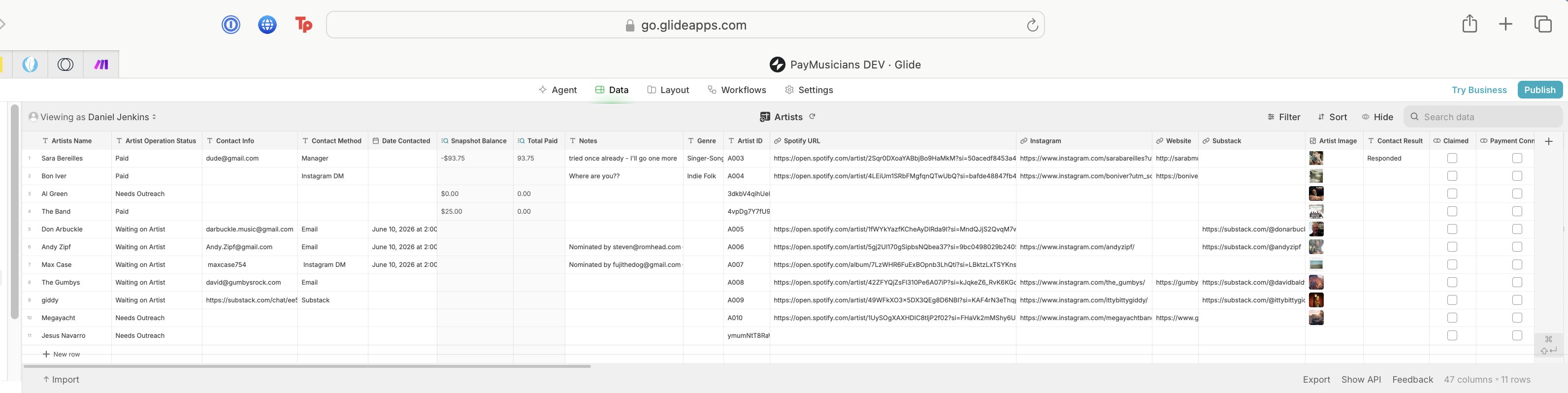
Issue Overview:
I’m experiencing an issue where an Item Click workflow on a list becomes completely unresponsive for any row where the Relation column (“Existing Support Relationship is not empty”) resolves as true, regardless of the data in the related row. If the Relation is empty, the workflow fires as expected.
Steps to Reproduce:
- Create a list from any table (for example, Artists).
- Add a Relation column, matching against a second table, single match.
- Attach a workflow (App Interaction) to the list row, with a top-level condition: Relation “is not empty”.
- Assign this workflow to “Item Click” in the list’s settings.
- In Preview:
- Clicking a row with an empty Relation works – workflow triggers.
- Clicking a row where Relation is not empty does nothing – row is not clickable and the workflow never runs.
Key Observations:
- The unclickable state is strictly tied to “Relation is not empty”.
- The actual data in the related row doesn’t affect this (I confirmed by toggling values).
- No errors are thrown, and the cursor does not change on hover for affected rows.
Additional possibly-related issue:
Workflows sometimes revert to “Untitled workflow” or disappear after minimal engagement or navigation away from Glide Builder, with previously saved logic and steps lost.
Has anyone else run into this or found a workaround? Is this a known bug? Any help appreciated.
I just tested this, and it works as expected.
Could you perhaps add some screenshots to show how you have everything configured?
Perhaps we can spot something that might not be obvious to you.
Oh trust me, nothing is obvious to me…!  You are very kind to take a look!
Here are screenshots of data sheets and workflow. I’ll try to add some config pieces, too…let me know what you’re missing! Many thanks in advance!!
Trying to populate artists rows in Support Relationships Table when a new user is onboarded through glide interaction. The “Heart Toggle” will live in the description and visually toggle status from the default “Available to support” to “Supporting”. We’ve wired that before and got it going. Just trying to solve the user data import at the moment… Thanks again!!
Hi there,
Wanted to follow up with what I found after more digging — this turned out to be a genuinely useful rabbit hole, and the root cause was different (and more interesting) than the original symptom suggested.
Confirming the original bug report: Item Click did stop firing on any row where a Relation column (“Existing Support Relationship is not empty”) evaluated true, regardless of the related row’s actual data. I rebuilt the workflow from scratch (same logic, but built fresh rather than patched) and that specific dead-click symptom went away. So either the from-scratch rebuild cleared some stale state, or the order I built the conditions in this time around sidestepped whatever was triggering it. I don’t have a clean theory of the underlying mechanism, but the workaround (full rebuild) reliably fixed it for me.
The more important discovery: while testing the rebuilt workflow with a second real user (not just the account I’d been building/testing with), I found that the Relation itself (“Existing Support Relationship”) was never actually scoped to the current user — it matched on Artist ID alone, with no per-user filter. Since I’d only ever tested as one user, this silently worked for me by coincidence: my own taps always matched my own rows. But for any other user, the relation returned MY existing rows as “not empty,” even though they had none of their own — so the workflow would think a row existed when it didn’t, and take the wrong branch.
The fix was building a combined “(User Email)-(Artist ID)” template key on both sides of the relation (instead of matching on Artist ID alone), so the relation now correctly answers “does THIS user have a row for THIS artist” rather than “does ANY row exist for this artist.” Once that was in place, new users onboarded cleanly with their own correctly-scoped rows.
Sharing this in case it’s useful to others who might hit something similar — a Relation that “works” during solo testing can hide a real scoping bug that only shows up with a second user, and that’s a much higher-value bug to catch than the click-handling quirk that led me to it.
Thanks again for the help getting started on this.
Best,
Daniel
PayMusicians
A cleaner approach to that is to use a Query column, and apply appropriate filters.
Oh! Cool - don’t think I’ve even seen that before…I will check it out - thank you!
Hey Darren — thanks again for the Query column tip, going to dig into that when I’m back in that part of the app.
Separate issue, but since you’ve been helpful here: I’m seeing our published app’s auto-generated .glide.page subdomain change on every publish — 5 different strings across 2 days of normal editing/publishing (no custom domain set up). “Public” is checked each time and publishing completes fine, so it’s not a permissions issue. I tried posting a fresh bug report but it looks like new posts need approval right now — figured I’d flag it here in case you’ve run into this or know if it’s expected behavior.
Team ID: SMtmpOGFzNGKVBS9yDUH
App ID: SrYcXxwCBtyGLXKnijel
Trying to use the published URL as a stable redirect target for Stripe Checkout, so the rotation is breaking that. Appreciate any pointers!
That’s not normal, and it shouldn’t happen - unless you unpublish and then republish. And I assume you’re not doing that, are you?
I’m not UNpublishing - just continuing to make changes, then duplicating and publishing the working copy. I do call the working copy the same name each time after duplication though - PayMusicians DEV,
oh, you’re duplicating then publishing?
In that case, yes of course every time you do that a different URL will be generated. But you can change it, as @Jeff_Hager pointed out in your other thread.
What I would suggest is to pick your own URL, eg, myurl.glide.page, and use that. And only ever publish one version of your App.
Gotcha. I guess I have been duplicating my brains out because of saving paranoia… Do you have any tips about proper saving hygiene…?
I always have manual publishing enabled, and I make changes in the live App, then publish once I’m done. Usually I’ll only bother making a copy of an App if I’m about to make large changes that could break things.
Ok, cool. I’ll try a new flow and see how it goes…Thank you so much!
Hi Daniel, I’m a little paranoid too about backups and messing up the live app. I back up the live app after working on it and have a naming convention with dates and the nature of the backup. In the dashboard, I have a folder system where are store the backups. The Live folder only stores apps that are actually live in production.
The system is probably over-engineered but it takes little effort to maintain and it has saved projects a few times (not often, but enough times that I would consider it worth it).
I’ve applied this system to protect a functioning live app from myself and from well-intentioned collaborators who might inadvertently break things inside the (previously) working app.
Oh cool – thanks so much for sharing this!