First question I would have here: Is there an absolute need to use Big Tables? It will limit your options, so you should know in advance before working more on it.
Secondly, do you need a Calendar_layout table like that? I think you can just have a date component writing to a user-specific column and filter based on that value?
Sorry for the confusion. This is actually my first real project in Glide, so I’m still learning the platform and its limitations.
At the time I started, I didn’t fully understand the differences between Big Tables and regular tables, and I wasn’t aware how much they can limit some options. I only learned about that after your comment.
The same applies to the Calendar_layout table. I created it as a workaround because I wasn’t yet familiar with using if-then-else columns and filtering directly from them. That’s why I built an extra calendar table to filter current month in layout.
My suggestion is still the same, it’s unlikely you need to have a full Calendar_layout table. Just point 2 date components to 2 user-specific columns and filter/rollup your data based on that.
If the data you’re rolling up doesn’t need to scale much, you can use the normal table. Else, you’ll deal with the computation limitations that it has.
My goal is to build an accounting timesheet view.
The accountant first selects an employee (e.g. Tomaž), then selects a month, and the app should display a full calendar from day 1 to day 31 for that employee.
For each day it should show:
worked hours
travel / commute
absence type
And also include empty rows for days without any records, such as weekends and holidays.
This means the view must always show all calendar days of the selected month, even if there are no time entries for that day.
Example shown in the image
I was wondering what number of employees at your company are to submit an entry every working day. Have you checked the amount of rows your app is going to consume for this time tracking feature only?
At the moment this is a small internal app. We currently have 2 employees, maybe 3–5 in the near future.
So we are talking about tens of rows per month, not thousands.
This is primarily for internal accounting and payroll, not a large-scale SaaS product.
That’s why correctness of rollups (hours, travel, absences) is more important for me than extreme scalability at this stage.
If in the future the company grows significantly, I understand that we may need to migrate the time entries to a Big Table or another high-scale data source.
For now, I am optimizing for accounting accuracy and full calendar reporting (1–31 days, including weekends and empty days).
In that case, I guess a calendar table is needed and the most straightforward way to do it. You just have to make sure the numbers you want to rollup are rollup-able (i.e either accepting the limitations of Big Tables and work around it, or change to normal tables).
Write the choice of employee and month (I guess it’s a combination of month and year) to user-specific columns, in a helper table with one row. This is where you can host the tab on the front end.
Cast them to the calendar table using single value columns, then do the queries to filter your other tables by those values. The query targeting other tables should be constructed like “employeeID is this row > single value chosen employeeID AND date is within this row > date”.
Finally, use rollups to calculate the total of these things, assuming they are numbers:
Worked hours
Travel/commute
Use a joined list to get the absence type.
Then on the front end, display a data grid targeting the calendar table, and filter by the row’s month is the same as single value chosen month.
Be careful with how you structure the time values though, I would suggest converting month values to numerical format.
I’m having an issue with Relations in Glide and I can’t figure out why it behaves like this.
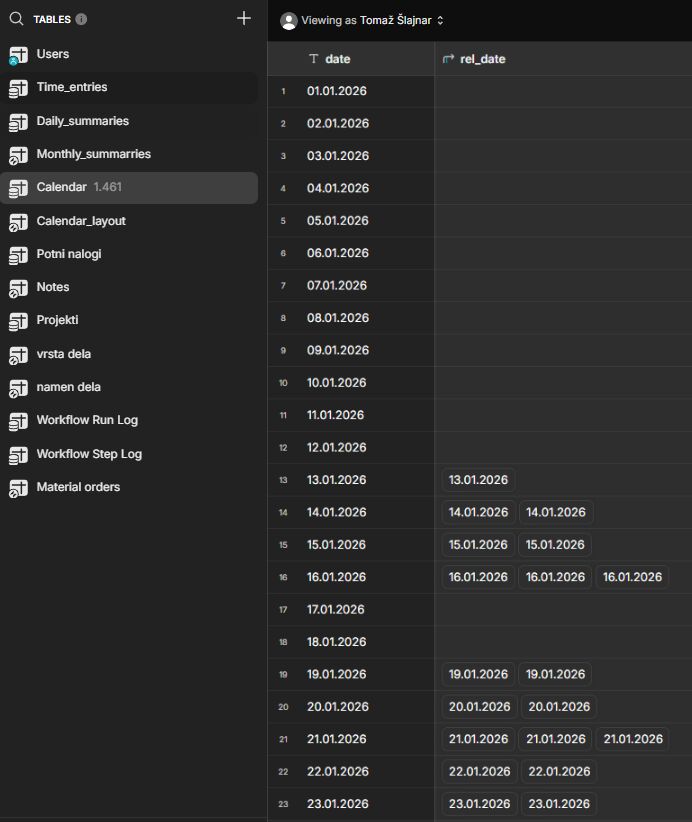
I have a Calendar table with a date column.
I also have another table where I relate records to the Calendar table using a Relation based on the same date value.
The problem:
Relations are only recognized from January 13th onward.
Dates before 13.01.2026 do exist in the Daily_summaries, but the relation column stays empty for those rows.
I’ve already managed to set up the calendar and the filtering — the only thing missing is a solution to this issue.


 The problem: