# Weekly overview
**URL:** https://community.glideapps.com/t/weekly-overview/56955
**Category:** Ask for Help
**Created:** [January 21, 2023, 10:03am UTC](https://community.glideapps.com/t/weekly-overview/56955 "2023-01-21T10:03:57Z")
**Posts on this page:** 20
**Page:** 1
### Author:  [@Andreas\_Ramelsberger](https://community.glideapps.com/u/Andreas_Ramelsberger)
#### Post date: [January 21, 2023, 10:03am UTC](https://community.glideapps.com/t/weekly-overview/56955/1 "2023-01-21T10:03:57Z")
Hey,
I would like to Programm a week overview to show all todos and projects in that period.
So from Monday to Sunday.
Has someone an idea what is the best approach for that?
Best
Andi
---
### Author:  [@Uzo](https://community.glideapps.com/u/Uzo)
#### Post date: [January 21, 2023, 10:08am UTC](https://community.glideapps.com/t/weekly-overview/56955/2 "2023-01-21T10:08:46Z")
> **[Personal Time Card DEMO](https://time-card-demo.glideapp.io/dl/d0a5f4/s/56ee74/r/HspuEs3HTFGE5n72teJ6XQ)**
>
> Track your working hours, sort by week, month, or year. Export as PDF files
---
### Author:  [@Darren\_Murphy](https://community.glideapps.com/u/Darren_Murphy)
#### Post date: [January 21, 2023, 4:14pm UTC](https://community.glideapps.com/t/weekly-overview/56955/3 "2023-01-21T16:14:48Z")
Assuming that:
- you always want to filter records within the current week, and
- you have a datetime column in your Projects/ToDo’s tables that can be used as a filter
then…
- in each table that you want to filter records, create two math columns using the following formulas:
```auto
Now+MOD(8-WEEKDAY(Now),7)-6-HOUR(Now)/24-MINUTE(Now)/1440-SECOND(Now)/86400
```
```auto
Monday + 7
```
- In the first formula, use the current date/time as a replacement for “Now”
- In the second formula, use the output of the first formula as a replacement for “Monday”
- This will give you two dates - Last Monday & Next Monday. Here is how it should look in the Data Editor:

- Next create an if-then-else column as follows:
– If record date is before last Monday then null (leave empty)
– If record date is after next Monday, then null
– Else true
- Now you can use that if-then-else column as a filter (ie. only show records that are true)
---
### Author:  [@slscustom.ru](https://community.glideapps.com/u/slscustom.ru)
#### Post date: [January 22, 2023, 6:33pm UTC](https://community.glideapps.com/t/weekly-overview/56955/5 "2023-01-22T18:33:29Z")
Hi, Darren!
I trying your setup…
Where did I go wrong

---
### Author:  [@Darren\_Murphy](https://community.glideapps.com/u/Darren_Murphy)
#### Post date: [January 23, 2023, 2:47am UTC](https://community.glideapps.com/t/weekly-overview/56955/6 "2023-01-23T02:47:32Z")
Are you asking why the 16th wasn’t considered part of “this week”?
I’d say that’s because the Math formula for “Last Monday” doesn’t account for milliseconds.
You can test that by using the following in a JavaScript column and compare the result you get for Date and Last Monday. You might find they are not quite exactly the same.
```auto
return new Date(p1).getTime();
```

One way to “fix” that would be to convert everything to integers and then use numerical comparisions.
---
### Author:  [@slscustom.ru](https://community.glideapps.com/u/slscustom.ru)
#### Post date: [January 23, 2023, 10:02am UTC](https://community.glideapps.com/t/weekly-overview/56955/7 "2023-01-23T10:02:46Z")
Thanks for answer, Darren!
How do you think, this setup will work correctly?
Or maybe, it much more slowly, compared to your setup?

---
### Author:  [@Darren\_Murphy](https://community.glideapps.com/u/Darren_Murphy)
#### Post date: [January 23, 2023, 10:25am UTC](https://community.glideapps.com/t/weekly-overview/56955/8 "2023-01-23T10:25:16Z")
I don’t know. What are you using there, the Format Date plugin?
I don’t use that, but if it works for you then that should be fine.
---
### Author:  [@slscustom.ru](https://community.glideapps.com/u/slscustom.ru)
#### Post date: [January 23, 2023, 11:30am UTC](https://community.glideapps.com/t/weekly-overview/56955/9 "2023-01-23T11:30:56Z")
Yes, this is Format Date plugin.
Just i see your setup and another expert liked it, but it not working for me and you had explained why. So as i understand, your setup is wrong for this question and must be little bit changed if need for work.
Maybe i wrong understanding something, because my poor English.
I trying to understand why you suggesting so many calculation, maybe some hidden reason.
Sorry if my posts is unreasonable!
---
### Author:  [@Darren\_Murphy](https://community.glideapps.com/u/Darren_Murphy)
#### Post date: [January 23, 2023, 12:03pm UTC](https://community.glideapps.com/t/weekly-overview/56955/10 "2023-01-23T12:03:36Z")
> [@slscustom.ru](#):
>
> So as i understand, your setup is wrong for this question and must be little bit changed if need for work.
Well, it was a contrived example, and it will only fail for dates where the time is less than one second after midnight. So for the purpose of the original question, it should work fine. But to make it rock solid, I would add a couple of math columns to convert both “Last Monday” and “Date” to integers, and then adjust the if-then-else column to use those, ie:
- If Date Integer is less than Last Monday Integer, then null
- If Date Integer is greater than or equal to Next Monday, then null
- Else true
So the end solution would look something like this:

> [@slscustom.ru](#):
>
> I trying to understand why you suggesting so many calculation, maybe some hidden reason.
Personal preference, mostly. I don’t trust any of the Date Plugins, and so I avoid them and use Date Math instead. Even if it means a few extra columns.
---
### Author:  [@slscustom.ru](https://community.glideapps.com/u/slscustom.ru)
#### Post date: [January 23, 2023, 12:10pm UTC](https://community.glideapps.com/t/weekly-overview/56955/11 "2023-01-23T12:10:58Z")
> [@Darren\_Murphy](#):
>
> it will only fail for dates where the time is less than one second after midnight.
But it is very common, because it generated by Date picker component.
Thanks! Now I clear about!
---
### Author:  [@Darren\_Murphy](https://community.glideapps.com/u/Darren_Murphy)
#### Post date: [January 23, 2023, 12:48pm UTC](https://community.glideapps.com/t/weekly-overview/56955/12 "2023-01-23T12:48:45Z")
Actually yes, you’re right.
For some reason I had it in my head that the date picker would give the time of submission with a date. But that’s not the case at all. The date picker gives midnight on the selected date.
So yes, I take back what I said. The original solution that I gave _is_ unreliable.
---
### Author:  [@Andreas\_Ramelsberger](https://community.glideapps.com/u/Andreas_Ramelsberger)
#### Post date: [January 29, 2023, 8:09pm UTC](https://community.glideapps.com/t/weekly-overview/56955/13 "2023-01-29T20:09:43Z")
@Darren_Murphy
Thanks for you input.
I am not sure if it is 100% what I need. Cause in general I see with a data filter in the calendar already “just the events” which are relevant / upcoming. With your input I can then filter them to see which are during the next week / 7 days!
→ this is already very nice. My approach is to go one step further
My plan is / and thoughts are:
- a page which show the next 7 days. So for example Tuesday to Monday, if it is tuesday today. (So I need a table with all 7 days + the actual date behind it. How can I do it with the date? So that it updates automatically?)
- then I would add one calendar per day (assuming that I put the dates for all 7 days in different column) and I filter them fitting to the date the item has. How can I handle events which are for a longer period? And can I highlight the event color depending on that?
- with the thoughts I descripe I see the problem coming, that it will not be possible to go trough the other upcoming weeks. So this is also something we should think about
Thanks a lot for you input!
Andi
---
### Author:  [@slscustom.ru](https://community.glideapps.com/u/slscustom.ru)
#### Post date: [January 29, 2023, 9:02pm UTC](https://community.glideapps.com/t/weekly-overview/56955/14 "2023-01-29T21:02:17Z")
> [@Andreas\_Ramelsberger](#):
>
> a page which show the next 7 days.
if date is before now then empty
if date is after (math now+7) then empty
else date
If you need per weekday column:
for Monday column:
if date is before now then empty
if date is after (math now+7) then empty
if math(weekday(date) is not 1 then empty
else date
for Tuesday column:
if date is before now then empty
if date is after (math now+7) then empty
if math(weekday(date) is not 2 then empty
else date
And so on
---
### Author:  [@Andreas\_Ramelsberger](https://community.glideapps.com/u/Andreas_Ramelsberger)
#### Post date: [January 31, 2023, 9:17pm UTC](https://community.glideapps.com/t/weekly-overview/56955/15 "2023-01-31T21:17:01Z")
Thanks a lot. I am still not sure with a lot things:
1. how can I see the current date and time? There should be a =NOW() function right? But how to add this?
2. do I then still need multiple rows like in the screenshost you shared? So that I add for every date a new row? And if YES, can that happen automatically? Or how to do / trigger that?
3. I would say show the project / todo and so on on the deadline - event in the week. So when you see the date is the same. This is how it should technically work.
Thanks a lot
Andi
---
### Author:  [@Jeff\_Hager](https://community.glideapps.com/u/Jeff_Hager)
#### Post date: [January 31, 2023, 9:51pm UTC](https://community.glideapps.com/t/weekly-overview/56955/16 "2023-01-31T21:51:06Z")
> [@Andreas\_Ramelsberger](#):
>
> how can I see the current date and time? There should be a =NOW() function right? But how to add this?
Yes, there is definitely Now functionality in a Math column.

---
### Author:  [@Andreas\_Ramelsberger](https://community.glideapps.com/u/Andreas_Ramelsberger)
#### Post date: [February 3, 2023, 3:47pm UTC](https://community.glideapps.com/t/weekly-overview/56955/17 "2023-02-03T15:47:53Z")
thats nice. And has someone an idea for the other questions?
1. do I then still need multiple rows like in the screenshost you shared? So that I add for every date a new row? And if YES, can that happen automatically? Or how to do / trigger that?
2. I would say show the project / todo and so on on the deadline - event in the week. So when you see the date is the same. This is how it should technically work.
Best
Andi
---
### Author:  [@Andreas\_Ramelsberger](https://community.glideapps.com/u/Andreas_Ramelsberger)
#### Post date: [February 5, 2023, 7:25pm UTC](https://community.glideapps.com/t/weekly-overview/56955/18 "2023-02-05T19:25:09Z")
Hey, I am not sure if you can give me another advice. But I do not find a solution.
Here you see my “week overview” table.
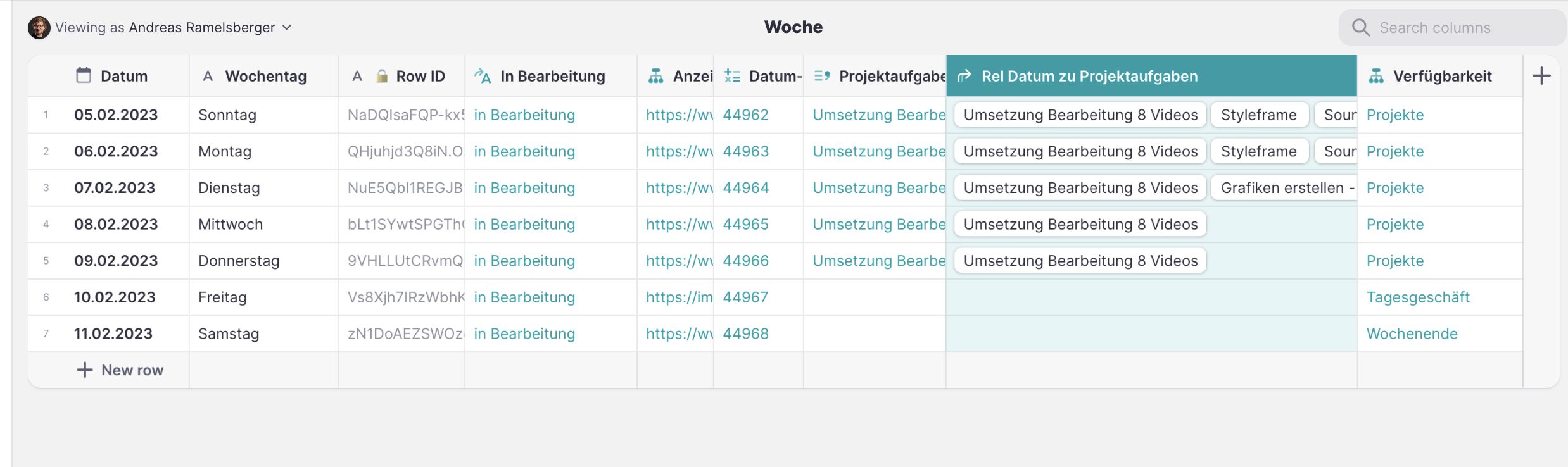
In general it is nice. BUT the related todos which I have marked in the screenshot give a relation for all todos which has to be done during that week. Now I just have to filter that by the user … How can I do this? I did not find a solution yet… Normally I would do that in the frontend… But therefore I would need the user name in that week overview table and that does not work.
Do you have an idea?
Andi
---
### Author:  [@Andreas\_Ramelsberger](https://community.glideapps.com/u/Andreas_Ramelsberger)
#### Post date: [February 5, 2023, 7:31pm UTC](https://community.glideapps.com/t/weekly-overview/56955/19 "2023-02-05T19:31:02Z")
this is how the frontend looks like. I think my main problem is, that I am searching for a visual approach like this, but it does not work.

---
### Author:  [@ThinhDinh](https://community.glideapps.com/u/ThinhDinh)
#### Post date: [February 6, 2023, 12:13am UTC](https://community.glideapps.com/t/weekly-overview/56955/20 "2023-02-06T00:13:51Z")
I haven’t followed this thread, but if you already have that relation and use that as the source of an inline list, shouldn’t you be able to filter that by a column that stores something like the user’s email or rowID?
---
### Author:  [@Andreas\_Ramelsberger](https://community.glideapps.com/u/Andreas_Ramelsberger)
#### Post date: [February 6, 2023, 7:06am UTC](https://community.glideapps.com/t/weekly-overview/56955/21 "2023-02-06T07:06:41Z")
thanks. With this option i can integrate the todos yes… but NOT that they work with the design.

Here in the screenshot you see the List / Design I want to achive. Right now the todo is below the day… so “montag” and below it you see a grey text… thats fine… is there a way to do it like this? And also you see in the corner I marked it green the status of your task… so it means you are in the office… or it means you are out in the field… all that is not possible with the “design” of a relation list.
Do you have an idea?
[Next page](https://community.glideapps.com/t/weekly-overview/56955.md?page=2)