# Visibility Conditions Not Working
**URL:** https://community.glideapps.com/t/visibility-conditions-not-working/77787
**Category:** Report a Bug
**Created:** [November 9, 2024, 3:18pm UTC](https://community.glideapps.com/t/visibility-conditions-not-working/77787 "2024-11-09T15:18:16Z")
**Posts on this page:** 8
**Page:** 1
### Author:  [@Atom](https://community.glideapps.com/u/Atom)
#### Post date: [November 9, 2024, 3:18pm UTC](https://community.glideapps.com/t/visibility-conditions-not-working/77787/1 "2024-11-09T15:18:16Z")
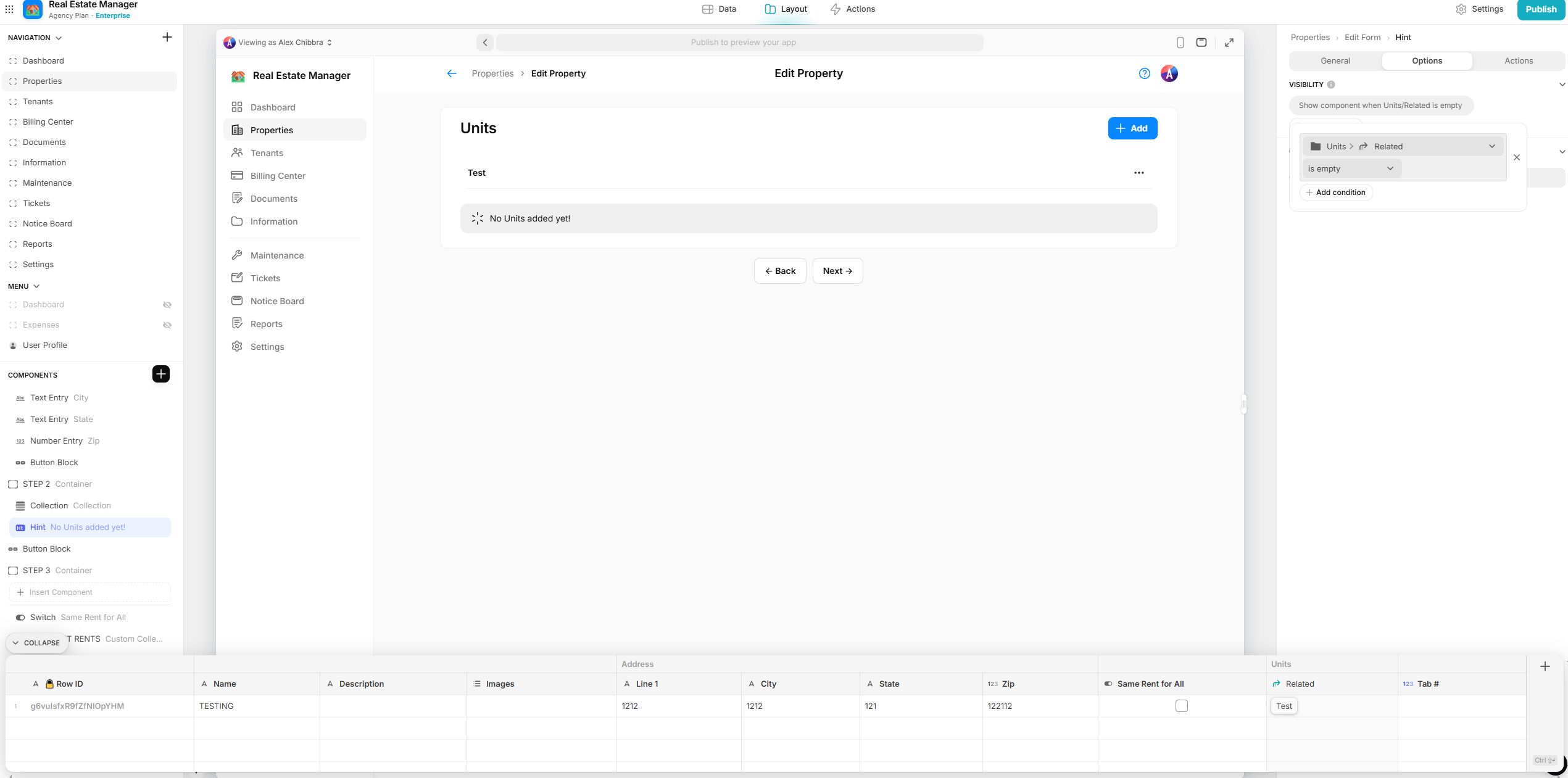
Visibility condition issues. I’m trying to display the hint only when there are no related Units for the Property, however it’s not working. I also attempted to do a count of the Units with a condition to display if the Count is less than or equal to 0 but it’s not working at all.
* * *
**Team ID:**
- In the Glide dashoard URL, e.g.
[https://go.glideapps.com/o/y60l3n8HkXyhX6yCO7cd](https://go.glideapps.com/o/y60l3n8HkXyhX6yCO7cd)
**App ID:**
- In the Glide builder URL, e.g.
[https://go.glideapps.com/app/vJ9jBMVpVRwrdYBdHASX/layout](https://go.glideapps.com/app/vJ9jBMVpVRwrdYBdHASX/layout)
**Description**
- I’m trying to display the hint only when there are no related Units for the Property, however it’s not working. I also attempted to do a count of the Units with a condition to display if the Count is less than or equal to 0 but it’s not working at all.
**How to replicate**
- Attempt to hide an element on an Edit screen based on any related field.

---
### Author:  [@Jeff\_Hager](https://community.glideapps.com/u/Jeff_Hager)
#### Post date: [November 9, 2024, 4:05pm UTC](https://community.glideapps.com/t/visibility-conditions-not-working/77787/2 "2024-11-09T16:05:26Z")
I’m guessing it has something to do with the fact that you are inside a form, but out of curiosity, can you show how the relation is configured? Did a value change in step 1 that would cause the relation to be empty or not?
---
### Author:  [@Atom](https://community.glideapps.com/u/Atom)
#### Post date: [November 9, 2024, 4:31pm UTC](https://community.glideapps.com/t/visibility-conditions-not-working/77787/3 "2024-11-09T16:31:19Z")
I thought that at first too. But then I saved the form, and reopened it (so the data should have saved) but it still shows the exact same thing. The images are from after reopening the edit screen.
---
### Author:  [@ThinhDinh](https://community.glideapps.com/u/ThinhDinh)
#### Post date: [November 10, 2024, 1:44am UTC](https://community.glideapps.com/t/visibility-conditions-not-working/77787/4 "2024-11-10T01:44:17Z")
What type of backend are you using for this? Glide Tables, Airtable or something else?
---
### Author:  [@Atom](https://community.glideapps.com/u/Atom)
#### Post date: [November 10, 2024, 3:32am UTC](https://community.glideapps.com/t/visibility-conditions-not-working/77787/5 "2024-11-10T03:32:54Z")
Native Glide Tables for all sources
---
### Author:  [@ThinhDinh](https://community.glideapps.com/u/ThinhDinh)
#### Post date: [November 10, 2024, 2:22pm UTC](https://community.glideapps.com/t/visibility-conditions-not-working/77787/6 "2024-11-10T14:22:55Z")
If you try to have a component on the details screen of the item, not the form, does it work?
---
### Author:  [@Hassan\_Nadeem](https://community.glideapps.com/u/Hassan_Nadeem)
#### Post date: [November 10, 2024, 2:25pm UTC](https://community.glideapps.com/t/visibility-conditions-not-working/77787/7 "2024-11-10T14:25:45Z")
I experienced the same thing. Visibility condition worked on the detail screen but not on the edit screen.
I did open a ticket for it as well, but didn’t follow up.
---
### Author:  [@system](https://community.glideapps.com/u/system)
#### Post date: [May 9, 2025, 2:26pm UTC](https://community.glideapps.com/t/visibility-conditions-not-working/77787/8 "2025-05-09T14:26:38Z")
This topic was automatically closed 180 days after the last reply. New replies are no longer allowed.