# Update form fields based on selection
**URL:** https://community.glideapps.com/t/update-form-fields-based-on-selection/85095
**Category:** Ask for Help
**Tags:** form
**Created:** [October 27, 2025, 5:46am UTC](https://community.glideapps.com/t/update-form-fields-based-on-selection/85095 "2025-10-27T05:46:05Z")
**Posts on this page:** 6
**Page:** 1
### Author:  [@blairrorani](https://community.glideapps.com/u/blairrorani)
#### Post date: [October 27, 2025, 5:46am UTC](https://community.glideapps.com/t/update-form-fields-based-on-selection/85095/1 "2025-10-27T05:46:05Z")
Here’s a form:
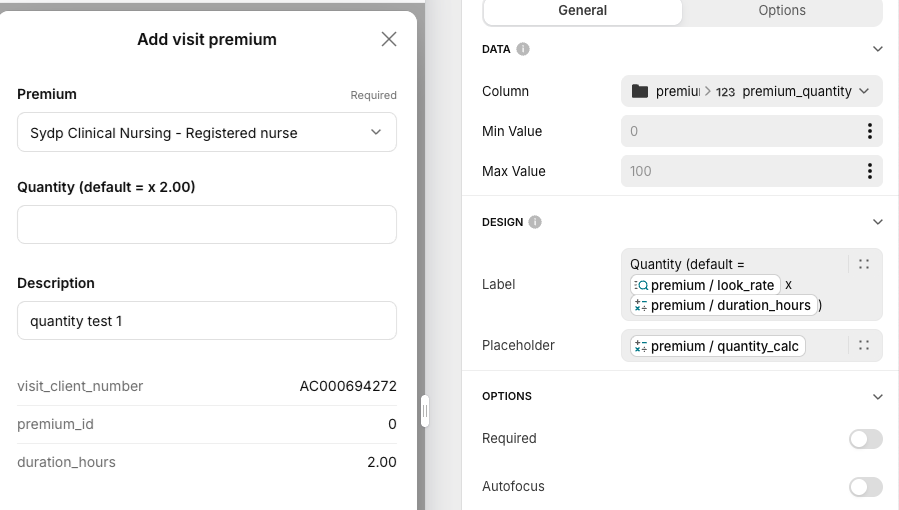
The **Quantity** field label includes the premium rate. I look up that rate. However, it won’t populate the lookup col until after the form is submitted. But, I want it to update “live”.
If premium id is 1 then rate is 240 and the Quantity field label = **Quantity (default = 240 x 2.00)** in this example.
You can see this data is available in the detail screen once a record is created after form is submitted:
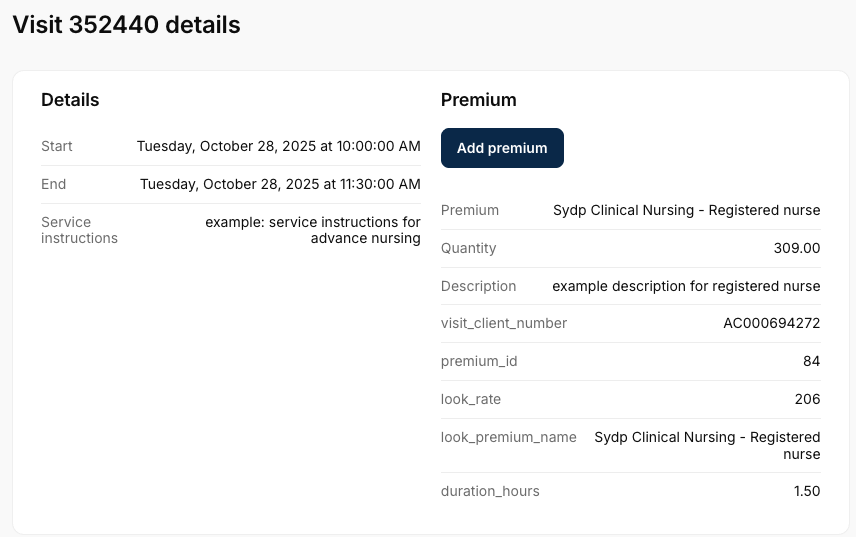
This is the **edit** form for a record and I’m editing three fields of many fields.
---
### Author:  [@Darren\_Murphy](https://community.glideapps.com/u/Darren_Murphy)
#### Post date: [October 27, 2025, 7:08am UTC](https://community.glideapps.com/t/update-form-fields-based-on-selection/85095/2 "2025-10-27T07:08:27Z")
If it’s a lookup, then why use a number input?
Is that because you allow the user to change the default?
There is no way to populate that number input based on another input in the same form, but what you could do is either use a custom form, or target the inputs at the user profile row. Either of those would allow you to create a relation/lookup and then display the result in a text-type component (eg. a hint or similar)
---
### Author:  [@blairrorani](https://community.glideapps.com/u/blairrorani)
#### Post date: [October 27, 2025, 11:02pm UTC](https://community.glideapps.com/t/update-form-fields-based-on-selection/85095/3 "2025-10-27T23:02:48Z")
There is a default calculation
And there needs to be the ability to overwrite this number so it needs a value (that I wan’t to populate as described) and also that fields needs to be editable.
---
### Author:  [@blairrorani](https://community.glideapps.com/u/blairrorani)
#### Post date: [October 27, 2025, 11:04pm UTC](https://community.glideapps.com/t/update-form-fields-based-on-selection/85095/4 "2025-10-27T23:04:16Z")
I think I’m going to use a table to store form inputs and then use those values to create the new record.
That way I can display and edit the value I’m referring to and also store it afterwards.
---
### Author:  [@ThinhDinh](https://community.glideapps.com/u/ThinhDinh)
#### Post date: [October 27, 2025, 11:48pm UTC](https://community.glideapps.com/t/update-form-fields-based-on-selection/85095/6 "2025-10-27T23:48:30Z")
It still doesn’t “populate” that field automatically when you change the Premium input though. This might need an AI component to tell it to look at the Premium variable, and the Quantity variable, then write into the Quantity variable when the Premium variable changes.
It’s a preview component though, so beware of using it in production.
---
### Author:  [@Darren\_Murphy](https://community.glideapps.com/u/Darren_Murphy)
#### Post date: [October 28, 2025, 3:24am UTC](https://community.glideapps.com/t/update-form-fields-based-on-selection/85095/7 "2025-10-28T03:24:57Z")
> [@blairrorani](#):
>
> I think I’m going to use a table to store form inputs and then use those values to create the new record.
Yes, that’s essentially what a custom form is. Just be sure to use User Specific columns, otherwise you’ll have users clobbering each others data.