# Transpose Data for Data Grid
**URL:** https://community.glideapps.com/t/transpose-data-for-data-grid/85157
**Category:** Ask for Help
**Tags:** api
**Created:** [October 30, 2025, 1:01am UTC](https://community.glideapps.com/t/transpose-data-for-data-grid/85157 "2025-10-30T01:01:21Z")
**Posts on this page:** 4
**Page:** 1
### Author:  [@Brandon\_Finley](https://community.glideapps.com/u/Brandon_Finley)
#### Post date: [October 30, 2025, 1:01am UTC](https://community.glideapps.com/t/transpose-data-for-data-grid/85157/1 "2025-10-30T01:01:21Z")
I’m building a process data collection app for my company in manufacturing. To get data into Glide from our ERP system, we have an API process that gets data into a Glide Table. The raw JSON gets stored in a column and I extract into each column using the Query JSON column type. The issue I have is that each record is an entire production schedule that consists of multiple item keys, descriptions, quantities, etc. As an example, one production schedule can have up to 30 item keys (which are separate columns in the table that extracts the API data.
When the user is working in the app, they select the production schedule which brings up the detail screen. I need to be able to display a data grid that the operators can use for each Item Key to log that they staged the material. The image below should help articulate what i’m trying to do. The top mock table is how the data is arranged after parsing the API. The second table is what I need for the Data Grid.

---
### Author:  [@ThinhDinh](https://community.glideapps.com/u/ThinhDinh)
#### Post date: [October 31, 2025, 12:21am UTC](https://community.glideapps.com/t/transpose-data-for-data-grid/85157/2 "2025-10-31T00:21:27Z")
I’m trying to reproduce the JSON that you get from your API here.

With a Query JSON step in a workflow (ideally bundled straight after you call the API), you can convert it to the format you want.

```auto
(
$$.(
$distinct(
$keys()[$match($, /^Item Key \d+$/)].$substringAfter($, "Item Key ")
) ~> $map(function($v, $i, $a) {
{
"Production Schedule ID": $."Production Schedule ID",
"Item Key": $lookup($, "Item Key " & $v),
"Item Description": $lookup($, "Item Description " & $v)
}
})
)
)
```

Here’s what that function does.
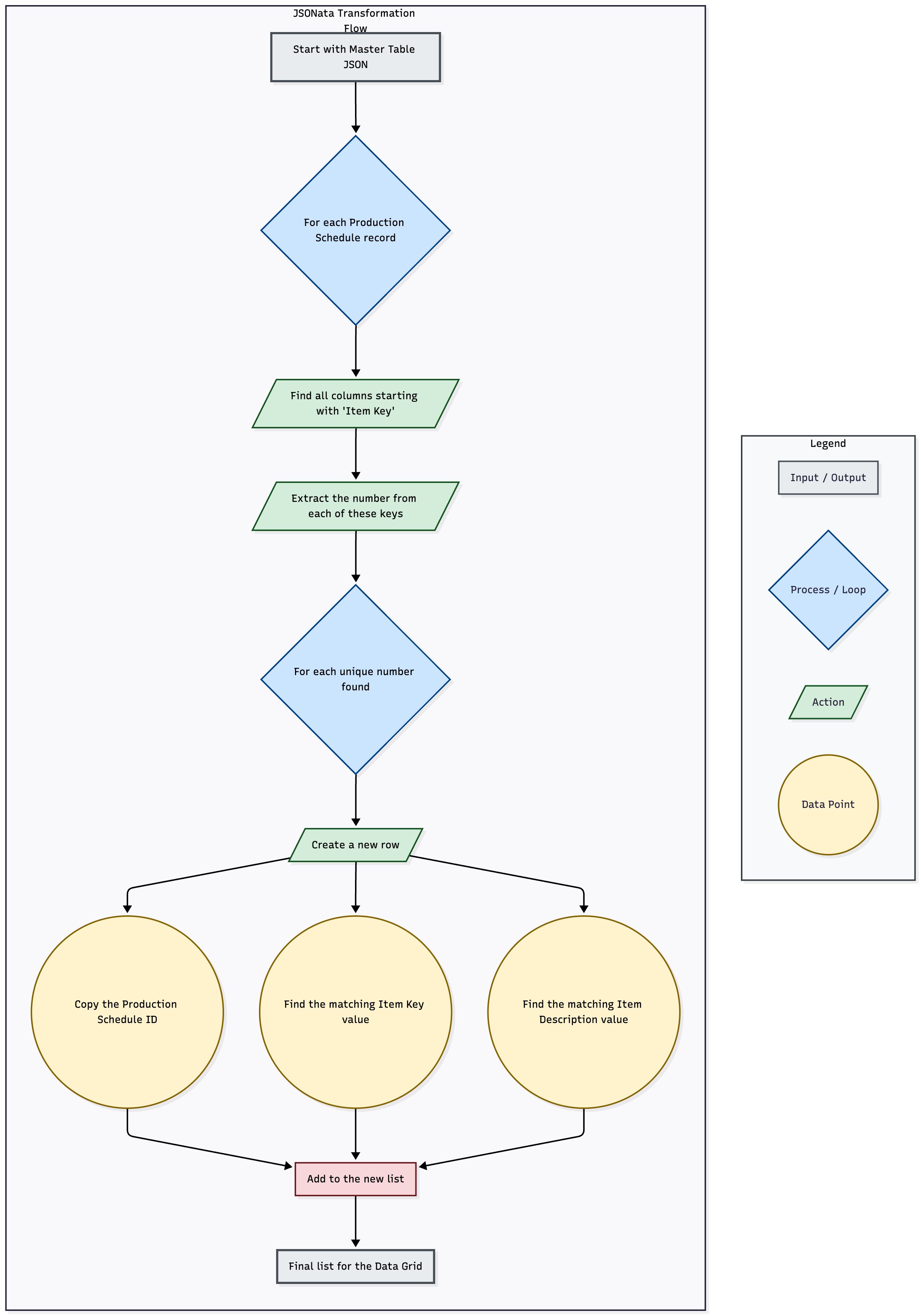
---
### Author:  [@Brandon\_Finley](https://community.glideapps.com/u/Brandon_Finley)
#### Post date: [October 31, 2025, 12:49am UTC](https://community.glideapps.com/t/transpose-data-for-data-grid/85157/3 "2025-10-31T00:49:43Z")
Wow this looks great! To give a bit more information, my IT team is using a Webhook to push data into my MasterDataTable that has the columns I need transposed into rows. Since the data is already in Glide, What does the flow need to look like in order to automatically populate the table as new data is pushed to the Master table?
---
### Author:  [@ThinhDinh](https://community.glideapps.com/u/ThinhDinh)
#### Post date: [October 31, 2025, 12:53am UTC](https://community.glideapps.com/t/transpose-data-for-data-grid/85157/4 "2025-10-31T00:53:02Z")
Is the “webhook” here a Webhook workflow, or simply a Glide API call?
If it’s the first, you can just add the Query JSON step inside it, and loop through the created JSON to add rows to a new helper table.