# Text column to remove line breaks & new paragraphs?
**URL:** https://community.glideapps.com/t/text-column-to-remove-line-breaks-new-paragraphs/37457
**Category:** Ask for Help
**Created:** [January 20, 2022, 11:34am UTC](https://community.glideapps.com/t/text-column-to-remove-line-breaks-new-paragraphs/37457 "2022-01-20T11:34:59Z")
**Posts on this page:** 19
**Page:** 1
### Author:  [@Simon\_Hill](https://community.glideapps.com/u/Simon_Hill)
#### Post date: [January 20, 2022, 11:34am UTC](https://community.glideapps.com/t/text-column-to-remove-line-breaks-new-paragraphs/37457/1 "2022-01-20T11:34:59Z")
Is there as special text column that can ‘clean’ a text string to remove text formatting, e.g. line breaks and new paragraphs?
I am trying to export data from a Glide Data table by copying the contents of a Template column to clipboard. The template column is fed by content from a few different columns. It works well except when a user has inputted some text that includes line breaks or new paragraphs! If they do, pasting into excel disrupts the formatting.
(Not interested in other ways to export data at this stage!)
---
### Author:  [@Darren\_Murphy](https://community.glideapps.com/u/Darren_Murphy)
#### Post date: [January 20, 2022, 11:51am UTC](https://community.glideapps.com/t/text-column-to-remove-line-breaks-new-paragraphs/37457/2 "2022-01-20T11:51:21Z")
> **[Trim Whitespace column • Glide](https://www.glideapps.com/plugins/trim)**
>
> Remove whitespace around text.
I haven’t tested with things like line breaks, but I would assume it handles them.
---
### Author:  [@Simon\_Hill](https://community.glideapps.com/u/Simon_Hill)
#### Post date: [January 20, 2022, 11:53am UTC](https://community.glideapps.com/t/text-column-to-remove-line-breaks-new-paragraphs/37457/3 "2022-01-20T11:53:17Z")
Yup, tried that. no luck.
---
### Author:  [@Darren\_Murphy](https://community.glideapps.com/u/Darren_Murphy)
#### Post date: [January 20, 2022, 11:55am UTC](https://community.glideapps.com/t/text-column-to-remove-line-breaks-new-paragraphs/37457/4 "2022-01-20T11:55:56Z")
oh, really?
Okay, next option would be the [Extract Matching Text](https://www.glideapps.com/plugins/regex) plugin with an appropriately crafted regex. Are you familiar with regex, or would you like some help with that?
`^\s*(.*)\s*$` should do the trick.


Actually, the Trim Whitespace plugin works for me. Can you share some examples of strings that it doesn’t work for?
---
### Author:  [@Simon\_Hill](https://community.glideapps.com/u/Simon_Hill)
#### Post date: [January 20, 2022, 12:12pm UTC](https://community.glideapps.com/t/text-column-to-remove-line-breaks-new-paragraphs/37457/5 "2022-01-20T12:12:49Z")
Oh thanks for taking the time Darren.
An example of some tricky text:
"We need to engage Urologists and not just Oncs.
Office-based urologists carry out cystoscopy or transurethelial resection and refer patients with suspected UC to hospital."
In my version, the whitespace column does nothing to that text. The paragraph breaks remain in tact…
---
### Author:  [@Darren\_Murphy](https://community.glideapps.com/u/Darren_Murphy)
#### Post date: [January 20, 2022, 12:14pm UTC](https://community.glideapps.com/t/text-column-to-remove-line-breaks-new-paragraphs/37457/6 "2022-01-20T12:14:52Z")
oh, I see. So you actually want to condense line breaks into a single white space, yeah?
yeah, Trim won’t do that. You need a regex. It’s time for my little boys bedtime story now, but I can come back with an appropriate regex a bit later…
---
### Author:  [@Simon\_Hill](https://community.glideapps.com/u/Simon_Hill)
#### Post date: [January 20, 2022, 12:19pm UTC](https://community.glideapps.com/t/text-column-to-remove-line-breaks-new-paragraphs/37457/7 "2022-01-20T12:19:24Z")
I will try one other thing first, see if I can use a template column to replace all paragraph breaks…
---
### Author:  [@Simon\_Hill](https://community.glideapps.com/u/Simon_Hill)
#### Post date: [January 20, 2022, 12:22pm UTC](https://community.glideapps.com/t/text-column-to-remove-line-breaks-new-paragraphs/37457/8 "2022-01-20T12:22:21Z")
The template option didn’t work…!
---
### Author:  [@Darren\_Murphy](https://community.glideapps.com/u/Darren_Murphy)
#### Post date: [January 20, 2022, 12:25pm UTC](https://community.glideapps.com/t/text-column-to-remove-line-breaks-new-paragraphs/37457/9 "2022-01-20T12:25:10Z")
[Replace All](https://www.glideapps.com/plugins/replace-all) will do it.

The replacement value is just a single space.
This won’t get rid of leading/trailing single spaces, but you could then run that through Trim to clean those up.
---
### Author:  [@Simon\_Hill](https://community.glideapps.com/u/Simon_Hill)
#### Post date: [January 20, 2022, 12:27pm UTC](https://community.glideapps.com/t/text-column-to-remove-line-breaks-new-paragraphs/37457/10 "2022-01-20T12:27:50Z")
I will try this (need to run for 2 hours first though) but THANKS^6
---
### Author:  [@Simon\_Hill](https://community.glideapps.com/u/Simon_Hill)
#### Post date: [January 20, 2022, 4:33pm UTC](https://community.glideapps.com/t/text-column-to-remove-line-breaks-new-paragraphs/37457/11 "2022-01-20T16:33:17Z")
Excellent Darren - THANK YOU.
Your proposal to use the ‘Replace All’ text column works well. This column accepts special rich text format arguments. I could literally type enter (new line) as the argument to replace and it works perfectly.
---
### Author:  [@Darren\_Murphy](https://community.glideapps.com/u/Darren_Murphy)
#### Post date: [January 20, 2022, 4:52pm UTC](https://community.glideapps.com/t/text-column-to-remove-line-breaks-new-paragraphs/37457/12 "2022-01-20T16:52:51Z")
Cool!
Just one thing to be aware of with that approach… if you’re using a literal new line as the argument, and a space as the replacement value, then it will replace _every_ new line with a space. So for example, if you had a block of text that contained 6 new lines, then it would replace that with 6 spaces. Which may or may not be what you want.
If you’d want those 6 new lines condensed into a single space, then I’d recommend using the regex pattern as per my example, ie: `\s+`
`\s` matches _any_ white space character, and `+` is quantifier that means “match 1 or more times”
---
### Author:  [@Simon\_Hill](https://community.glideapps.com/u/Simon_Hill)
#### Post date: [January 20, 2022, 9:15pm UTC](https://community.glideapps.com/t/text-column-to-remove-line-breaks-new-paragraphs/37457/13 "2022-01-20T21:15:21Z")
Thanks for the advice. To be clear, I didn’t use any special characters like \s+. I just pressed enter.
Your example of \s+ is for spaces. What is the equivalent for a new line?
Regards,
Simon.
---
### Author:  [@ThinhDinh](https://community.glideapps.com/u/ThinhDinh)
#### Post date: [January 20, 2022, 11:49pm UTC](https://community.glideapps.com/t/text-column-to-remove-line-breaks-new-paragraphs/37457/14 "2022-01-20T23:49:23Z")
@Darren_Murphy knows better than me, but it might be one of \n (new line) or \r (carriage return).
---
### Author:  [@Darren\_Murphy](https://community.glideapps.com/u/Darren_Murphy)
#### Post date: [January 21, 2022, 1:28am UTC](https://community.glideapps.com/t/text-column-to-remove-line-breaks-new-paragraphs/37457/15 "2022-01-21T01:28:40Z")
> [@Simon\_Hill](#):
>
> To be clear, I didn’t use any special characters like \s+. I just pressed enter.
Yes, I understand that.
> [@Simon\_Hill](#):
>
> Your example of \s+ is for spaces. What is the equivalent for a new line?
The equivalent for a new line is exactly the same. As I explained above:
> [@Darren\_Murphy](#):
>
> `\s` matches _any_ white space character, and `+` is quantifier that means “match 1 or more times”
The definition of _any_ whitespace character can vary depending on the regex engine, but it usually includes: space, tab, newline, carriage return & vertical tab.
Your response suggests that I didn’t do a very good job of explaining, so I’ll try again.
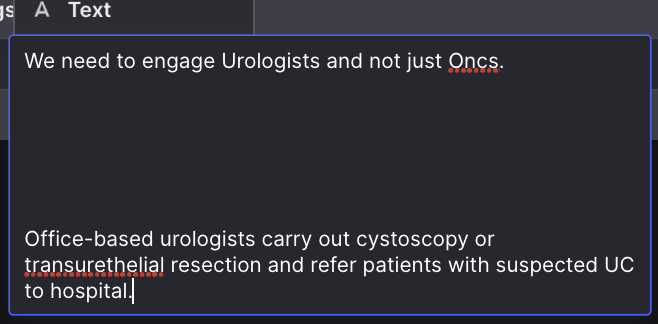
Let’s go back to your earlier example, but add a few extra carriage returns:
```auto
"We need to engage Urologists and not just Oncs.
Office-based urologists carry out cystoscopy or transurethelial resection and refer patients with suspected UC to hospital."
```
Here is what that looks like in the Data Editor:
Now, assuming that I understand correctly, what I believe you are doing is using the Replace All plugin and replacing all occurrences of a newline with a single space. So the column configuration probably looks something like this:

When you apply that approach to our extreme example above, this is the result you will get:

Notice that block of empty space after the word Oncs?
That’s because we have replaced 6 newlines with 6 spaces.
If that’s okay, then fine. But if you’d rather not have that odd looking empty space, then that’s where the regex pattern comes in. Here is what that looks like:

And here is the result:
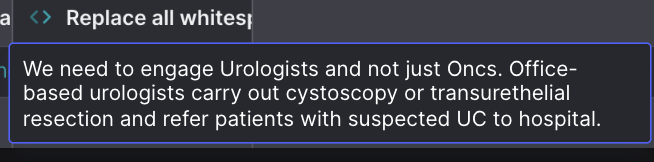
When you use `\s+` as the “Replace This” value, and a single space as the “With This” value, that essentially means: “replace any and all sequences of one or more white space characters with a single space”
---
### Author:  [@Darren\_Murphy](https://community.glideapps.com/u/Darren_Murphy)
#### Post date: [January 21, 2022, 1:33am UTC](https://community.glideapps.com/t/text-column-to-remove-line-breaks-new-paragraphs/37457/16 "2022-01-21T01:33:19Z")
> [@ThinhDinh](#):
>
> but it might be one of \n (new line) or \r
\n is a new line, and \r is a carriage return.
\s is a “superclass” that covers both of the above, and more.
A good analogy would be:
\n = oranges
\r = apples
\s = fruit
---
### Author:  [@ThinhDinh](https://community.glideapps.com/u/ThinhDinh)
#### Post date: [January 21, 2022, 3:27am UTC](https://community.glideapps.com/t/text-column-to-remove-line-breaks-new-paragraphs/37457/17 "2022-01-21T03:27:44Z")
> [@Darren\_Murphy](#):
>
> \n is a new line, and \r is a carriage return.
> \s is a “superclass” that covers both of the above, and more.
>
> A good analogy would be:
>
> \n = oranges
> \r = apples
> \s = fruit
That’s super clear, thank you!
---
### Author:  [@Simon\_Hill](https://community.glideapps.com/u/Simon_Hill)
#### Post date: [January 21, 2022, 9:39am UTC](https://community.glideapps.com/t/text-column-to-remove-line-breaks-new-paragraphs/37457/18 "2022-01-21T09:39:48Z")
My bad. You had already explained it perfectly. For some reason when I first tried the \s+ syntax it didn’t seem to work. Not sure what dumb thing I was doing since when I tried again today, it worked perfectly.
The fruit analogy is great and is super useful! Thank you again.
---
### Author:  [@system](https://community.glideapps.com/u/system)
#### Post date: [January 22, 2022, 9:40am UTC](https://community.glideapps.com/t/text-column-to-remove-line-breaks-new-paragraphs/37457/19 "2022-01-22T09:40:37Z")
This topic was automatically closed 24 hours after the last reply. New replies are no longer allowed.