# Sum up with condition
**URL:** https://community.glideapps.com/t/sum-up-with-condition/74003
**Category:** Ask for Help
**Created:** [June 10, 2024, 5:03am UTC](https://community.glideapps.com/t/sum-up-with-condition/74003 "2024-06-10T05:03:20Z")
**Posts on this page:** 10
**Page:** 1
### Author:  [@atiwat\_tangchaiwatta](https://community.glideapps.com/u/atiwat_tangchaiwatta)
#### Post date: [June 10, 2024, 5:03am UTC](https://community.glideapps.com/t/sum-up-with-condition/74003/1 "2024-06-10T05:03:20Z")
Hello community
I am working on machine production, 10 machines and daily record of total each work done
I want to sum up total pieces of machine 3 ( only this month) how can i do that
---
### Author:  [@Darren\_Murphy](https://community.glideapps.com/u/Darren_Murphy)
#### Post date: [June 10, 2024, 7:13am UTC](https://community.glideapps.com/t/sum-up-with-condition/74003/2 "2024-06-10T07:13:12Z")
Can you please provide screen shots from the Data Editor of the tables involved?
It will be easier to describe the solution if we can see the tables and column names.
---
### Author:  [@atiwat\_tangchaiwatta](https://community.glideapps.com/u/atiwat_tangchaiwatta)
#### Post date: [June 10, 2024, 4:39pm UTC](https://community.glideapps.com/t/sum-up-with-condition/74003/3 "2024-06-10T16:39:03Z")
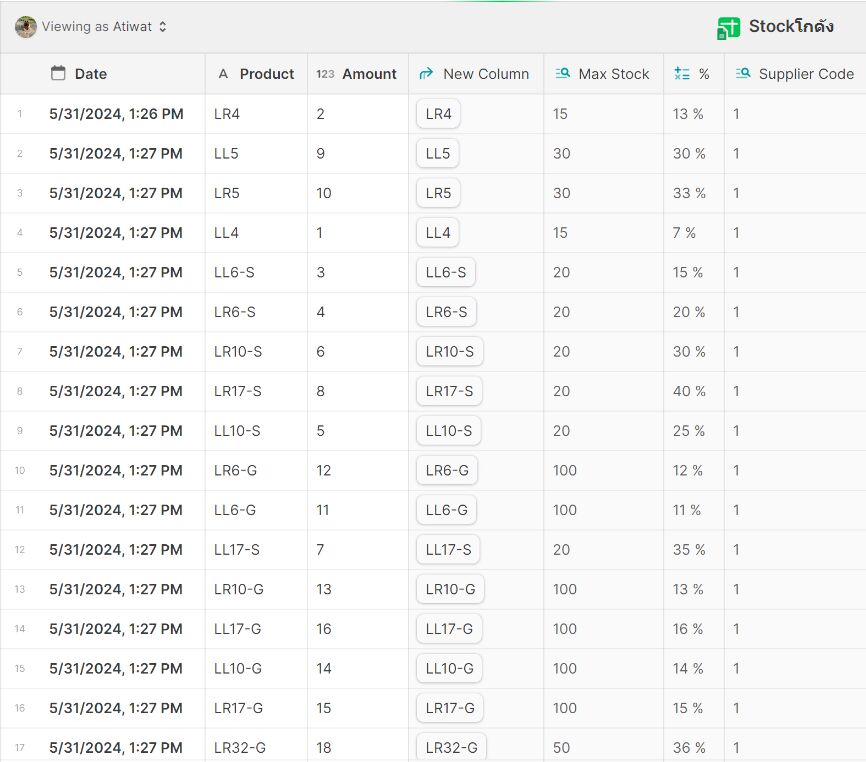
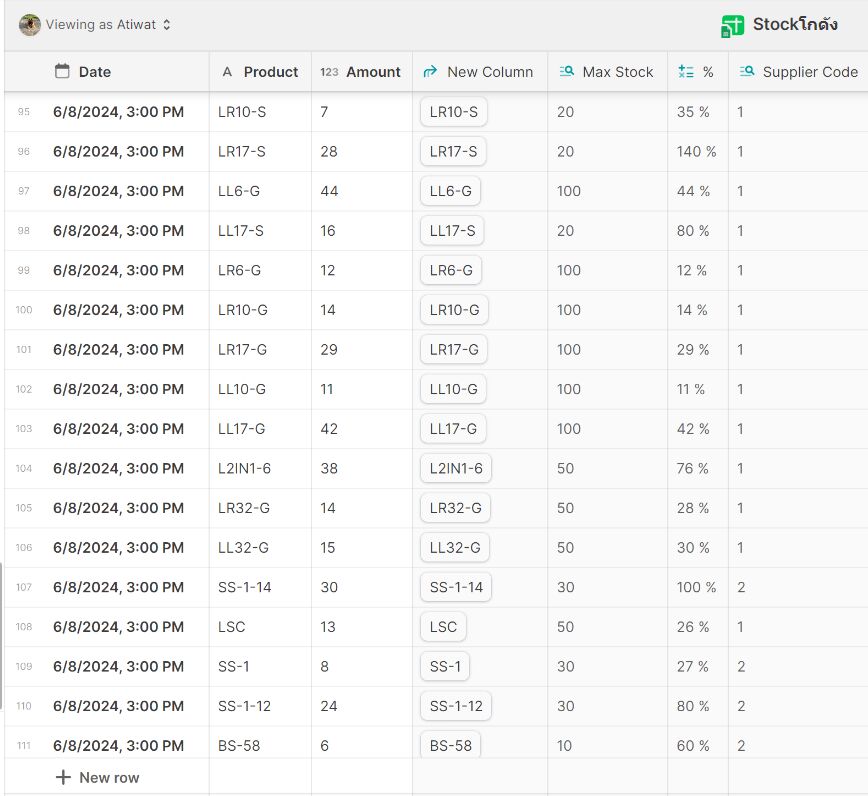
Each row contain Product Name , Amount , Date stamp
---
### Author:  [@ThinhDinh](https://community.glideapps.com/u/ThinhDinh)
#### Post date: [June 11, 2024, 11:45pm UTC](https://community.glideapps.com/t/sum-up-with-condition/74003/4 "2024-06-11T23:45:52Z")
> [@atiwat\_tangchaiwatta](#):
>
> I want to sum up total pieces of machine 3 ( only this month) how can i do that
What’s the column representing the machine in your screenshots?
---
### Author:  [@atiwat\_tangchaiwatta](https://community.glideapps.com/u/atiwat_tangchaiwatta)
#### Post date: [June 12, 2024, 5:01am UTC](https://community.glideapps.com/t/sum-up-with-condition/74003/5 "2024-06-12T05:01:24Z")
The column Product = Machine
Amount = Total daily production
Date = Timestamp . everytime the new row is added
---
### Author:  [@Himaladin](https://community.glideapps.com/u/Himaladin)
#### Post date: [June 12, 2024, 5:35am UTC](https://community.glideapps.com/t/sum-up-with-condition/74003/6 "2024-06-12T05:35:53Z")
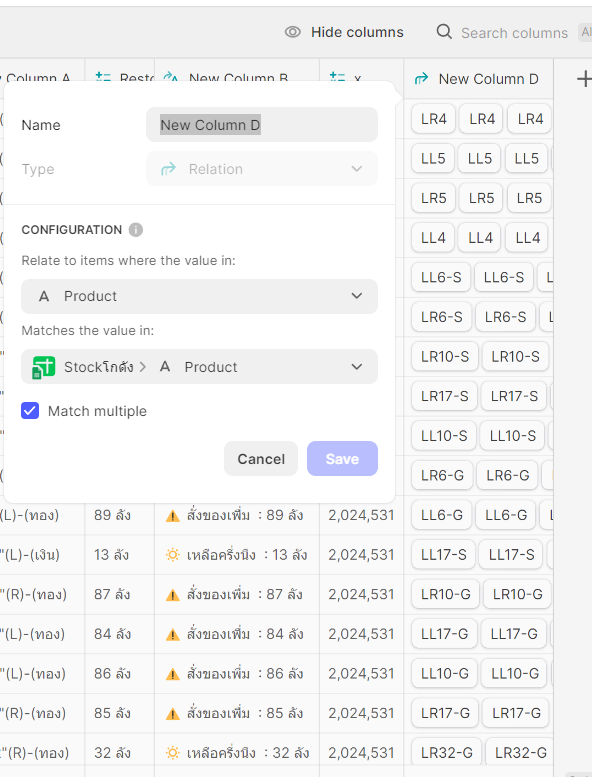
To obtain the total number of products: Create a relation column with the products themselves. Then add a rollup column directed to the relation and your Amount column to be summed.
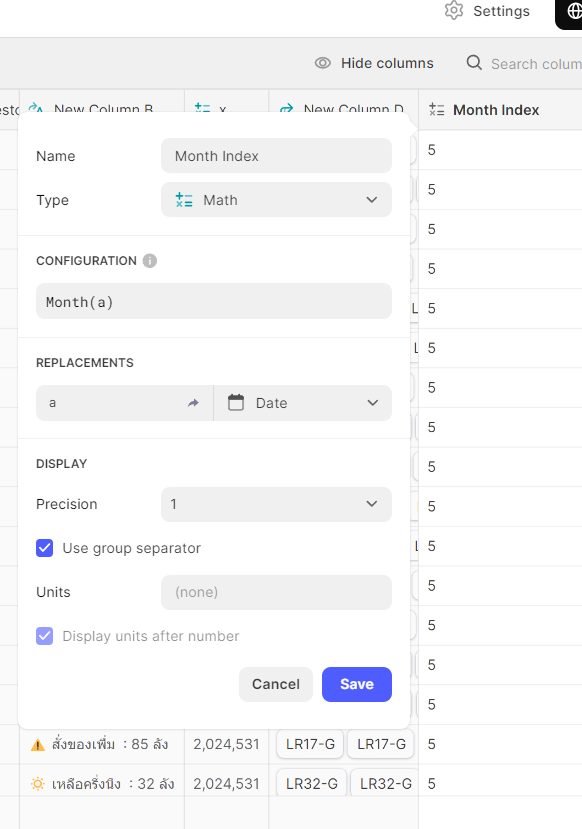
Add a math column with the configuration ‘Month(Date)’ to get the month index. If you do not want the month in index form, use an ITE column to convert it.
I think you can continue from here.
---
### Author:  [@atiwat\_tangchaiwatta](https://community.glideapps.com/u/atiwat_tangchaiwatta)
#### Post date: [June 12, 2024, 1:23pm UTC](https://community.glideapps.com/t/sum-up-with-condition/74003/7 "2024-06-12T13:23:33Z")

Really Thank You for the help , I am not good at this so please don’t be mad if i ask simple questions
1. Pic 1 : I made relation column with products but not sure if Match mutiple needed or not
2. Pic 2 : I rollup-Sum , got the result as Column E ( I think it’s correct)
3. Pic 3 : Month Index ( i think ,it’s working now)
4. From here i still confused how to get the total number of products with specific month , it semm it already added up all together in the table
Sorry again for noob questions , i am not good at this
---
### Author:  [@Himaladin](https://community.glideapps.com/u/Himaladin)
#### Post date: [June 12, 2024, 2:03pm UTC](https://community.glideapps.com/t/sum-up-with-condition/74003/8 "2024-06-12T14:03:10Z")
Yes, you are right. The rollup result is the total of similar products/machine. Now you just have to display it using the components you want.
Now do you want to display it dynamically, in the form of a selection of months, not just the current month? Here you need the choice component.
---
### Author:  [@atiwat\_tangchaiwatta](https://community.glideapps.com/u/atiwat_tangchaiwatta)
#### Post date: [June 12, 2024, 2:15pm UTC](https://community.glideapps.com/t/sum-up-with-condition/74003/9 "2024-06-12T14:15:19Z")
Oh , really thanks
Yes , I want to the user to choose machine number and the month they want to see . Could you please guide me how to do that ?
1. I think when user choose date and machine no. on their screen , we can translate them to month index and compare with Month Index above ( not sure if i got the concept correctly or not)
2. Problem is that i trying but user’s choses date only appear on first row ( I think we need them the entire column so we can compare them 1 by 1 on their row )
---
### Author:  [@Himaladin](https://community.glideapps.com/u/Himaladin)
#### Post date: [June 12, 2024, 2:23pm UTC](https://community.glideapps.com/t/sum-up-with-condition/74003/10 "2024-06-12T14:23:15Z")
> [@atiwat\_tangchaiwatta](#):
>
> I think when user choose date and machine no. on their screen , we can translate them to month index and compare with Month Index above ( not sure if i got the concept correctly or not)
Yes.
If you want the display to be the name of the month, then you need to change it with the ITE column as I mentioned above.
> [@atiwat\_tangchaiwatta](#):
>
> Problem is that i trying but user’s choses date only appear on first row ( I think we need them the entire column so we can compare them 1 by 1 on their row )
To accommodate user choices, you need two USC columns (month and product selection). Then you change it to the single value column. This way you can match it to a whole row that has 2 conditions according to the user’s choice (month and product name).