# (select all) or (cancel all)
**URL:** https://community.glideapps.com/t/select-all-or-cancel-all/56158
**Category:** Ask for Help
**Created:** [December 29, 2022, 7:38pm UTC](https://community.glideapps.com/t/select-all-or-cancel-all/56158 "2022-12-29T19:38:30Z")
**Posts on this page:** 13
**Page:** 1
### Author:  [@Sales\_Manager](https://community.glideapps.com/u/Sales_Manager)
#### Post date: [December 29, 2022, 7:38pm UTC](https://community.glideapps.com/t/select-all-or-cancel-all/56158/1 "2022-12-29T19:38:30Z")
I have more than 120 users,
I created multiple choice,
But when I want to (select all) or (cancel all) it is very difficult to select 120 items
Any idea that might help me with that?
---
### Author:  [@Uzo](https://community.glideapps.com/u/Uzo)
#### Post date: [December 29, 2022, 7:45pm UTC](https://community.glideapps.com/t/select-all-or-cancel-all/56158/2 "2022-12-29T19:45:32Z")
use the inline list as a choice component, make a relation to the first row, and place there the indicator for select all, then copy that first row to all rows… so if someone clicks ones, set value there, the second click… clear value… then add an if-else column to compare with individual check marks.
---
### Author:  [@Jeff\_Hager](https://community.glideapps.com/u/Jeff_Hager)
#### Post date: [December 29, 2022, 8:01pm UTC](https://community.glideapps.com/t/select-all-or-cancel-all/56158/3 "2022-12-29T20:01:20Z")
There is no native option in the choice component, but there are some other options.
- One would be to implement something like this:
Click → [Reset Multiple Rows At Once](https://community.glideapps.com/t/reset-multiple-rows-at-once/22211)
It’s not exactly a simple solution, but one to consider.
- Another option is to create a joined list column that returns a comma delimited list of user emails. Then you can use that joined list to write that comma delimited list to another column with a button action, or clear that destination column with another button action.
I guess it all depends on where your choice component is located, such as a detail screen, add form, edit form, form, or custom form.
---
### Author:  [@Darren\_Murphy](https://community.glideapps.com/u/Darren_Murphy)
#### Post date: [December 30, 2022, 2:39am UTC](https://community.glideapps.com/t/select-all-or-cancel-all/56158/4 "2022-12-30T02:39:17Z")
If your choice is multi-select and optional, you can use the `-` option to “clear all”.
There is no easy way to “select all” though. What I sometimes do is construct my logic so that “none” means “all” - I usually do that with custom filters. That probably wouldn’t make sense inside a form.
---
### Author:  [@Uzo](https://community.glideapps.com/u/Uzo)
#### Post date: [December 30, 2022, 2:46am UTC](https://community.glideapps.com/t/select-all-or-cancel-all/56158/5 "2022-12-30T02:46:56Z")
there is a very easy way to select all… just read my first post. 😉
---
### Author:  [@Darren\_Murphy](https://community.glideapps.com/u/Darren_Murphy)
#### Post date: [December 30, 2022, 3:38am UTC](https://community.glideapps.com/t/select-all-or-cancel-all/56158/6 "2022-12-30T03:38:45Z")
Sorry, I didn’t really understand your response, so I skipped over it.
I just re-read it and I still don’t get it, but it looks more like a bit of smoke and mirrors rather than a true “select all”. A true “select all” would result in a joined list of all values being written to the choice target column.
---
### Author:  [@Uzo](https://community.glideapps.com/u/Uzo)
#### Post date: [December 30, 2022, 3:41am UTC](https://community.glideapps.com/t/select-all-or-cancel-all/56158/7 "2022-12-30T03:41:35Z")
really… I have done it over… and over… hundreds of times… smoke and mirrors? (but… do not use the choice element… use the inline list on edit window mode… the same look… much more flexibility)
I do understand that many of the members here do not like me… because the way I write my posts… makes them report and flag my posts… it might be my English… (which is not my primary), but I wanna make it clear to all… Glide is my second favorite platform out there… the first one is Google… I can bet, many of my posts make Glide’s owners push to limits… but in the end… makes Glide better. 😉
---
### Author:  [@Darren\_Murphy](https://community.glideapps.com/u/Darren_Murphy)
#### Post date: [December 30, 2022, 3:52am UTC](https://community.glideapps.com/t/select-all-or-cancel-all/56158/8 "2022-12-30T03:52:15Z")
Oh, right. Inline list as a choice component.
Yes, that’s a useful technique.
---
### Author:  [@Sales\_Manager](https://community.glideapps.com/u/Sales_Manager)
#### Post date: [December 30, 2022, 11:08am UTC](https://community.glideapps.com/t/select-all-or-cancel-all/56158/9 "2022-12-30T11:08:09Z")
I got an idea I think it’s good
thanks to everyone


---
### Author:  [@erwblo](https://community.glideapps.com/u/erwblo)
#### Post date: [December 30, 2022, 11:38am UTC](https://community.glideapps.com/t/select-all-or-cancel-all/56158/10 "2022-12-30T11:38:28Z")
I think your English is fine! At least good enough to find borders and cross borders. You seem to like to stir things up 😉
---
### Author:  [@Uzo](https://community.glideapps.com/u/Uzo)
#### Post date: [December 30, 2022, 12:11pm UTC](https://community.glideapps.com/t/select-all-or-cancel-all/56158/11 "2022-12-30T12:11:04Z")
Salute for that!.. that means I’m not the only one who can understand me… lol
---
### Author:  [@Sales\_Manager](https://community.glideapps.com/u/Sales_Manager)
#### Post date: [January 3, 2023, 7:23am UTC](https://community.glideapps.com/t/select-all-or-cancel-all/56158/12 "2023-01-03T07:23:33Z")
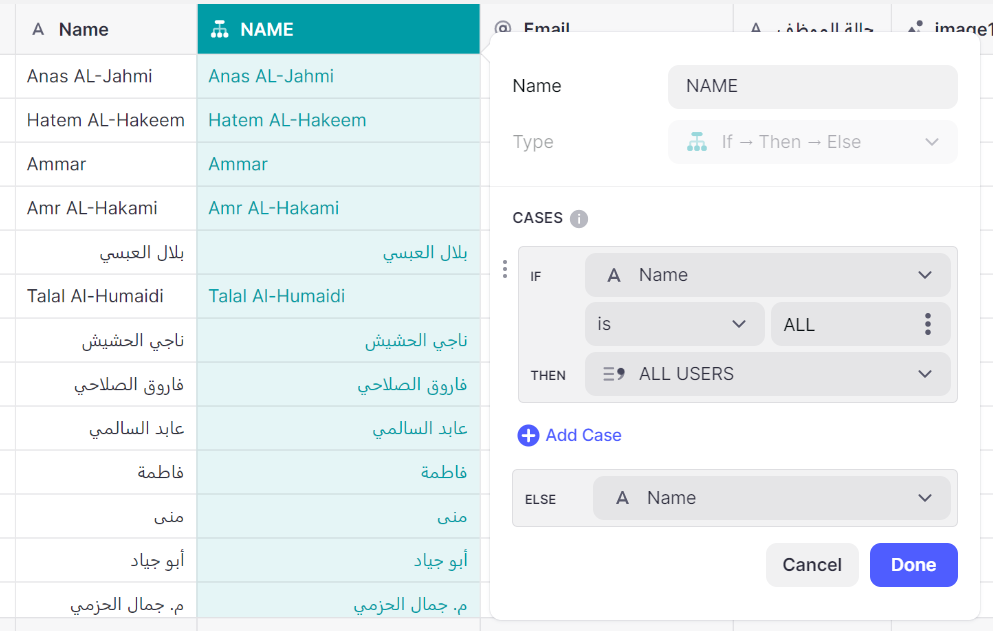
This method is easy and works very well.
---
### Author:  [@system](https://community.glideapps.com/u/system)
#### Post date: [January 4, 2023, 7:23am UTC](https://community.glideapps.com/t/select-all-or-cancel-all/56158/13 "2023-01-04T07:23:56Z")
This topic was automatically closed 24 hours after the last reply. New replies are no longer allowed.