# Relation column problem
**URL:** https://community.glideapps.com/t/relation-column-problem/83768
**Category:** Ask for Help
**Created:** [August 11, 2025, 6:53am UTC](https://community.glideapps.com/t/relation-column-problem/83768 "2025-08-11T06:53:21Z")
**Posts on this page:** 4
**Page:** 1
### Author:  [@CIRIHawaii](https://community.glideapps.com/u/CIRIHawaii)
#### Post date: [August 11, 2025, 6:53am UTC](https://community.glideapps.com/t/relation-column-problem/83768/1 "2025-08-11T06:53:21Z")
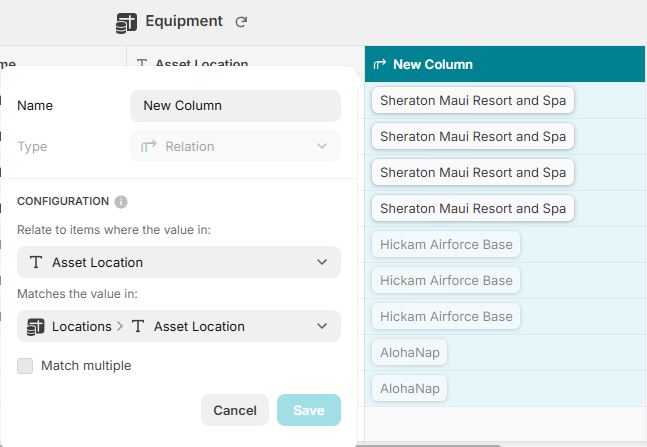
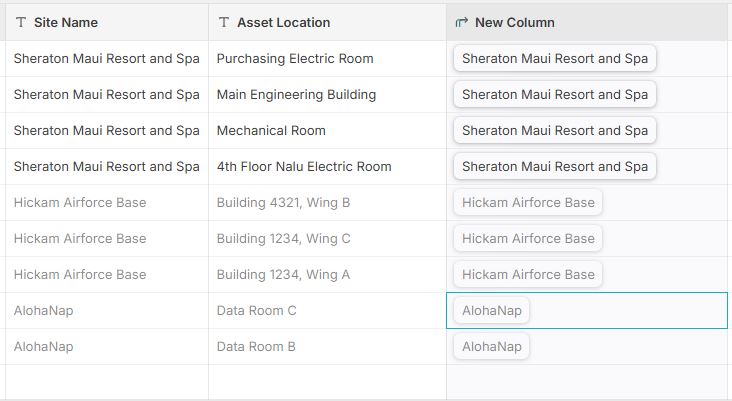
The AI helps, but when it’s specific issues, it causes more confusion. I am trying to create a relationship column between 2 different tables. I set it up to and when pressing the query button, I get information, but not the correct information. Ive copy/pasted to ensure everything is the same but I cannot get it show the information I need. Please help.

---
### Author:  [@Darren\_Murphy](https://community.glideapps.com/u/Darren_Murphy)
#### Post date: [August 11, 2025, 7:30am UTC](https://community.glideapps.com/t/relation-column-problem/83768/2 "2025-08-11T07:30:37Z")
What is the result you are expecting?
Note that a relation only establishes a link between rows, it does not contain any actual data. If you need data from the second table, then you will need to add one or more Lookup columns that fetch the appropriate values via the relation.
---
### Author:  [@CIRIHawaii](https://community.glideapps.com/u/CIRIHawaii)
#### Post date: [August 17, 2025, 5:13am UTC](https://community.glideapps.com/t/relation-column-problem/83768/3 "2025-08-17T05:13:25Z")
I read in an old post that the relation only sees the 1st column, so I swapped the Asset Location with Site Name and now it is showing correctly (this seems very limiting to me).
My issue now is that even though I am making a relationship column in the Equipment table to reference the location, when I tap on a specific Location with the goal of ONLY seeing equipment at that location, all the equipment is being populated. Im not able to only show equipment within a specific location.
---
### Author:  [@Jeff\_Hager](https://community.glideapps.com/u/Jeff_Hager)
#### Post date: [August 17, 2025, 5:54am UTC](https://community.glideapps.com/t/relation-column-problem/83768/4 "2025-08-17T05:54:58Z")
> [@Table data not linking despite relations column](https://community.glideapps.com/t/table-data-not-linking-despite-relations-column/83869/2):
>
> Are you using that relation as the source of your collection?