# New user has their rowID change after signing in and using a webhook for Zapier
**URL:** https://community.glideapps.com/t/new-user-has-their-rowid-change-after-signing-in-and-using-a-webhook-for-zapier/73939
**Category:** Report a Bug
**Created:** [June 6, 2024, 7:37pm UTC](https://community.glideapps.com/t/new-user-has-their-rowid-change-after-signing-in-and-using-a-webhook-for-zapier/73939 "2024-06-06T19:37:23Z")
**Posts on this page:** 18
**Page:** 1
### Author:  [@chanwise](https://community.glideapps.com/u/chanwise)
#### Post date: [June 6, 2024, 7:37pm UTC](https://community.glideapps.com/t/new-user-has-their-rowid-change-after-signing-in-and-using-a-webhook-for-zapier/73939/1 "2024-06-06T19:37:23Z")
_First time reporting a bug? [Refer to our Start Here post.](https://community.glideapps.com/t/start-here-reporting-platform-bugs-issues/40)_
* * *
**Team ID:**
- In the Glide dashoard URL, e.g.
[`https://go.glideapps.com/o/your-team-id-here/`](https://go.glideapps.com/o/0RCiu85QYLbWLRx8ZjvC)
**App ID:**
- In the Glide builder URL, e.g.
[`https://go.glideapps.com/app/your-app-id-here/layout`](https://go.glideapps.com/app/JpBjvjS3kz8o3HTS5VpD/layout)
**Description**
- I’m running into a new issue where I have a new user who signs in and then goes through Stripe which runs through Zapier. What I’m doing is running a webhook to create an entry in a Zapier table with the Row ID of the user and then using that to link back once the Stripe Checkout is complete. What I’m noticing and is happening intermittenly is that when I check the Zapier run history, it completes everything but then the Row ID doesn’t match what’s in Glide. So its like the user in Glide now has a new Row ID that is different than what they started with to sign in and go through checkout. And there is only one record of the user. Just not sure why

---
### Author:  [@NFNHello](https://community.glideapps.com/u/NFNHello)
#### Post date: [June 6, 2024, 7:58pm UTC](https://community.glideapps.com/t/new-user-has-their-rowid-change-after-signing-in-and-using-a-webhook-for-zapier/73939/2 "2024-06-06T19:58:09Z")
Can you verify that the rowID is from the user table and not another one?
---
### Author:  [@ThinhDinh](https://community.glideapps.com/u/ThinhDinh)
#### Post date: [June 7, 2024, 12:30am UTC](https://community.glideapps.com/t/new-user-has-their-rowid-change-after-signing-in-and-using-a-webhook-for-zapier/73939/3 "2024-06-07T00:30:07Z")
I just blurred out parts of your user’s email and your webhook since they’re sensitive data.
For your problem, not sure what the cause would be, but if you can reliably reproduce that, I would suggest chatting with the support team using the Intercom integration in the builder (bottom right).
---
### Author:  [@chanwise](https://community.glideapps.com/u/chanwise)
#### Post date: [June 7, 2024, 12:49pm UTC](https://community.glideapps.com/t/new-user-has-their-rowid-change-after-signing-in-and-using-a-webhook-for-zapier/73939/4 "2024-06-07T12:49:37Z")
So I can verify that the new RowID is in the users table but I’ll need to export the users table and check the original one since I can’t seem to use the Find function within glide for the RowID column
---
### Author:  [@chanwise](https://community.glideapps.com/u/chanwise)
#### Post date: [June 7, 2024, 12:50pm UTC](https://community.glideapps.com/t/new-user-has-their-rowid-change-after-signing-in-and-using-a-webhook-for-zapier/73939/5 "2024-06-07T12:50:20Z")
Thanks for that. I didn’t even think about blurring that haha
---
### Author:  [@chanwise](https://community.glideapps.com/u/chanwise)
#### Post date: [June 7, 2024, 4:15pm UTC](https://community.glideapps.com/t/new-user-has-their-rowid-change-after-signing-in-and-using-a-webhook-for-zapier/73939/6 "2024-06-07T16:15:23Z")
I’ve confirmed that the original rowID doesn’t exist at all within the Users table but the second rowID does and is tied to the user. So not sure what is causing the RowID to change since it hasn’t happened every time we have a user sign up
---
### Author:  [@ThinhDinh](https://community.glideapps.com/u/ThinhDinh)
#### Post date: [June 7, 2024, 11:22pm UTC](https://community.glideapps.com/t/new-user-has-their-rowid-change-after-signing-in-and-using-a-webhook-for-zapier/73939/7 "2024-06-07T23:22:20Z")
> [@chanwise](#):
>
> What I’m doing is running a webhook to create an entry in a Zapier table with the Row ID of the user
Can you tell me what triggers this? A button in an onboarding process, or a row added to your Users table?
---
### Author:  [@chanwise](https://community.glideapps.com/u/chanwise)
#### Post date: [June 8, 2024, 4:36am UTC](https://community.glideapps.com/t/new-user-has-their-rowid-change-after-signing-in-and-using-a-webhook-for-zapier/73939/8 "2024-06-08T04:36:16Z")
So a user has to sign in to use the app at all which is when the row is created. Then they will go to a sign up page and from there, i have a CTA to run an action where it does a webhook to zapier, opens stripe and then stripe and zapier do all the processing for me.
The webhook just sends the email, rowID and timestamp to Zapier and The “Row Created in Zapier” just sets a boolean to true so I know a user has already sent their data to Zapier.

---
### Author:  [@ThinhDinh](https://community.glideapps.com/u/ThinhDinh)
#### Post date: [June 8, 2024, 1:36pm UTC](https://community.glideapps.com/t/new-user-has-their-rowid-change-after-signing-in-and-using-a-webhook-for-zapier/73939/9 "2024-06-08T13:36:11Z")
So you just need the rowID in Zapier to push data back later on when the user completes the Stripe Checkout? I’m thinking if you query all rows and filter the rowID after the transaction is done, that might cost some more operations, but it guarantees you are getting the correct ID.
---
### Author:  [@NFNHello](https://community.glideapps.com/u/NFNHello)
#### Post date: [June 8, 2024, 2:36pm UTC](https://community.glideapps.com/t/new-user-has-their-rowid-change-after-signing-in-and-using-a-webhook-for-zapier/73939/10 "2024-06-08T14:36:25Z")
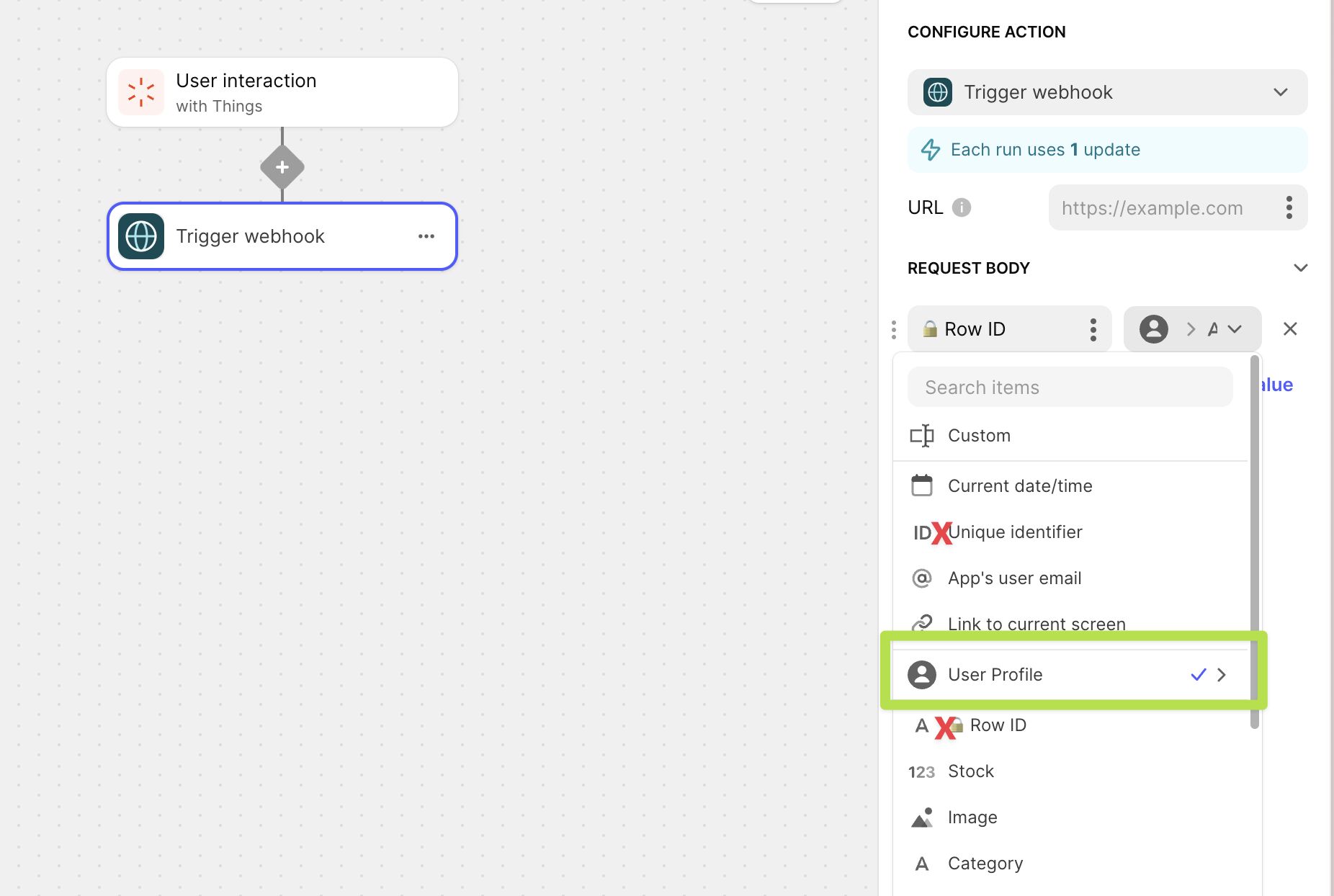
You might double check the “Create Zapier row” action UserID value. Given your quote, it looks like you are using this action to send the UserID value. And given that your action is on your Subscriptions table, you’d want to make sure that you are grabbing the user’s ID via the “User Profile” option in your value instead of the Subscriptions one or a new one with the “Unique Identifier” option.
> [@chanwise](#):
>
> create an entry in a Zapier table with the Row ID of the user
---
### Author:  [@chanwise](https://community.glideapps.com/u/chanwise)
#### Post date: [June 8, 2024, 3:28pm UTC](https://community.glideapps.com/t/new-user-has-their-rowid-change-after-signing-in-and-using-a-webhook-for-zapier/73939/11 "2024-06-08T15:28:24Z")
Yep, i’m using the Row ID from the Users table. The weird issue is this doesn’t happen for all users. It’s prob been like maybe 4 times out of a lot more but it’s just enough recently that I didn’t know if it was something on my end or not. Honestly just hoping it’s a glitch and just something I’ll have to fix when it occurs.

---
### Author:  [@chanwise](https://community.glideapps.com/u/chanwise)
#### Post date: [June 8, 2024, 3:30pm UTC](https://community.glideapps.com/t/new-user-has-their-rowid-change-after-signing-in-and-using-a-webhook-for-zapier/73939/12 "2024-06-08T15:30:09Z")
Yep. It was the way I found to get the RowID so that Stripe can update the user after payment without going through the invoice route. I’ve thought about this but I just don’t know how many operations that would be. I’m already averaging like 500 updates a day so that might kill me in the long run haha
---
### Author:  [@ThinhDinh](https://community.glideapps.com/u/ThinhDinh)
#### Post date: [June 9, 2024, 1:15am UTC](https://community.glideapps.com/t/new-user-has-their-rowid-change-after-signing-in-and-using-a-webhook-for-zapier/73939/13 "2024-06-09T01:15:39Z")
It’s just one further step to run a JavaScript.
> [@Zapier integration : Get row ID based on another field](https://community.glideapps.com/t/zapier-integration-get-row-id-based-on-another-field/72995/2):
>
> Just successfully tested this. Add a “Code by Zapier” step and choose Run Javascript. [image] Setup the inputs as I have below. The “search” part will reference the email you want to find the rowID for. Now here’s the code: let emails = inputData.emails.split(","); let rowIDs = inputData.rowIDs.split(","); let index = emails.findIndex(email =\> email.includes(inputData.search)); output = {rowID: rowIDs[index]}; I split the emails and rowIDs into arrays, then find the index of t…
---
### Author:  [@chanwise](https://community.glideapps.com/u/chanwise)
#### Post date: [June 9, 2024, 6:27am UTC](https://community.glideapps.com/t/new-user-has-their-rowid-change-after-signing-in-and-using-a-webhook-for-zapier/73939/14 "2024-06-09T06:27:38Z")
okay cool! I’ll have to keep this in my back pocket if I end up having this happen more often.
---
### Author:  [@chanwise](https://community.glideapps.com/u/chanwise)
#### Post date: [June 9, 2024, 6:17pm UTC](https://community.glideapps.com/t/new-user-has-their-rowid-change-after-signing-in-and-using-a-webhook-for-zapier/73939/15 "2024-06-09T18:17:24Z")
I do have a question about this now, if I no longer wanted to send a webhook to Glide, I could potentially just use this instead to react when Stripe’s webhook runs on a checkout being completed? And this would reduce my need on Zapier tables?
I’m just curious as that would actually probably save me on updates now that I think about it. Just wanted to ask before attempting to maybe change my billing workflows
---
### Author:  [@ThinhDinh](https://community.glideapps.com/u/ThinhDinh)
#### Post date: [June 9, 2024, 11:42pm UTC](https://community.glideapps.com/t/new-user-has-their-rowid-change-after-signing-in-and-using-a-webhook-for-zapier/73939/16 "2024-06-09T23:42:52Z")
> [@chanwise](#):
>
> I do have a question about this now, if I no longer wanted to send a webhook to Glide, I could potentially just use this instead to react when Stripe’s webhook runs on a checkout being completed? And this would reduce my need on Zapier tables?
That sounds correct to me. So you have 2 scenarios now: one to write the user info to Zapier Tables, the other to write the payment info back to Glide when a Stripe purchase is completed?
---
### Author:  [@chanwise](https://community.glideapps.com/u/chanwise)
#### Post date: [June 10, 2024, 12:16am UTC](https://community.glideapps.com/t/new-user-has-their-rowid-change-after-signing-in-and-using-a-webhook-for-zapier/73939/17 "2024-06-10T00:16:59Z")
Yep, i’m doing both so if this can reduce it down to one, this probably makes more sense to implement instead. So will definitely have to update my process 🙂
---
### Author:  [@system](https://community.glideapps.com/u/system)
#### Post date: [June 17, 2024, 12:17am UTC](https://community.glideapps.com/t/new-user-has-their-rowid-change-after-signing-in-and-using-a-webhook-for-zapier/73939/18 "2024-06-17T00:17:28Z")
This topic was automatically closed 7 days after the last reply. New replies are no longer allowed.