# List of users going to event
**URL:** https://community.glideapps.com/t/list-of-users-going-to-event/56274
**Category:** Ask for Help
**Created:** [January 3, 2023, 3:30pm UTC](https://community.glideapps.com/t/list-of-users-going-to-event/56274 "2023-01-03T15:30:21Z")
**Posts on this page:** 8
**Page:** 1
### Author:  [@Ollie\_Yates](https://community.glideapps.com/u/Ollie_Yates)
#### Post date: [January 3, 2023, 3:30pm UTC](https://community.glideapps.com/t/list-of-users-going-to-event/56274/1 "2023-01-03T15:30:21Z")
I need a bit of help with something as I’m still new to glide.
I’m looking at adding a section to an event where it shows a list of people who are going to the event but I’m struggling to work out how to get it so that people can tick that they’re going and also show the list of people that have ticked that they’re going.
Hope that makes sense.
Any help is greatly appreciated.
---
### Author:  [@Robert\_Petitto](https://community.glideapps.com/u/Robert_Petitto)
#### Post date: [January 3, 2023, 4:01pm UTC](https://community.glideapps.com/t/list-of-users-going-to-event/56274/2 "2023-01-03T16:01:31Z")
Check this out:
> [@TWO WAYS to Allow Users to RSVP, Register and Join](https://community.glideapps.com/t/two-ways-to-allow-users-to-rsvp-register-and-join/36924):
>
> If you’re allowing your users to register for a course, RSVP to an event, check in to a location or assign themselves to an item, you’ll need to create some sort of user log. In this video, you’ll learn two ways to create the log: Creating a Log Sheet (flexible but eats into your row quota) Creating a User Array Column (significantly saves rows, but only tracks one data point—usually user ID/email). Watch and learn which way is most applicable for your app! [[Glide: TWO WAYS to Allow …](https://www.youtube.com/watch?v=IWZWB1hn3DU)
---
### Author:  [@Ollie\_Yates](https://community.glideapps.com/u/Ollie_Yates)
#### Post date: [January 4, 2023, 1:46am UTC](https://community.glideapps.com/t/list-of-users-going-to-event/56274/3 "2023-01-04T01:46:19Z")
Amazing video thankyou so much.
One question, is there a way, using either process to display a list of the people who have checked in/RSVP’d rather than just a number of people?
---
### Author:  [@Robert\_Petitto](https://community.glideapps.com/u/Robert_Petitto)
#### Post date: [January 4, 2023, 2:06am UTC](https://community.glideapps.com/t/list-of-users-going-to-event/56274/4 "2023-01-04T02:06:11Z")
You bet. Depending which method you go with, you’d just display the multiple relation of RSVPs as a collection/inline list
---
### Author:  [@IdeaStrider](https://community.glideapps.com/u/IdeaStrider)
#### Post date: [June 29, 2023, 2:51am UTC](https://community.glideapps.com/t/list-of-users-going-to-event/56274/5 "2023-06-29T02:51:23Z")
Hi @Robert_Petitto. I followed your tutorial so thank you for that! I’m new to Glide so could you elaborate a little more about what you mean by multiple relations of RSVPs as a collection/inline list?
If you build the list of people RSVPing as a string in the same table (option 2 in your video), would that be possible?
---
### Author:  [@Robert\_Petitto](https://community.glideapps.com/u/Robert_Petitto)
#### Post date: [June 29, 2023, 3:13am UTC](https://community.glideapps.com/t/list-of-users-going-to-event/56274/6 "2023-06-29T03:13:39Z")
If you build it as a CSV string (I assume RowIDs of users), then you’d split the column, and then do a multiple relation to the users table.
---
### Author:  [@IdeaStrider](https://community.glideapps.com/u/IdeaStrider)
#### Post date: [June 29, 2023, 4:05am UTC](https://community.glideapps.com/t/list-of-users-going-to-event/56274/7 "2023-06-29T04:05:25Z")
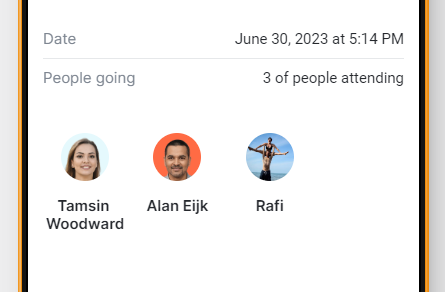
Thank you for responding so quickly! A quick Google search on the definition of multiple relations and I got a beautiful list of user profile pictures.
😃
---
### Author:  [@Darren\_Murphy](https://community.glideapps.com/u/Darren_Murphy)
#### Post date: [June 29, 2023, 4:12am UTC](https://community.glideapps.com/t/list-of-users-going-to-event/56274/8 "2023-06-29T04:12:30Z")
But wait, it gets better!
There is actually documentation on this topic, complete with a video 😉
> **[Glide • Relations](https://www.glideapps.com/docs/reference/computed-columns/relations#multiple-relations)**
>
> Create relationships and link rows together.