# Introducing: Swipe Cards Collection (AI Component + JSON)

**URL:** https://community.glideapps.com/t/introducing-swipe-cards-collection-ai-component-json/80802
**Category:** Community Resources
**Tags:** ai, custom-code, collections
**Created:** [March 18, 2025, 2:30am UTC](https://community.glideapps.com/t/introducing-swipe-cards-collection-ai-component-json/80802 "2025-03-18T02:30:56Z")
**Posts on this page:** 20
**Page:** 1

<div class="post-metadata">

### Author: ![MaximeBaker](https://sea2.discourse-cdn.com/flex002/user_avatar/community.glideapps.com/maximebaker/32/80877_2.png) [@MaximeBaker](https://community.glideapps.com/u/MaximeBaker)
#### Post date: [March 18, 2025, 2:30am UTC](https://community.glideapps.com/t/introducing-swipe-cards-collection-ai-component-json/80802/1 "2025-03-18T02:30:56Z")

</div>

# A new way to show data 🆕

Hello **Fellow Gliders** 🛝

I’m excited to share a versatile **Swipe Cards Collection** I created using an **AI Component** and **JSON**. Though it might remind you of Tinder, its applications are extensive. This post will show you what it does and guide you through the implementation.

# First, here is the baby

![1000014763](https://us1.discourse-cdn.com/flex002/uploads/glideapps/original/3X/a/9/a9d6e591681f87c052fd697f721db2a5b526c3be.gif)

# Fine-tuning

You can change anything you want in it by asking the AI to make so changes. **Remember** that the AI in the Glide AI Component doesn’t remember previous message. It only know the current message context and the code already in place. So make sure to do good prompts.

 ![1000014775](https://us1.discourse-cdn.com/flex002/uploads/glideapps/original/3X/6/f/6f76db2bb9f2b9dddd50426aa38fbed3af3bf9d9.png)

# JSON Configuration

Create the needed columns in your desired table. By using my default AI Component, here is the columns configuration and the JSON Object.

 ![1000014764](https://us1.discourse-cdn.com/flex002/uploads/glideapps/original/3X/b/e/be1c226a496e5920f316425abf06f31d46945896.jpeg)

Then, you need to create a **joined list** and a **template** to make a **JSON Array** of all the rows. You can use **query column** before joined list if you need to **filter the data**.

 ![1000014765](https://us1.discourse-cdn.com/flex002/uploads/glideapps/original/3X/2/4/24a30239238393799b8f68c9648aa8c856dd6b27.jpeg)  
 ![1000014766](https://us1.discourse-cdn.com/flex002/uploads/glideapps/original/3X/3/3/330227de3359b3864b1ff36c2367d249cab796fc.jpeg)

# Likes Counter

You can now create, if needed, the likes counter.  
Create a likes-dislikes table.

 ![1000014771](https://us1.discourse-cdn.com/flex002/uploads/glideapps/original/3X/4/e/4edcbc6373a530858ebd062d992095d0399be9b1.jpeg)  
Then, create the relation.  
 ![1000014767](https://us1.discourse-cdn.com/flex002/uploads/glideapps/original/3X/f/8/f89b218570468a89226a9b052094a5b24b8f7903.jpeg)  
 ![1000014768](https://us1.discourse-cdn.com/flex002/uploads/glideapps/original/3X/0/e/0e32233384b23ef40f4977051c86b0ed3f824821.png)

# Context

Add a _user-specific_ **text column** that will store current Card JSON object in it to be able to execute action in the right row context from the AI Component.

 ![1000014769](https://us1.discourse-cdn.com/flex002/uploads/glideapps/original/3X/5/a/5a33042eb5a0bb8e0fedcf5c927503d6cadcc68e.png)  
 ![1000014770](https://us1.discourse-cdn.com/flex002/uploads/glideapps/original/3X/9/1/91536c18e84d38bd0f2eaadd50cd4e4a4c64166f.png)

# AI Component

You first need to create the variables and actions:

 ![1000014772](https://us1.discourse-cdn.com/flex002/uploads/glideapps/original/3X/4/3/4335df009841a4b01e0fc79b7af3ff00bd84495b.png)  
 ![1000014773](https://us1.discourse-cdn.com/flex002/uploads/glideapps/original/3X/5/5/55dcc2e1b3814fded1073c348f4b942f46a427ce.png)  
 ![1000014774](https://us1.discourse-cdn.com/flex002/uploads/glideapps/original/3X/b/f/bf07c5325b654c27ae8e791180494a866d4d8941.png)

- For the user id, you can use row id of the users table. For the example, I forgot to create the row id, so I used email instead.

Then paste:

```html
Do exactly this : <html class="color-scheme-light"><head>
<style>:root {--color-accent: 215deg 99% 28%;

      }</style>
    <link rel="preload" href="https://fonts.googleapis.com/css2?family=Inter:wght@400;500;600;700&amp;display=swap" as="style">
    
    <meta name="color-scheme" content="light dark">
    <style>
      html, body {
        font-family: Inter,-apple-system,BlinkMacSystemFont,Roboto,sans-serif;
        background-color: transparent;
      }
    </style>
    <script type="module">
      import { init } from "https://go.glideapps.com/shell/v1.js";
      init({"fieldsDataObject":{"currentCard":"{\"Name\":\"Item Title\",\"Description\":\"A short description of the item\",\"Category\":\"Category 1\",\"Image\":\"https://images.pexels.com/photos/158827/field-corn-air-frisch-158827.jpeg\",\"ID\":\"a-k3jPSWlSAKokMunvj5TDg\",\"Likes\":18}"},"schema":[{"id":"jsonArray","type":"string","name":"jsonArray"},{"id":"currentCard","type":"string","name":"currentCard"}],"actions":[{"title":"swipedLeft","id":"swipedLeft"},{"title":"swipedRight","id":"swipedRight"}],"config":{"colorScheme":"light","cssVariables":{"--color-accent":"215deg 99% 28%"},"alpineConfig":{"mode":"standalone","hasBodyAction":false}},"debug":false})
    </script>
    <script src="//cdn.jsdelivr.net/npm/@iframe-resizer/child@5.2.1"></script>
    <style>/*! tailwindcss v3.4.10 | MIT License | https://tailwindcss.com*/*,:after,:before{border-color:hsl(var(--color-gray-200)/1);border-style:solid;border-width:0;box-sizing:border-box}:after,:before{--tw-content:""}:host,html{line-height:1.5;-webkit-text-size-adjust:100%;font-family:ui-sans-serif,system-ui,sans-serif,Apple Color Emoji,Segoe UI Emoji,Segoe UI Symbol,Noto Color Emoji;font-feature-settings:normal;font-variation-settings:normal;-moz-tab-size:4;tab-size:4;-webkit-tap-highlight-color:transparent}body{line-height:inherit;margin:0}hr{border-top-width:1px;color:inherit;height:0}abbr:where([title]){text-decoration:underline dotted}h1,h2,h3,h4,h5,h6{font-size:inherit;font-weight:inherit}a{color:inherit;text-decoration:inherit}b,strong{font-weight:bolder}code,kbd,pre,samp{font-family:ui-monospace,SFMono-Regular,Menlo,Monaco,Consolas,Liberation Mono,Courier New,monospace;font-feature-settings:normal;font-size:1em;font-variation-settings:normal}small{font-size:80%}sub,sup{font-size:75%;line-height:0;position:relative;vertical-align:baseline}sub{bottom:-.25em}sup{top:-.5em}table{border-collapse:collapse;border-color:inherit;text-indent:0}button,input,optgroup,select,textarea{color:inherit;font-family:inherit;font-feature-settings:inherit;font-size:100%;font-variation-settings:inherit;font-weight:inherit;letter-spacing:inherit;line-height:inherit;margin:0;padding:0}button,select{text-transform:none}button,input:where([type=button]),input:where([type=reset]),input:where([type=submit]){-webkit-appearance:button;background-color:transparent;background-image:none}:-moz-focusring{outline:auto}:-moz-ui-invalid{box-shadow:none}progress{vertical-align:baseline}::-webkit-inner-spin-button,::-webkit-outer-spin-button{height:auto}[type=search]{-webkit-appearance:textfield;outline-offset:-2px}::-webkit-search-decoration{-webkit-appearance:none}::-webkit-file-upload-button{-webkit-appearance:button;font:inherit}summary{display:list-item}blockquote,dd,dl,figure,h1,h2,h3,h4,h5,h6,hr,p,pre{margin:0}fieldset{margin:0}fieldset,legend{padding:0}menu,ol,ul{list-style:none;margin:0;padding:0}dialog{padding:0}textarea{resize:vertical}input::placeholder,textarea::placeholder{color:hsl(var(--color-gray-400)/1);opacity:1}[role=button],button{cursor:pointer}:disabled{cursor:default}audio,canvas,embed,iframe,img,object,svg,video{display:block;vertical-align:middle}img,video{height:auto;max-width:100%}[hidden]{display:none}*,:after,:before{--tw-border-spacing-x:0;--tw-border-spacing-y:0;--tw-translate-x:0;--tw-translate-y:0;--tw-rotate:0;--tw-skew-x:0;--tw-skew-y:0;--tw-scale-x:1;--tw-scale-y:1;--tw-pan-x: ;--tw-pan-y: ;--tw-pinch-zoom: ;--tw-scroll-snap-strictness:proximity;--tw-gradient-from-position: ;--tw-gradient-via-position: ;--tw-gradient-to-position: ;--tw-ordinal: ;--tw-slashed-zero: ;--tw-numeric-figure: ;--tw-numeric-spacing: ;--tw-numeric-fraction: ;--tw-ring-inset: ;--tw-ring-offset-width:0px;--tw-ring-offset-color:#fff;--tw-ring-color:rgba(59,130,246,.5);--tw-ring-offset-shadow:0 0 #0000;--tw-ring-shadow:0 0 #0000;--tw-shadow:0 0 #0000;--tw-shadow-colored:0 0 #0000;--tw-blur: ;--tw-brightness: ;--tw-contrast: ;--tw-grayscale: ;--tw-hue-rotate: ;--tw-invert: ;--tw-saturate: ;--tw-sepia: ;--tw-drop-shadow: ;--tw-backdrop-blur: ;--tw-backdrop-brightness: ;--tw-backdrop-contrast: ;--tw-backdrop-grayscale: ;--tw-backdrop-hue-rotate: ;--tw-backdrop-invert: ;--tw-backdrop-opacity: ;--tw-backdrop-saturate: ;--tw-backdrop-sepia: ;--tw-contain-size: ;--tw-contain-layout: ;--tw-contain-paint: ;--tw-contain-style: }::backdrop{--tw-border-spacing-x:0;--tw-border-spacing-y:0;--tw-translate-x:0;--tw-translate-y:0;--tw-rotate:0;--tw-skew-x:0;--tw-skew-y:0;--tw-scale-x:1;--tw-scale-y:1;--tw-pan-x: ;--tw-pan-y: ;--tw-pinch-zoom: ;--tw-scroll-snap-strictness:proximity;--tw-gradient-from-position: ;--tw-gradient-via-position: ;--tw-gradient-to-position: ;--tw-ordinal: ;--tw-slashed-zero: ;--tw-numeric-figure: ;--tw-numeric-spacing: ;--tw-numeric-fraction: ;--tw-ring-inset: ;--tw-ring-offset-width:0px;--tw-ring-offset-color:#fff;--tw-ring-color:rgba(59,130,246,.5);--tw-ring-offset-shadow:0 0 #0000;--tw-ring-shadow:0 0 #0000;--tw-shadow:0 0 #0000;--tw-shadow-colored:0 0 #0000;--tw-blur: ;--tw-brightness: ;--tw-contrast: ;--tw-grayscale: ;--tw-hue-rotate: ;--tw-invert: ;--tw-saturate: ;--tw-sepia: ;--tw-drop-shadow: ;--tw-backdrop-blur: ;--tw-backdrop-brightness: ;--tw-backdrop-contrast: ;--tw-backdrop-grayscale: ;--tw-backdrop-hue-rotate: ;--tw-backdrop-invert: ;--tw-backdrop-opacity: ;--tw-backdrop-saturate: ;--tw-backdrop-sepia: ;--tw-contain-size: ;--tw-contain-layout: ;--tw-contain-paint: ;--tw-contain-style: }.headline-lg,.headline-md,.headline-sm,.headline-xl,.headline-xs{font-weight:600}.headline-sm{font-size:20px;letter-spacing:-.025em;line-height:1.375}@media (min-width:768px){.headline-sm{font-size:1.25rem;line-height:1.75rem}}.body-base{font-size:1rem;line-height:1.5rem;line-height:1.5}@media (min-width:768px){.body-base{font-size:.875rem;line-height:1.25rem}}.pointer-events-none{pointer-events:none}.absolute{position:absolute}.relative{position:relative}.inset-0{inset:0}.inset-x-0{left:0;right:0}.bottom-0{bottom:0}.mx-auto{margin-left:auto;margin-right:auto}.mb-2{margin-bottom:.5rem}.mb-8{margin-bottom:2rem}.ml-1{margin-left:.25rem}.line-clamp-2{display:-webkit-box;overflow:hidden;-webkit-box-orient:vertical;-webkit-line-clamp:2}.flex{display:flex}.h-14{height:3.5rem}.h-\[600px\]{height:600px}.h-full{height:100%}.w-14{width:3.5rem}.w-full{width:100%}.max-w-sm{max-width:24rem}.transform{transform:translate(var(--tw-translate-x),var(--tw-translate-y)) rotate(var(--tw-rotate)) skewX(var(--tw-skew-x)) skewY(var(--tw-skew-y)) scaleX(var(--tw-scale-x)) scaleY(var(--tw-scale-y))}.cursor-pointer{cursor:pointer}.select-none{user-select:none}.items-center{align-items:center}.justify-center{justify-content:center}.justify-between{justify-content:space-between}.overflow-hidden{overflow:hidden}.rounded-full{border-radius:9999px}.rounded-xl{border-radius:.75rem}.border{border-width:1px}.border-gray-200{--tw-border-opacity:1;border-color:hsl(var(--color-gray-200)/var(--tw-border-opacity))}.bg-accent{--tw-bg-opacity:1;background-color:hsl(var(--color-accent)/var(--tw-bg-opacity))}.bg-background{--tw-bg-opacity:1;background-color:hsl(var(--color-background-DEFAULT)/var(--tw-bg-opacity))}.bg-white{--tw-bg-opacity:1;background-color:rgb(255 255 255/var(--tw-bg-opacity))}.bg-opacity-10{--tw-bg-opacity:0.1}.bg-opacity-20{--tw-bg-opacity:0.2}.bg-gradient-to-t{background-image:linear-gradient(to top,var(--tw-gradient-stops))}.from-black{--tw-gradient-from:#000 var(--tw-gradient-from-position);--tw-gradient-to:transparent var(--tw-gradient-to-position);--tw-gradient-stops:var(--tw-gradient-from),var(--tw-gradient-to)}.to-transparent{--tw-gradient-to:transparent var(--tw-gradient-to-position)}.object-cover{object-fit:cover}.p-4{padding:1rem}.px-2{padding-left:.5rem;padding-right:.5rem}.px-4{padding-left:1rem;padding-right:1rem}.px-8{padding-left:2rem;padding-right:2rem}.py-1{padding-bottom:.25rem;padding-top:.25rem}.text-2xl{font-size:1.5rem;line-height:2rem}.text-lg{font-size:1.125rem;line-height:1.75rem}.text-sm{font-size:.875rem;line-height:1.25rem}.text-xs{font-size:.75rem;line-height:1rem}.font-medium{font-weight:500}.text-accent{--tw-text-opacity:1;color:hsl(var(--color-accent)/var(--tw-text-opacity))}.text-red-500{--tw-text-opacity:1;color:rgb(239 68 68/var(--tw-text-opacity))}.text-white{--tw-text-opacity:1;color:rgb(255 255 255/var(--tw-text-opacity))}.text-opacity-80{--tw-text-opacity:0.8}.antialiased{-webkit-font-smoothing:antialiased;-moz-osx-font-smoothing:grayscale}.backdrop-blur-sm{--tw-backdrop-blur:blur(4px);-webkit-backdrop-filter:var(--tw-backdrop-blur) var(--tw-backdrop-brightness) var(--tw-backdrop-contrast) var(--tw-backdrop-grayscale) var(--tw-backdrop-hue-rotate) var(--tw-backdrop-invert) var(--tw-backdrop-opacity) var(--tw-backdrop-saturate) var(--tw-backdrop-sepia);backdrop-filter:var(--tw-backdrop-blur) var(--tw-backdrop-brightness) var(--tw-backdrop-contrast) var(--tw-backdrop-grayscale) var(--tw-backdrop-hue-rotate) var(--tw-backdrop-invert) var(--tw-backdrop-opacity) var(--tw-backdrop-saturate) var(--tw-backdrop-sepia)}.transition{transition-duration:.15s;transition-property:color,background-color,border-color,text-decoration-color,fill,stroke,opacity,box-shadow,transform,filter,backdrop-filter;transition-timing-function:cubic-bezier(.4,0,.2,1)}.transition-all{transition-duration:.15s;transition-property:all;transition-timing-function:cubic-bezier(.4,0,.2,1)}.transition-colors{transition-duration:.15s;transition-property:color,background-color,border-color,text-decoration-color,fill,stroke;transition-timing-function:cubic-bezier(.4,0,.2,1)}.duration-300{transition-duration:.3s}.ease-out{transition-timing-function:cubic-bezier(0,0,.2,1)}.\@container{container-type:inline-size}@layer colors{:root.color-scheme-auto{color-scheme:light;--color-gray-0:0deg 0% 100%;--color-gray-50:0deg 0% 98%;--color-gray-100:0deg 0% 96%;--color-gray-200:0deg 0% 94%;--color-gray-300:0deg 0% 88%;--color-gray-400:0deg 0% 68%;--color-gray-500:0deg 0% 56%;--color-gray-600:0deg 0% 44%;--color-gray-700:0deg 0% 31%;--color-gray-800:0deg 0% 20%;--color-gray-900:0deg 0% 5%;--color-gray-950:0deg 0% 0%;--color-background-DEFAULT:0deg 0% 100%}@media (prefers-color-scheme:dark){:root.color-scheme-auto{color-scheme:dark;--color-gray-0:0deg 0% 4%;--color-gray-50:0deg 0% 9%;--color-gray-100:0deg 0% 12%;--color-gray-200:0deg 0% 15%;--color-gray-300:0deg 0% 20%;--color-gray-400:0deg 0% 31%;--color-gray-500:0deg 0% 44%;--color-gray-600:0deg 0% 57%;--color-gray-700:0deg 0% 72%;--color-gray-800:0deg 0% 90%;--color-gray-900:0deg 0% 100%;--color-gray-950:0deg 0% 100%;--color-background-DEFAULT:0deg 0% 9%}}:root.color-scheme-light{color-scheme:light;--color-gray-0:0deg 0% 100%;--color-gray-50:0deg 0% 98%;--color-gray-100:0deg 0% 96%;--color-gray-200:0deg 0% 94%;--color-gray-300:0deg 0% 88%;--color-gray-400:0deg 0% 68%;--color-gray-500:0deg 0% 56%;--color-gray-600:0deg 0% 44%;--color-gray-700:0deg 0% 31%;--color-gray-800:0deg 0% 20%;--color-gray-900:0deg 0% 5%;--color-gray-950:0deg 0% 0%;--color-background-DEFAULT:0deg 0% 100%}:root.color-scheme-dark{color-scheme:dark;--color-gray-0:0deg 0% 4%;--color-gray-50:0deg 0% 9%;--color-gray-100:0deg 0% 12%;--color-gray-200:0deg 0% 15%;--color-gray-300:0deg 0% 20%;--color-gray-400:0deg 0% 31%;--color-gray-500:0deg 0% 44%;--color-gray-600:0deg 0% 57%;--color-gray-700:0deg 0% 72%;--color-gray-800:0deg 0% 90%;--color-gray-900:0deg 0% 100%;--color-gray-950:0deg 0% 100%;--color-background-DEFAULT:0deg 0% 9%}}.hover\:bg-red-50:hover{--tw-bg-opacity:1;background-color:rgb(254 242 242/var(--tw-bg-opacity))}@media (min-width:640px){.sm\:px-5{padding-left:1.25rem;padding-right:1.25rem}}@media (min-width:768px){.md\:px-6{padding-left:1.5rem;padding-right:1.5rem}}@media (min-width:1024px){.lg\:px-7{padding-left:1.75rem;padding-right:1.75rem}}@media (min-width:1280px){.xl\:px-8{padding-left:2rem;padding-right:2rem}}</style>
  </head>
  <body x-data="state" class="" :class="{ 'cursor-pointer': hasBodyAction }">
    <div class="@container w-full body-base antialiased">
      <div :class="{ 'px-4 py-1 sm:px-5 md:px-6 lg:px-7 xl:px-8': mode === 'standalone' }">
        <div x-data="swipeCards" class="relative w-full max-w-sm mx-auto h-[600px] overflow-hidden select-none">
          <template x-for="(item, index) in JSON.parse(jsonArray)" :key="index">
              <div class="absolute inset-0 bg-background rounded-xl border border-gray-200 transition-all duration-300 ease-out overflow-hidden" :style="{ 
                      opacity: index === currentIndex ? 1 : 0, 
                      zIndex: JSON.parse(jsonArray).length - Math.abs(index - currentIndex),
                      transform: getCardTransform(index),
                      transition: 'transform 0.3s ease-out, opacity 0.3s ease-out'
                   }" @mousedown="startDrag($event, index)" @touchstart="startDrag($event, index)" @mousemove="drag($event, index)" @touchmove="drag($event, index)" @mouseup="endDrag($event, index)" @touchend="endDrag($event, index)" @mouseleave="endDrag($event, index)">
                  <img :src="item.Image" :alt="item.Name" class="absolute inset-0 w-full h-full object-cover pointer-events-none">
                  <div class="absolute inset-x-0 bottom-0 bg-gradient-to-t from-black to-transparent p-4">
                      <div class="flex items-center justify-between mb-2">
                          <h3 class="headline-sm text-white" x-text="item.Name"></h3>
                          <span class="px-2 py-1 text-xs font-medium text-accent bg-accent bg-opacity-10 rounded-full" x-text="item.Category"></span>
                      </div>
                      <p class="text-white text-opacity-80 line-clamp-2 mb-8" x-text="item.Description"></p>
                      <div class="flex justify-between items-center">
                          <button @click="swipe('left', index)" class="w-14 h-14 flex items-center justify-center bg-white bg-opacity-20 backdrop-blur-sm rounded-full text-red-500 text-2xl transition-colors hover:bg-red-50">
                              ✕
                          </button>
                          <button @click="swipe('right', index)" class="w-14 h-14 flex items-center justify-center bg-accent bg-opacity-20 backdrop-blur-sm rounded-full text-white transition-colors hover:bg-accent-dark">
                              <span class="text-lg">❤</span>
                              <span class="text-sm ml-1" x-text="item.Likes"></span>
                          </button>
                      </div>
                  </div>
              </div>
          </template>
      </div>
      
      <script>
          document.addEventListener('alpine:init', () => {
              Alpine.data('swipeCards', () => ({
                  startX: 0,
                  currentX: 0,
                  isDragging: false,
                  threshold: 100,
                  currentIndex: 0,
                  cardOffsets: {},
      
                  init() {
                      this.$watch('jsonArray', () => this.updateCurrentCard());
                      this.$watch('currentIndex', () => this.updateCurrentCard());
                      this.$nextTick(() => setTimeout(() => this.updateCurrentCard(), 250));
                  },
      
                  updateCurrentCard() {
                      const cards = JSON.parse(this.jsonArray || '[]');
                      if (cards.length > 0 && this.currentIndex < cards.length) {
                          this.currentCard = JSON.stringify(cards[this.currentIndex]);
                      }
                  },
      
                  getCardTransform(index) {
                      const offset = this.cardOffsets[index] || 0;
                      const scale = index === this.currentIndex ? 1 : 0.8;
                      return `translateX(${offset}px) rotate(${offset * 0.1}deg) scale(${scale})`;
                  },
      
                  startDrag(e, index) {
                      if (e.target.closest('button')) return;
                      this.isDragging = true;
                      this.startX = e.type.includes('mouse') ? e.clientX : e.touches[0].clientX;
                      this.currentX = this.startX;
                      this.draggedIndex = index;
                  },
      
                  drag(e, index) {
                      if (!this.isDragging || this.draggedIndex !== index) return;
                      this.currentX = e.type.includes('mouse') ? e.clientX : e.touches[0].clientX;
                      const deltaX = this.currentX - this.startX;
                      this.cardOffsets[index] = deltaX;
                  },
      
                  endDrag(e, index) {
                      if (!this.isDragging || this.draggedIndex !== index) return;
                      this.isDragging = false;
                      const deltaX = this.currentX - this.startX;
                      const direction = deltaX > 0 ? 'right' : 'left';
                      if (Math.abs(deltaX) > this.threshold) {
                          this.swipe(direction, index);
                      } else {
                          this.cardOffsets[index] = 0;
                      }
                      this.draggedIndex = null;
                  },
      
                  swipe(direction, index) {
                      const swipeAnimation = direction === 'left' ? -150 : 150;
                      this.cardOffsets[index] = swipeAnimation;
                      
                      setTimeout(() => {
                          this.currentIndex = (this.currentIndex + 1) % JSON.parse(this.jsonArray).length;
                          this.updateCurrentCard();
                          this.cardOffsets[index] = 0;
                          if (direction === 'left') {
                              this.swipedLeft();
                          } else {
                              this.swipedRight();
                          }
                      }, 500);
                  },
      
                  swipedLeft() {
                      // Call the provided action
                      if (typeof swipedLeft === 'function') {
                          swipedLeft();
                      }
                  },
      
                  swipedRight() {
                      // Call the provided action
                      if (typeof swipedRight === 'function') {
                          swipedRight();
                      }
                  }
              }));
          });
      </script>
      </div>
    </div>
  
</body></html>

```

# Happy Gliding! ⚡🔥

Hope you like it! Feel free to comment or ask any questions. 🙂

---

<div class="post-metadata">

### Author: ![Darren\_Murphy](https://sea2.discourse-cdn.com/flex002/user_avatar/community.glideapps.com/darren_murphy/32/47326_2.png) [@Darren\_Murphy](https://community.glideapps.com/u/Darren_Murphy)
#### Post date: [March 18, 2025, 3:08am UTC](https://community.glideapps.com/t/introducing-swipe-cards-collection-ai-component-json/80802/2 "2025-03-18T03:08:32Z")

</div>

> [@MaximeBaker](#):
>
> Then, you need to create a **joined list** and a **template** to make a **JSON Array** of all the rows.

hehe, you’re still doing this 🙂  
Have you actually tried using a Lookup like I suggested last time?  
Save yourself a column, and the bonus is that the Lookup is “JSON aware”, where a Joined list is not.

---

<div class="post-metadata">

### Author: ![Luther](https://sea2.discourse-cdn.com/flex002/user_avatar/community.glideapps.com/luther/32/17929_2.png) [@Luther](https://community.glideapps.com/u/Luther)
#### Post date: [March 18, 2025, 5:37am UTC](https://community.glideapps.com/t/introducing-swipe-cards-collection-ai-component-json/80802/3 "2025-03-18T05:37:14Z")

</div>

Gold 🤩. Thank you for sharing

---

<div class="post-metadata">

### Author: ![Marc-Olivier](https://avatars.discourse-cdn.com/v4/letter/m/ac91a4/32.png) [@Marc-Olivier](https://community.glideapps.com/u/Marc-Olivier)
#### Post date: [March 18, 2025, 8:38am UTC](https://community.glideapps.com/t/introducing-swipe-cards-collection-ai-component-json/80802/4 "2025-03-18T08:38:04Z")

</div>

Thanks for sharing @MaximeBaker

---

<div class="post-metadata">

### Author: ![nathanaelb](https://sea2.discourse-cdn.com/flex002/user_avatar/community.glideapps.com/nathanaelb/32/43079_2.png) [@nathanaelb](https://community.glideapps.com/u/nathanaelb)
#### Post date: [March 18, 2025, 9:44am UTC](https://community.glideapps.com/t/introducing-swipe-cards-collection-ai-component-json/80802/5 "2025-03-18T09:44:26Z")

</div>

It’s a nice collection style. We could try to think of good use cases for it in a business setting.

I love it how Glide removed the custom code component and this is the answer 😆

 ![Screenshot 2025-03-18 at 10.35.36](https://us1.discourse-cdn.com/flex002/uploads/glideapps/original/3X/2/0/20e2a95e048c6c2fd5db6c9c7a2f955027f13291.png)

 ![1_Isvyn-sOnthR9YzLl-81aQ](https://us1.discourse-cdn.com/flex002/uploads/glideapps/original/3X/3/9/399e19b0a04de217a8e05b054665d0c6e240d859.webp)

---

<div class="post-metadata">

### Author: ![MaximeBaker](https://sea2.discourse-cdn.com/flex002/user_avatar/community.glideapps.com/maximebaker/32/80877_2.png) [@MaximeBaker](https://community.glideapps.com/u/MaximeBaker)
#### Post date: [March 18, 2025, 10:06am UTC](https://community.glideapps.com/t/introducing-swipe-cards-collection-ai-component-json/80802/6 "2025-03-18T10:06:37Z")

</div>

I’ll try this!

---

<div class="post-metadata">

### Author: ![Marc-Olivier](https://avatars.discourse-cdn.com/v4/letter/m/ac91a4/32.png) [@Marc-Olivier](https://community.glideapps.com/u/Marc-Olivier)
#### Post date: [March 18, 2025, 10:28am UTC](https://community.glideapps.com/t/introducing-swipe-cards-collection-ai-component-json/80802/7 "2025-03-18T10:28:08Z")

</div>

I usually  
1/ ask to add the data fields to the DOM (header)  
2/ create component with this exact same code  
{{write the code in the body minus the first 2 div}}

I always find this process to avoid waisting time if you remove step 2/ the data fields are kept safe

---

<div class="post-metadata">

### Author: ![MaximeBaker](https://sea2.discourse-cdn.com/flex002/user_avatar/community.glideapps.com/maximebaker/32/80877_2.png) [@MaximeBaker](https://community.glideapps.com/u/MaximeBaker)
#### Post date: [March 18, 2025, 10:34am UTC](https://community.glideapps.com/t/introducing-swipe-cards-collection-ai-component-json/80802/8 "2025-03-18T10:34:44Z")

</div>

Good hint!

---

<div class="post-metadata">

### Author: ![fk1214](https://sea2.discourse-cdn.com/flex002/user_avatar/community.glideapps.com/fk1214/32/71058_2.png) [@fk1214](https://community.glideapps.com/u/fk1214)
#### Post date: [March 30, 2025, 7:53am UTC](https://community.glideapps.com/t/introducing-swipe-cards-collection-ai-component-json/80802/9 "2025-03-30T07:53:57Z")

</div>

Now that we’ve got this feature can you give us a share link?

> [@Beta: Share & reuse AI Custom components](https://community.glideapps.com/t/beta-share-reuse-ai-custom-components/81038):
>
> We’re testing a new capability to let you share, reuse, and import AI Custom components between Glide apps. Here’s a quick demo from Christian, our lead designer on the project: The feature is in Public Beta. Our team is watching this thread, so please give it a try, and reply with whatever feedback you have. Learn more in our [Glide docs for the AI Custom component](https://www.glideapps.com/docs/essentials/components/ai-custom#sharing-and-importing-ai-custom-components): Thank you! folded_hands

---

<div class="post-metadata">

### Author: ![MaximeBaker](https://sea2.discourse-cdn.com/flex002/user_avatar/community.glideapps.com/maximebaker/32/80877_2.png) [@MaximeBaker](https://community.glideapps.com/u/MaximeBaker)
#### Post date: [March 30, 2025, 11:03am UTC](https://community.glideapps.com/t/introducing-swipe-cards-collection-ai-component-json/80802/10 "2025-03-30T11:03:02Z")

</div>

> [@fk1214](#):
>
> Now that we’ve got this feature can you give us a share link?
> 
> [Beta: Share & reuse AI Custom components](https://community.glideapps.com/t/beta-share-reuse-ai-custom-components/81038)

There you go:

> **[Untitled - Glide custom component](https://components.glide.info/share/commit::15e8a422-5cfa-40eb-5644-ffee5f065e8c)**
>
> Custom component created in Glide

---

<div class="post-metadata">

### Author: ![fk1214](https://sea2.discourse-cdn.com/flex002/user_avatar/community.glideapps.com/fk1214/32/71058_2.png) [@fk1214](https://community.glideapps.com/u/fk1214)
#### Post date: [March 30, 2025, 1:32pm UTC](https://community.glideapps.com/t/introducing-swipe-cards-collection-ai-component-json/80802/11 "2025-03-30T13:32:01Z")

</div>

Thank you! It takes forever if I just paste “Do exactly this:” and a lot of code in the component, luckily we have this now so we could share components much easier 😅 With a little tweaking I made a more TikTok-ish style feed for an app [Snapverse](https://community.glideapps.com/t/snapverse-share-your-moments/80928) 🎉
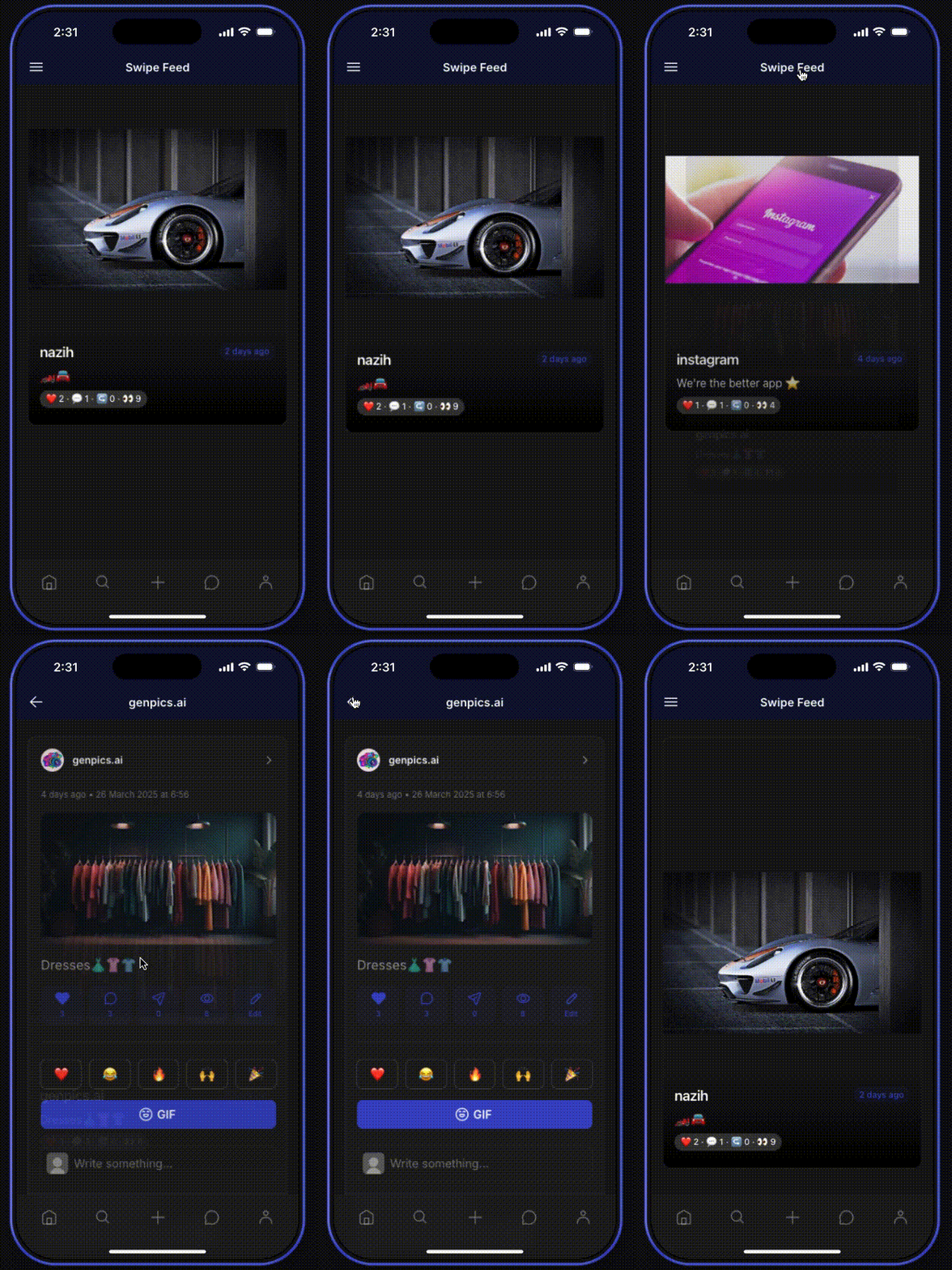
![Screen Recording 2025-03-30 at 2.31.18 pm](https://us1.discourse-cdn.com/flex002/uploads/glideapps/original/3X/c/2/c2c1de52d10898d7ea20a1e38aaf63314276ae7a.gif)

---

<div class="post-metadata">

### Author: ![MaximeBaker](https://sea2.discourse-cdn.com/flex002/user_avatar/community.glideapps.com/maximebaker/32/80877_2.png) [@MaximeBaker](https://community.glideapps.com/u/MaximeBaker)
#### Post date: [March 30, 2025, 3:13pm UTC](https://community.glideapps.com/t/introducing-swipe-cards-collection-ai-component-json/80802/12 "2025-03-30T15:13:26Z")

</div>

Wow I like it!

---

<div class="post-metadata">

### Author: ![MaximeBaker](https://sea2.discourse-cdn.com/flex002/user_avatar/community.glideapps.com/maximebaker/32/80877_2.png) [@MaximeBaker](https://community.glideapps.com/u/MaximeBaker)
#### Post date: [April 4, 2025, 2:18pm UTC](https://community.glideapps.com/t/introducing-swipe-cards-collection-ai-component-json/80802/13 "2025-04-04T14:18:33Z")

</div>

Not working, can’t use the JSON in AI component and make it work.

---

<div class="post-metadata">

### Author: ![Darren\_Murphy](https://sea2.discourse-cdn.com/flex002/user_avatar/community.glideapps.com/darren_murphy/32/47326_2.png) [@Darren\_Murphy](https://community.glideapps.com/u/Darren_Murphy)
#### Post date: [April 5, 2025, 5:17am UTC](https://community.glideapps.com/t/introducing-swipe-cards-collection-ai-component-json/80802/14 "2025-04-05T05:17:31Z")

</div>

That sounds like a problem with the AI component 😉

---

<div class="post-metadata">

### Author: ![MaximeBaker](https://sea2.discourse-cdn.com/flex002/user_avatar/community.glideapps.com/maximebaker/32/80877_2.png) [@MaximeBaker](https://community.glideapps.com/u/MaximeBaker)
#### Post date: [April 5, 2025, 10:56am UTC](https://community.glideapps.com/t/introducing-swipe-cards-collection-ai-component-json/80802/15 "2025-04-05T10:56:15Z")

</div>

You think?

---

<div class="post-metadata">

### Author: ![Darren\_Murphy](https://sea2.discourse-cdn.com/flex002/user_avatar/community.glideapps.com/darren_murphy/32/47326_2.png) [@Darren\_Murphy](https://community.glideapps.com/u/Darren_Murphy)
#### Post date: [April 5, 2025, 11:45am UTC](https://community.glideapps.com/t/introducing-swipe-cards-collection-ai-component-json/80802/16 "2025-04-05T11:45:24Z")

</div>

Well, yes.

I couldn’t say for sure, because generally I don’t use the AI component.  
But the fact is a JSON Array created via a lookup does return valid JSON, and it works perfectly fine if you subsequently use it in a JSON Template, Call API, Trigger Webhook, or whatever. So if the API component can’t handle it, to me that points to the API component.

---

<div class="post-metadata">

### Author: ![Federico\_Fleitas](https://sea2.discourse-cdn.com/flex002/user_avatar/community.glideapps.com/federico_fleitas/32/77461_2.png) [@Federico\_Fleitas](https://community.glideapps.com/u/Federico_Fleitas)
#### Post date: [April 21, 2025, 1:14pm UTC](https://community.glideapps.com/t/introducing-swipe-cards-collection-ai-component-json/80802/17 "2025-04-21T13:14:04Z")

</div>

How did you create the component?

---

<div class="post-metadata">

### Author: ![MaximeBaker](https://sea2.discourse-cdn.com/flex002/user_avatar/community.glideapps.com/maximebaker/32/80877_2.png) [@MaximeBaker](https://community.glideapps.com/u/MaximeBaker)
#### Post date: [April 21, 2025, 1:20pm UTC](https://community.glideapps.com/t/introducing-swipe-cards-collection-ai-component-json/80802/18 "2025-04-21T13:20:17Z")

</div>

Just by prompting

---

<div class="post-metadata">

### Author: ![Ashton\_Pelzel](https://sea2.discourse-cdn.com/flex002/user_avatar/community.glideapps.com/ashton_pelzel/32/78156_2.png) [@Ashton\_Pelzel](https://community.glideapps.com/u/Ashton_Pelzel)
#### Post date: [April 23, 2025, 2:43pm UTC](https://community.glideapps.com/t/introducing-swipe-cards-collection-ai-component-json/80802/19 "2025-04-23T14:43:31Z")

</div>

BOYS, WE FOUND A NATIVE WAY TO MAKE TIKTOK ON GLIDEAPPS, LESGOOOOOOOOOOO-

But no, thank you for making this!

---

<div class="post-metadata">

### Author: ![MaximeBaker](https://sea2.discourse-cdn.com/flex002/user_avatar/community.glideapps.com/maximebaker/32/80877_2.png) [@MaximeBaker](https://community.glideapps.com/u/MaximeBaker)
#### Post date: [April 23, 2025, 11:45pm UTC](https://community.glideapps.com/t/introducing-swipe-cards-collection-ai-component-json/80802/20 "2025-04-23T23:45:59Z")

</div>

Can you share this with us ? 🤩

[Next page](https://community.glideapps.com/t/introducing-swipe-cards-collection-ai-component-json/80802.md?page=2)
