# I'm having trouble with Parent & Child Data
**URL:** https://community.glideapps.com/t/im-having-trouble-with-parent-child-data/85535
**Category:** Ask for Help
**Created:** [November 25, 2025, 5:37am UTC](https://community.glideapps.com/t/im-having-trouble-with-parent-child-data/85535 "2025-11-25T05:37:45Z")
**Posts on this page:** 11
**Page:** 1
### Author:  [@RowanS](https://community.glideapps.com/u/RowanS)
#### Post date: [November 25, 2025, 5:37am UTC](https://community.glideapps.com/t/im-having-trouble-with-parent-child-data/85535/1 "2025-11-25T05:37:45Z")
Background: This is a customer-facing quoting system for potential customers get quotes for glass window installations on Sydney’s Northern Beaches. (Sorry This detailed but I thought it would help with Clarity)
A homeowner needs new glass windows. They scan a QR code or click an email link. They land on my Welcome Page. They fill in their details. Then they use **cascading dropdown menus** to select from over **5,500 different window configurations and sizes**.
Residential or Commercial. Window or Door. Product Name. Panel Type. Height. Width.
Each choice narrows down the next. Like a funnel. Simple. Clean. Professional
**The Data Architecture**
Here’s how it’s supposed to flow…
● **Product Listing Table** - Houses all 5,500+ variations with cascading logic built in…
● **Customer Quotes System** - Main storage for client details and window selections…
● **Temporary Quote Entry** - Was meant for temporary storage before the AI destroyed it…
● **TRB Customer Table** - Holds personal information like First Name, Last Name, Phone…
● **TRB Window Quotes** - Child table for multiple window quotes per customer…
● **Glass Table** - Pulls costing data for glass per square meter…
**Reveals & Architrave Table** - Handles installation costing calculations
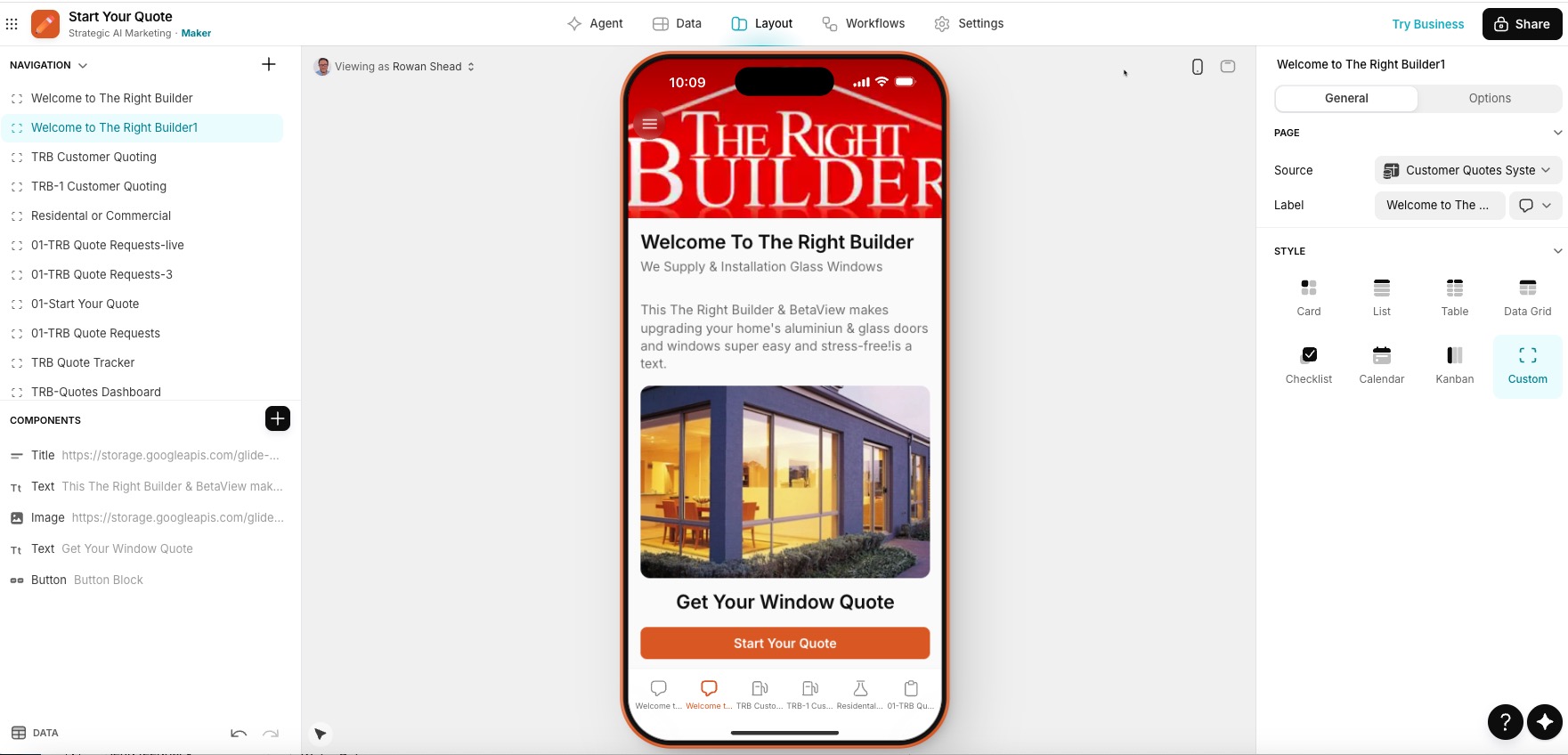
**STEP 1: The Welcome Screen (Where It All Begins)**
● **Screen Name:** The Right Builder Welcome Screen
● **Purpose:** Landing page for customers arriving via email or QR code
**STEP 2: Customer Details Collection**
**Screen Name:** TRB-1 Customer Quoting
**Purpose:** Capture customer personal information
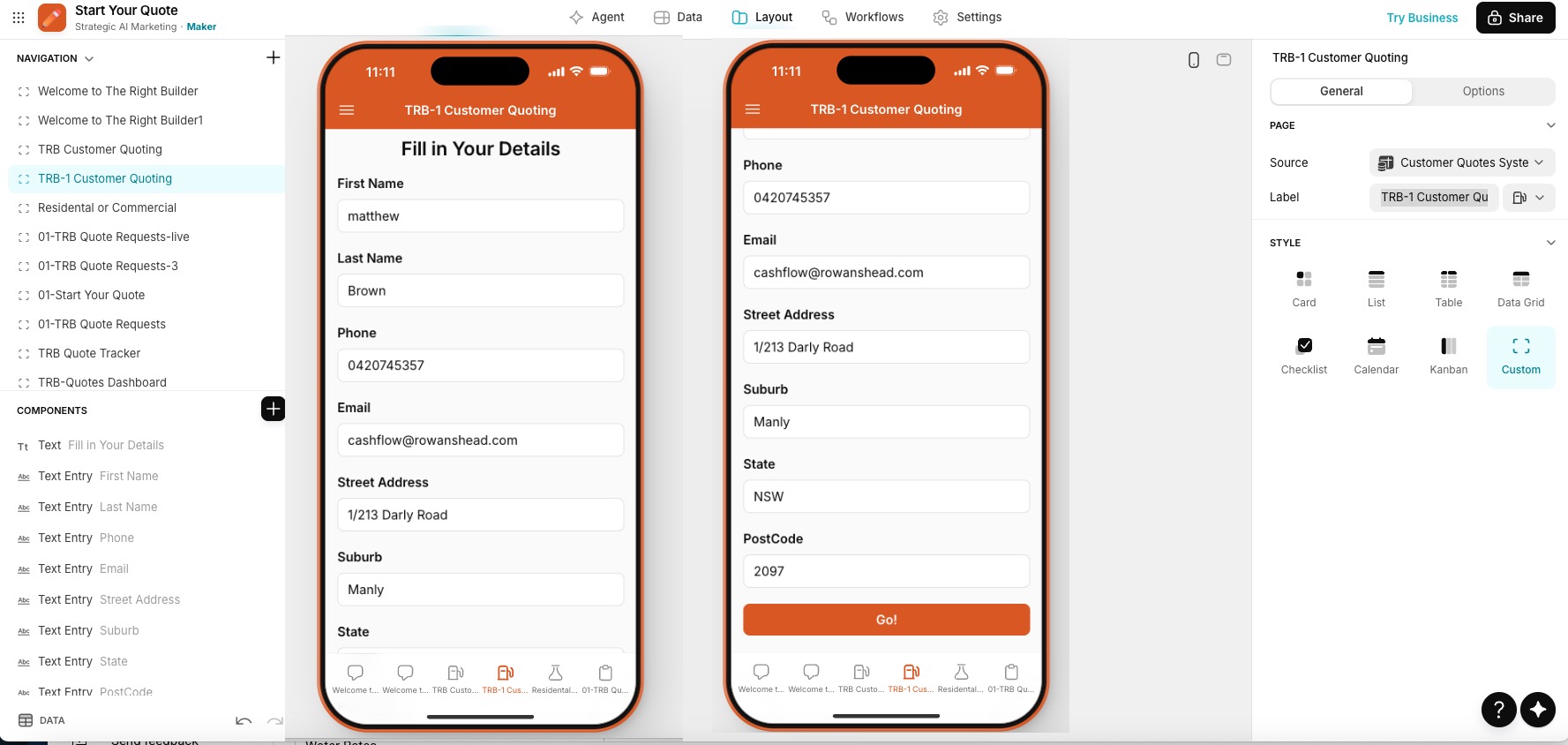
**What Happens When They Click “Go”:**
● **Button Action:** Go
● **Action Type:** Workflow
● **Work** fl **ow Name:** Add row CQS opentab
**The Work** fl **ow Does:**
1. Add row to **Customer Quotes System** (captures all their details)
2. Go to tab **01-TRB Quote Requests-live**
3. Add row to **Customer Table** (stores customer info separately)
**Current Status:** Still working correctly. Customer details are saved properly.
The breakdown happens in the next step.
**STEP 3: Window Selection (Where The Magic Used to Happen)**
● **Screen Name:** 01-TRB Quote Requests-live
● **Purpose:** Customer selects their window specifications through cascading dropdowns
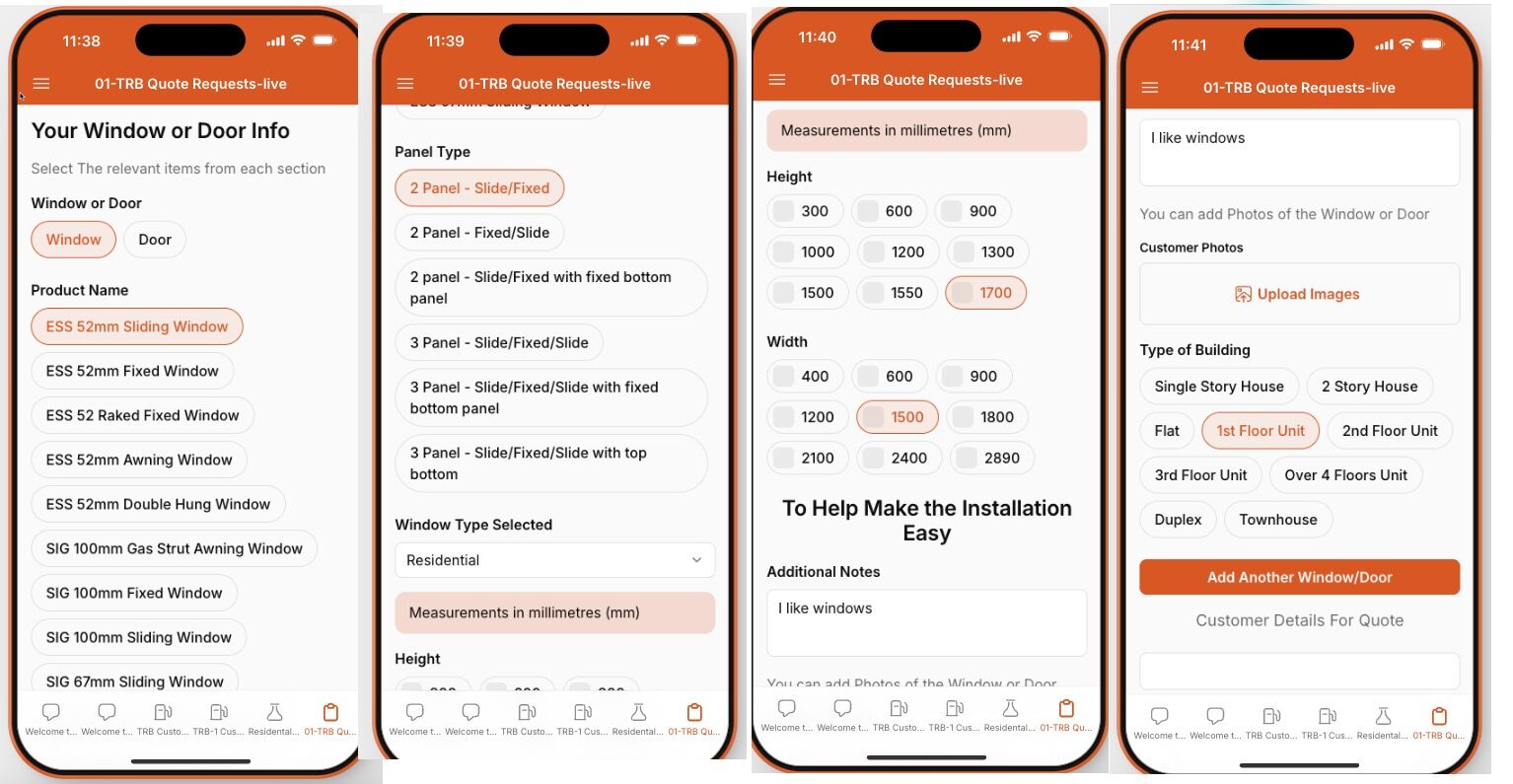
**The Cascading Dropdown Flow:**
**1: - Window or Door (First choice)**
● Customer selects “Window” or “Door”
● This filters everything that follows
**2: - Product Name (Second choice)**
● If Window selected → Shows only window product options
● If Door is selected → Shows only Door product options
● List dynamically filters based on the first choice
**3: - Panel Type (Third choice)**
● Shows panel types available for the selected Product Name
● Each product has different panel configurations
● List filters based on Product Name selection
**4: - Height (Fourth choice)**
● Shows heights available for the selected Panel Type
● Each panel type has specific height options
● List filters based on Panel Type selection
**5: - Width (Fifth choice)**
● Shows the widths available for the selected Height
● Final narrowing of options
● List filters based on Height selection
**The Technical Setup:**
Each dropdown is built from the **Product Listing Table** with conditional filters:
● Column: Window or Door
● Column: Product Name (filtered by Window/Door)
● Column: Panel Type (filtered by Product Name)
● Column: Height (filtered by Panel Type)
● Column: Width (filtered by Height)
**This cascading logic took weeks to build correctly.**
**And it worked. Flawlessly. Until the** fi **rst break.**
**STEP 4: Adding Multiple Windows (Where Everything Breaks)**
**The Use Case:**
Most customers need quotes for **multiple windows**. Not just one.
So after they configure Window #1, they need to add Window #2, Window #3, and so on.
**The Setup:**
At the bottom of **01-TRB Quote Requests-live** , there are two buttons:
**Button 1: Add Another Window/Door**
**STEP 5: The Breakdown (Visual Evidence)**
**THIS IS WHERE EVERYTHING FALLS APART.**
**What Should Happen:**
● Customer clicks “Add Another Window/Door”
● System should: ✅ Keep Window #1 data in its own row
● ✅ Create Window #2 in a new row
● ✅ Link both as children to the same parent customer
● ✅ Display summary showing both windows
● **Action Type:** Workflow
● **Work** fl **ow Name:** Add another Window
● What It Should Do: 1. Save current window selection
1. Create a new row in **TRB Window Quotes** (child table)
2. Link it to the parent in **the Customer Quotes System**
3. Reload **01-TRB Quote Requests-live** with blank fields
4. Show a summary of all windows selected so far
❌ AND adds a row at the bottom
❌ So you get duplicate data and lost data simultaneously
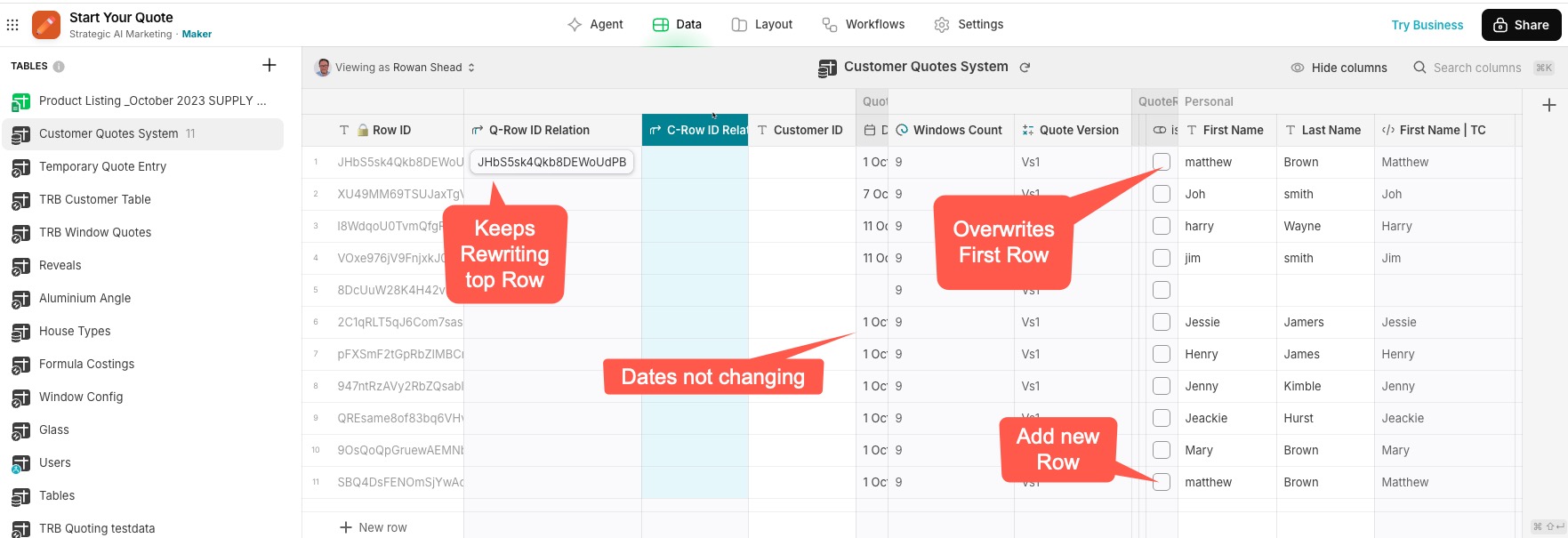
Look at **the TRB Customer Table:** ✅ Customer details are correctly add to the bottom (THIS WORKS)
Look at **TRB Window Quotes** (child table): ❌ New quotes don’t create separate child records
❌ They just keep appending to one giant quote
❌ No parent-child relationship maintained
**Visual Result:**
Instead of this structure:
Customer: John Smith
├── Window Quote 1: Sliding Door, 2400mm x 1800mm
└── Window Quote 2: Awning Window, 600mm x 900mm
I get this chaos:
Customer: John Smith
└── Window Quote: [Sliding Door 2400x1800 + Awning Window 600x900 all mashed together]
**This makes the system completely unusable for multi-window quotes.**
And multi-window quotes are **90% of the business.**
---
### Author:  [@Daniel1](https://community.glideapps.com/u/Daniel1)
#### Post date: [November 25, 2025, 7:57am UTC](https://community.glideapps.com/t/im-having-trouble-with-parent-child-data/85535/2 "2025-11-25T07:57:10Z")
This usually happens when the “Add Another Window/Door” workflow is updating the same parent row instead of creating a new child row first.
Glide will overwrite the top row if:
The action uses **Set Columns** on the parent table
The child row doesn’t get created _before_ linking
The relation between Customer → Window Quotes is set up backwards
For multi-window quoting, the workflow must:
1. Create a new row\*\* in \*\*TRB Window Quotes
2. Link that new row to the current customer
3. Clear the input fields
4. Never “Set Columns” on Customer Quotes System during this step
If the relation or workflow order is off, Glide overwrites the first row and duplicates the rest , exactly what your screenshots show.
If you want, I can outline the correct parent → child relationship structure that makes multi-window quotes stable.
---
### Author:  [@RowanS](https://community.glideapps.com/u/RowanS)
#### Post date: [November 26, 2025, 12:02am UTC](https://community.glideapps.com/t/im-having-trouble-with-parent-child-data/85535/4 "2025-11-26T00:02:16Z")
Thanks I’ll Look at This \_ I would be happy if you If you want, I can outline the correct parent → child relationship structure that makes multi-window quotes stable. What do you know -
---
### Author:  [@RowanS](https://community.glideapps.com/u/RowanS)
#### Post date: [November 26, 2025, 12:02am UTC](https://community.glideapps.com/t/im-having-trouble-with-parent-child-data/85535/5 "2025-11-26T00:02:50Z")
Sorry I meant what do you need? not know
---
### Author:  [@ThinhDinh](https://community.glideapps.com/u/ThinhDinh)
#### Post date: [November 26, 2025, 12:12am UTC](https://community.glideapps.com/t/im-having-trouble-with-parent-child-data/85535/7 "2025-11-26T00:12:06Z")

Tried to draw a chart here. Can you let me know if it answers your question?
The key thing is to link the child row with the parent row using an ID, and then clears the form for the next iteration.
---
### Author:  [@RowanS](https://community.glideapps.com/u/RowanS)
#### Post date: [November 26, 2025, 2:07am UTC](https://community.glideapps.com/t/im-having-trouble-with-parent-child-data/85535/8 "2025-11-26T02:07:13Z")
Yes looks like what I’m trying do. Thanks - The key thing is to link the child row with the parent row using an ID, and then clears the form for the next iteration. It does not seem to be working i’ll have go through - I probably just need clear eyes - I’ll check this out
---
### Author:  [@ThinhDinh](https://community.glideapps.com/u/ThinhDinh)
#### Post date: [November 26, 2025, 4:00am UTC](https://community.glideapps.com/t/im-having-trouble-with-parent-child-data/85535/9 "2025-11-26T04:00:34Z")
Action 1 & Action 2 should be combined into one add row, or if you’re planning to switch to a native form, just pass a special value pointing to the Parent ID to be written to the child table.
Let us know if you need further help.
---
### Author:  [@RowanS](https://community.glideapps.com/u/RowanS)
#### Post date: [November 27, 2025, 9:21am UTC](https://community.glideapps.com/t/im-having-trouble-with-parent-child-data/85535/10 "2025-11-27T09:21:22Z")
Ok I’ll Be looking at ON Saturday, when I give it some serius Time Thanks
---
### Author:  [@RowanS](https://community.glideapps.com/u/RowanS)
#### Post date: [December 2, 2025, 1:03am UTC](https://community.glideapps.com/t/im-having-trouble-with-parent-child-data/85535/11 "2025-12-02T01:03:06Z")
[quote=“ThinhDinh, post:9, topic:85535, full:true”]
Action 1 & Action 2 should be combined into one add row, or if you’re planning to switch to a native form, just pass a special value pointing to the Parent ID to be written to the child table.
Can you explain how to do this?
---
### Author:  [@Jeff\_Hager](https://community.glideapps.com/u/Jeff_Hager)
#### Post date: [December 2, 2025, 1:09am UTC](https://community.glideapps.com/t/im-having-trouble-with-parent-child-data/85535/12 "2025-12-02T01:09:36Z")
A native form has several additional Value components that you can add to the form. These are all values from the parent row (or the row connected to the screen that opened the form). You can add these components to your form. They won’t be visible components on the screen, but their values will pass directly through the form when it’s submitted.
Likewise, if you are using a form container instead, it’s similar but a different process. Instead of adding Value components to the screen, you instead have all of the fields in your destination table listed in the right-hand panel. The dropdown for each of those fields will allow you to pass a value directly from the parent row without the need to add visible components to the form itself.
---
### Author:  [@RowanS](https://community.glideapps.com/u/RowanS)
#### Post date: [December 2, 2025, 9:16pm UTC](https://community.glideapps.com/t/im-having-trouble-with-parent-child-data/85535/13 "2025-12-02T21:16:42Z")
> [@Daniel1](#):
>
> If you want, I can outline the correct parent → child relationship structure that makes multi-window quotes stable.
Could outline the parent child flow so see it works