# How to keep a date stamp stable
**URL:** https://community.glideapps.com/t/how-to-keep-a-date-stamp-stable/68630
**Category:** Ask for Help
**Created:** [December 12, 2023, 8:16pm UTC](https://community.glideapps.com/t/how-to-keep-a-date-stamp-stable/68630 "2023-12-12T20:16:21Z")
**Posts on this page:** 8
**Page:** 1
### Author:  [@ckinross](https://community.glideapps.com/u/ckinross)
#### Post date: [December 12, 2023, 8:16pm UTC](https://community.glideapps.com/t/how-to-keep-a-date-stamp-stable/68630/1 "2023-12-12T20:16:21Z")
This is odd. I have a series of Actions in which an image is generated, the current date is written to a ‘date’ column, and the count increments by 1. The intention is to count how many times within each day a user performs a task.
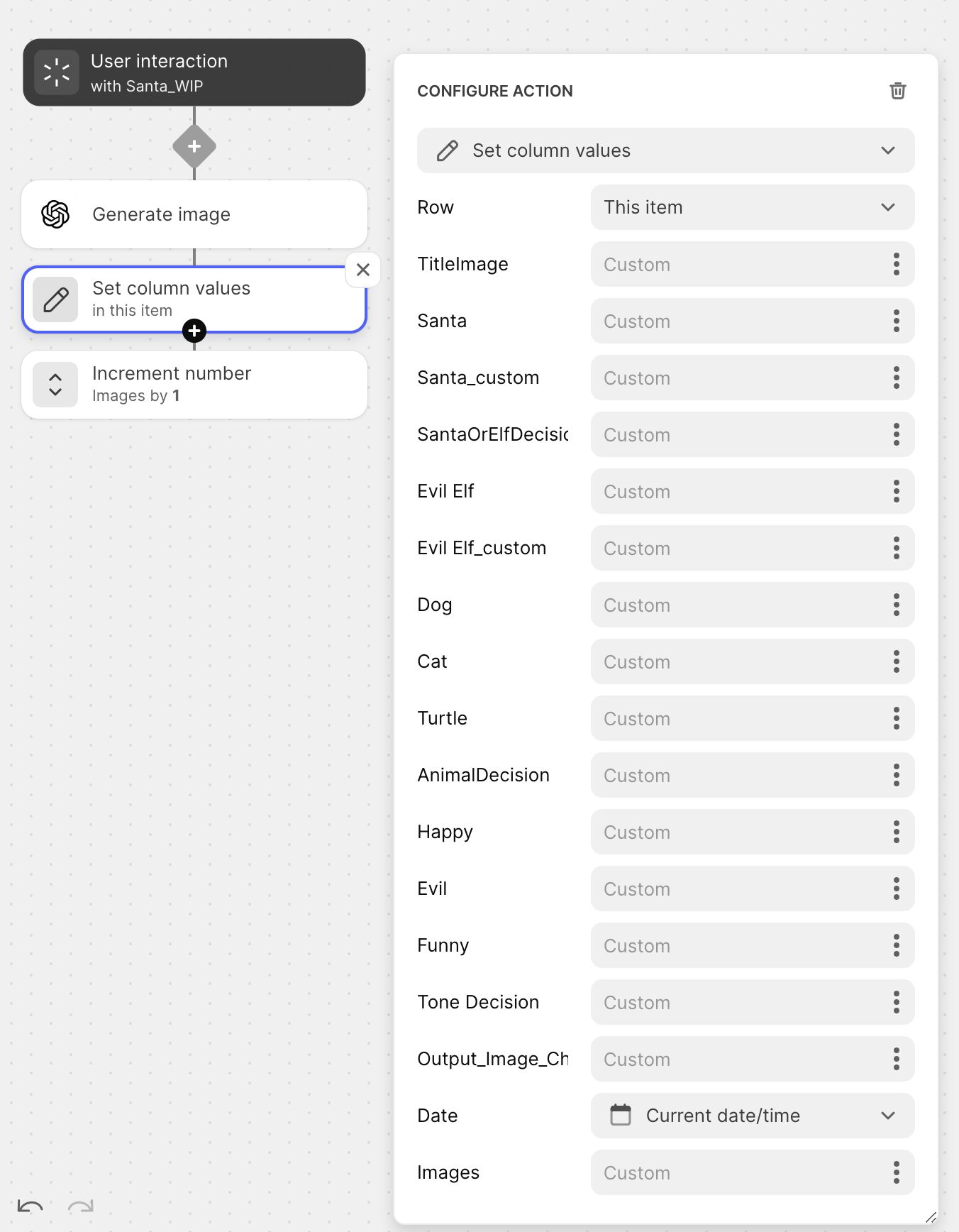
What’s odd is that yesterday (Dec 11), I generated 5 images. Those were logged with yesterday’s date in the data editor.
Today, Dec 12, I look at the data editor and it claims I generated 5 images today.
I haven’t generated any images today.

It appears that the ‘date’ column is showing today’s date and not the date on which I performed the action.
Does anyone see how to resolve this so that the data maintains the date on which an action was performed?
---
### Author:  [@ThinhDinh](https://community.glideapps.com/u/ThinhDinh)
#### Post date: [December 13, 2023, 2:32am UTC](https://community.glideapps.com/t/how-to-keep-a-date-stamp-stable/68630/2 "2023-12-13T02:32:26Z")
I might have more questions, but how do you “reset” this? It’s always just the use of the current day?
---
### Author:  [@ckinross](https://community.glideapps.com/u/ckinross)
#### Post date: [December 13, 2023, 2:50am UTC](https://community.glideapps.com/t/how-to-keep-a-date-stamp-stable/68630/3 "2023-12-13T02:50:19Z")
Right now, I only care about how many uses per day. It can reset each evening as far as I am concerned. The important bit is to have the count (increment) return to zero each day.
---
### Author:  [@Darren\_Murphy](https://community.glideapps.com/u/Darren_Murphy)
#### Post date: [December 13, 2023, 2:54am UTC](https://community.glideapps.com/t/how-to-keep-a-date-stamp-stable/68630/4 "2023-12-13T02:54:41Z")
Given that it’s a non-computed column, the only way that can happen is with an action. Maintaining counters in this way is always problematic and subject to all sorts of things going wrong.
I did offer you an alternative solution to this problem a day or two ago - no interest in that?
> [@Connect increment value to specific user](https://community.glideapps.com/t/connect-increment-value-to-specific-user/68590/2):
>
> I’m not quite sure that I follow your logic, but here is how I would do this: Ensure that you are saving both the users email address and date generated in the table where your images are stored. In your User Profile table, create a Query column that targets your Image table, and apply the following filters: – Email address is This row-\>Email – Date is within Today Add a Rollup-\>Count via the Query column If the count is equal to 3, don’t allow an image to be generated (I would use the count…
---
### Author:  [@ckinross](https://community.glideapps.com/u/ckinross)
#### Post date: [December 13, 2023, 4:27am UTC](https://community.glideapps.com/t/how-to-keep-a-date-stamp-stable/68630/5 "2023-12-13T04:27:58Z")
Thank you for offering the other option. I tried it but got stuck in the same problem in that the date changed to match current date but retained the previous count. I will continue to work through your previous suggestion to see if I can find my error.
Thank you
---
### Author:  [@Darren\_Murphy](https://community.glideapps.com/u/Darren_Murphy)
#### Post date: [December 13, 2023, 6:34am UTC](https://community.glideapps.com/t/how-to-keep-a-date-stamp-stable/68630/6 "2023-12-13T06:34:41Z")
That sounds like you may not have configured the Query column correctly. If you can’t get it working, show me what you’ve done and I’ll guide you.
---
### Author:  [@ckinross](https://community.glideapps.com/u/ckinross)
#### Post date: [December 13, 2023, 6:12pm UTC](https://community.glideapps.com/t/how-to-keep-a-date-stamp-stable/68630/7 "2023-12-13T18:12:09Z")
It would seem that I missed two words in your original suggestion:-(
It works now.
Thank you 🙇♀️
---
### Author:  [@system](https://community.glideapps.com/u/system)
#### Post date: [December 20, 2023, 6:12pm UTC](https://community.glideapps.com/t/how-to-keep-a-date-stamp-stable/68630/8 "2023-12-20T18:12:29Z")
This topic was automatically closed 7 days after the last reply. New replies are no longer allowed.