# Help with PDF intergration
**URL:** https://community.glideapps.com/t/help-with-pdf-intergration/85751
**Category:** Ask for Help
**Created:** [December 18, 2025, 2:38pm UTC](https://community.glideapps.com/t/help-with-pdf-intergration/85751 "2025-12-18T14:38:18Z")
**Posts on this page:** 12
**Page:** 1
### Author:  [@CES](https://community.glideapps.com/u/CES)
#### Post date: [December 18, 2025, 2:38pm UTC](https://community.glideapps.com/t/help-with-pdf-intergration/85751/1 "2025-12-18T14:38:18Z")
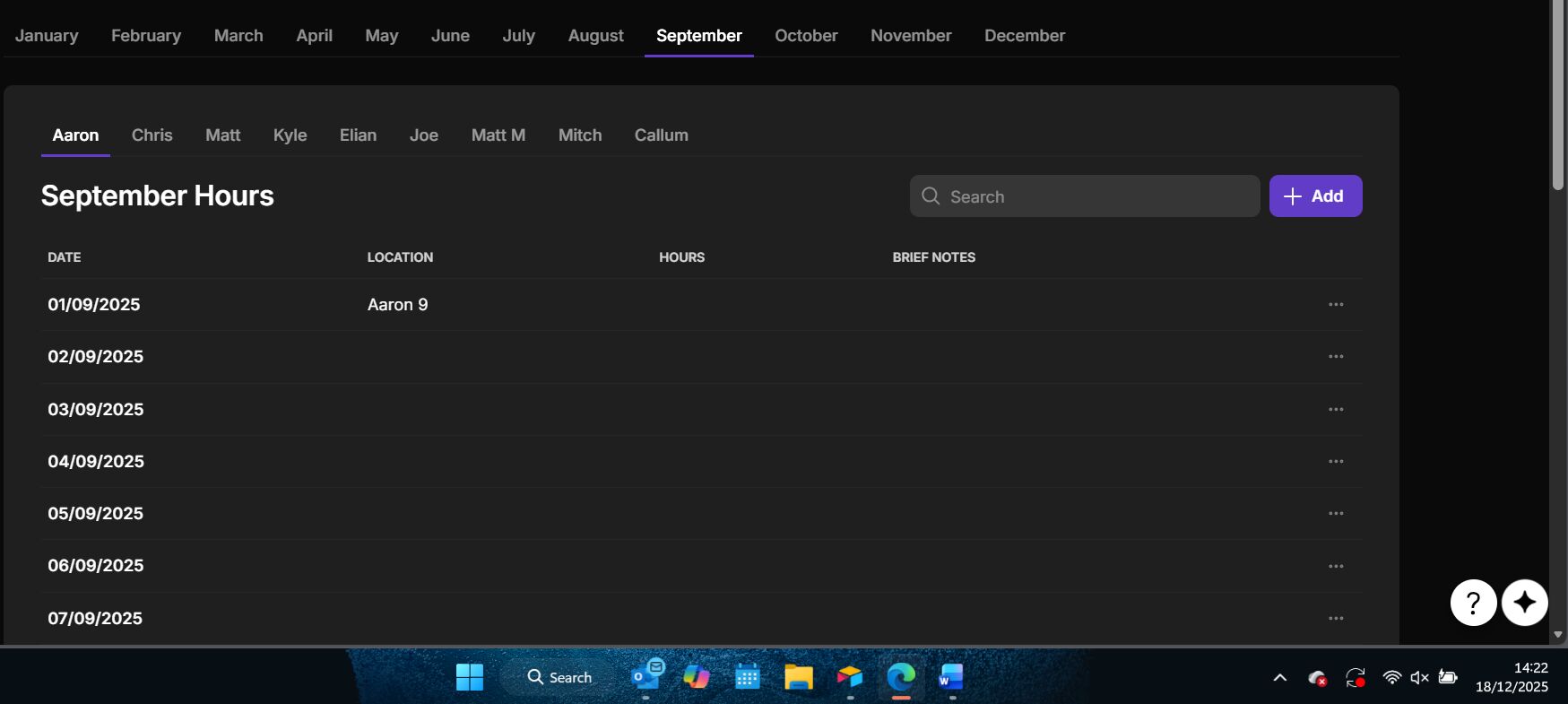
I’m struggling to make this work, i have a table for each operative (9 tables), i have a tab for each month, inside that tab is a tab container for each operative containing their own filtered table just showing that months timesheet.
My query is i want a button at the bottom of each container to create a PDF of the information shown above for that operative for that month, but everytime i set it up it just gives me january’s timesheet for the first operative (Aaron) with minimal information, only the first entry.
Any help would be appreciated, im new to glide and its frying my brain!
---
### Author:  [@Robert\_Petitto](https://community.glideapps.com/u/Robert_Petitto)
#### Post date: [December 18, 2025, 4:23pm UTC](https://community.glideapps.com/t/help-with-pdf-intergration/85751/2 "2025-12-18T16:23:33Z")
How are you attempting to create the PDF?
My suggestion would be to:
1. Use tabs instead of tab containers so you can capture the selections
2. Use a query column that points to the timesheet and uses the selections as the filters
— Note: you’ll probably have to convert the month selected to some sort of numeric date value (yyyymm) so that you’re querying the correct timesheet entries. See [https://youtu.be/AVSavEhdt6Y?t=195](https://youtu.be/AVSavEhdt6Y?t=195) starting at 3:10)
3. Generate your PDF using the returned records from the Query (lots of ways to do this)
Want to provide some clarification as to how you plan on crafting the PDF? HTML to PDF? One of Glide’s integrations?
---
### Author:  [@CES](https://community.glideapps.com/u/CES)
#### Post date: [December 18, 2025, 5:19pm UTC](https://community.glideapps.com/t/help-with-pdf-intergration/85751/3 "2025-12-18T17:19:46Z")
I was intending on using an integration but to be honest im open to suggestions, currently i have tabs for the months section at the top and tab containers for the operatives as it seemed to of flowed better and kept everything neat and easier to follow (as the operative tabs were in the container aswell) this made it easier to navigate and segragate for the office staff
---
### Author:  [@Robert\_Petitto](https://community.glideapps.com/u/Robert_Petitto)
#### Post date: [December 18, 2025, 6:31pm UTC](https://community.glideapps.com/t/help-with-pdf-intergration/85751/4 "2025-12-18T18:31:40Z")
Agreed— tab containers offers an easier build experience. However, the value selected in a tabs container doesn’t get written anywhere which means we can’t filter our time sheet records by what’s selected which is what’s required for a functional query.
As for the PDF generation, you can use Docs Automator for an easyish (but paid) solution: [Glide | DocsAutomator](https://docs.docsautomator.co/integrations-api/glide). Otherwise, you can use Loqodes HTML2PDF plugin for a free (but potentially somewhat labor intensive) setup: [🔥 Free Glide PDF Plugin - HTML2PDF](https://community.glideapps.com/t/free-glide-pdf-plugin-html2pdf/71954)
Let me know if this all makes sense.
---
### Author:  [@CES](https://community.glideapps.com/u/CES)
#### Post date: [December 18, 2025, 6:42pm UTC](https://community.glideapps.com/t/help-with-pdf-intergration/85751/5 "2025-12-18T18:42:26Z")
Right that makes sense it ends up being self contained in the container, hence why when i try the integration it always shows the the original table not the one im currently on. Ive even rried putting the button in the container with said table and still nothing.
So does that mean my current set up, theres no way of of printing specif things and ill have to redesign the whole app? Or is there any other method?
Im still yet to explore the HTML method tbh because i have no idea how to use it to get the look i want (even as simple as the design is) , i was trying to get a test run working first then worry about asthetics.
I appreciate your help
---
### Author:  [@ThinhDinh](https://community.glideapps.com/u/ThinhDinh)
#### Post date: [December 19, 2025, 12:25am UTC](https://community.glideapps.com/t/help-with-pdf-intergration/85751/6 "2025-12-19T00:25:19Z")
First up, I don’t think you should have a table for each “operative”. Is there a way for you to consolidate info into one single table, separated by a column to define the “operative”.
Then, you can build this tab on top of your user profiles table, and store filter values there.
The rest is just about querying to get the right data, and feed it into your PDF.
I expect it to look like this.

---
### Author:  [@Hassan\_Nadeem](https://community.glideapps.com/u/Hassan_Nadeem)
#### Post date: [December 19, 2025, 1:06am UTC](https://community.glideapps.com/t/help-with-pdf-intergration/85751/7 "2025-12-19T01:06:12Z")
@ThinhDinh what did you use to create this chart? This looks so clear to understand!
---
### Author:  [@ThinhDinh](https://community.glideapps.com/u/ThinhDinh)
#### Post date: [December 19, 2025, 3:49am UTC](https://community.glideapps.com/t/help-with-pdf-intergration/85751/8 "2025-12-19T03:49:38Z")
It’s a Mermaid chart.
You can try it out here.
> **[Mermaid Chart](https://www.mermaidchart.com/play)**
>
> Mermaid Chart makes diagramming simple: create and edit flowcharts, sequence diagrams, and more online. Collaborate in real time and save hours.
The syntax for the diagram above:
```auto
sequenceDiagram
autonumber
actor Staff as Office staff
participant App as Glide app
participant Data as Data layer
participant Service as PDF service
Staff ->> App: Select month tab
Staff ->> App: Select operative tab
App ->> Data: Build yyyymm filter
App ->> Data: Query timesheet records
Data -->> App: Return records
Staff ->> App: Tap generate PDF
App ->> Service: Send payload
Service -->> App: Return PDF link
App -->> Staff: Show link and download
```
---
### Author:  [@CES](https://community.glideapps.com/u/CES)
#### Post date: [December 19, 2025, 3:14pm UTC](https://community.glideapps.com/t/help-with-pdf-intergration/85751/9 "2025-12-19T15:14:04Z")
I have now put it all into 1 table instead of 9 and changed it through filters and ive got the print function to work, however i can only get it to print 1 record. but im after a button that would print the entire january time sheet for one operative for instance, is this possible or am i asking too much at this moment in time?
---
### Author:  [@Jeff\_Hager](https://community.glideapps.com/u/Jeff_Hager)
#### Post date: [December 19, 2025, 4:25pm UTC](https://community.glideapps.com/t/help-with-pdf-intergration/85751/10 "2025-12-19T16:25:00Z")
Are you creating a query based on the Month and Operative values? That query is ultimately what you should be using for the source of your table and the data for your PDF integration.
---
### Author:  [@CES](https://community.glideapps.com/u/CES)
#### Post date: [December 19, 2025, 4:46pm UTC](https://community.glideapps.com/t/help-with-pdf-intergration/85751/11 "2025-12-19T16:46:07Z")
i did that but still i could only get it to print 1 record lot not the entire month. also doesnt help that i cant seem to get it working at all if its inside a tab container.
---
### Author:  [@ThinhDinh](https://community.glideapps.com/u/ThinhDinh)
#### Post date: [December 20, 2025, 1:19am UTC](https://community.glideapps.com/t/help-with-pdf-intergration/85751/12 "2025-12-20T01:19:35Z")
Can you show us some screenshots of your current setup for related columns?