# Glide pages maps won't show all locations
**URL:** https://community.glideapps.com/t/glide-pages-maps-wont-show-all-locations/50594
**Category:** Report a Bug
**Created:** [October 1, 2022, 12:02am UTC](https://community.glideapps.com/t/glide-pages-maps-wont-show-all-locations/50594 "2022-10-01T00:02:49Z")
**Posts on this page:** 20
**Page:** 1
### Author:  [@Kevin](https://community.glideapps.com/u/Kevin)
#### Post date: [October 1, 2022, 12:02am UTC](https://community.glideapps.com/t/glide-pages-maps-wont-show-all-locations/50594/1 "2022-10-01T00:02:49Z")
**My App/Pages Support link:**
[https://go.glideapps.com/support/cd58b501-e23f-4149-9237-b9dffc374bb7](https://go.glideapps.com/support/cd58b501-e23f-4149-9237-b9dffc374bb7)
**Describe the bug:**
Glide pages maps won’t show all locations, but when searching it, the location will pop up. No limit number of items set. Tried to set it with a high number but still won’t work.
**Expected Behaviour:**
All locations to be displayed on the map
**How to replicate:**
visit the app and click map, a lot of locations in the list won’t show up in the map.
---
### Author:  [@ThinhDinh](https://community.glideapps.com/u/ThinhDinh)
#### Post date: [October 1, 2022, 12:54am UTC](https://community.glideapps.com/t/glide-pages-maps-wont-show-all-locations/50594/2 "2022-10-01T00:54:07Z")
How many pins do you have and what plan are you on?
---
### Author:  [@Kevin](https://community.glideapps.com/u/Kevin)
#### Post date: [October 1, 2022, 1:06am UTC](https://community.glideapps.com/t/glide-pages-maps-wont-show-all-locations/50594/3 "2022-10-01T01:06:37Z")
I’m on starter and I have 156 rows only, the mobile app shows all pins correctly just not pages.
---
### Author:  [@Martin\_B](https://community.glideapps.com/u/Martin_B)
#### Post date: [October 3, 2022, 1:08pm UTC](https://community.glideapps.com/t/glide-pages-maps-wont-show-all-locations/50594/4 "2022-10-03T13:08:10Z")
Hello,
On the map, i noticed also that pins at the exact same address are superposed and there is no way to reach the ones “below” the upper pin…
Would be nice if you could see all of them when zooming… or mini badges on the pin to tell how many items are at this location…
Have a nice day,
---
### Author:  [@ThinhDinh](https://community.glideapps.com/u/ThinhDinh)
#### Post date: [October 4, 2022, 12:35am UTC](https://community.glideapps.com/t/glide-pages-maps-wont-show-all-locations/50594/5 "2022-10-04T00:35:56Z")
> [@Martin\_B](#):
>
> or mini badges on the pin to tell how many items are at this location…
That would be ideal, but unlikely to be supported.
> [@Martin\_B](#):
>
> On the map, i noticed also that pins at the exact same address are superposed and there is no way to reach the ones “below” the upper pin
You can theoretically create a relation from the address to itself (though it’s safer if you use coordinates instead, since there’s a thousand ways to write an address), then when the user clicks the pin, show them the list of things that are under that same address/coordinate.
---
### Author:  [@Martin\_B](https://community.glideapps.com/u/Martin_B)
#### Post date: [October 5, 2022, 6:12pm UTC](https://community.glideapps.com/t/glide-pages-maps-wont-show-all-locations/50594/6 "2022-10-05T18:12:05Z")
> [@ThinhDinh](#):
>
> You can theoretically create a relation from the address to itself (though it’s safer if you use coordinates instead, since there’s a thousand ways to write an address), then when the user clicks the pin, show them the list of things that are under that same address/coordinate.
Thanks 🙂
I did exactly that actually…
« Stores at the same address » inline relation.
Also useful for Malls, which by definition have multiple stores inside
---
### Author:  [@Kevin](https://community.glideapps.com/u/Kevin)
#### Post date: [October 7, 2022, 3:35am UTC](https://community.glideapps.com/t/glide-pages-maps-wont-show-all-locations/50594/7 "2022-10-07T03:35:36Z")
Hi! Any idea if this issue is a bug or did I configure something wrong?
---
### Author:  [@Elmer\_Dubon](https://community.glideapps.com/u/Elmer_Dubon)
#### Post date: [December 9, 2022, 6:00pm UTC](https://community.glideapps.com/t/glide-pages-maps-wont-show-all-locations/50594/8 "2022-12-09T18:00:21Z")
Same issue here, any fix?
---
### Author:  [@ToOFa\_Apps](https://community.glideapps.com/u/ToOFa_Apps)
#### Post date: [December 13, 2022, 9:24pm UTC](https://community.glideapps.com/t/glide-pages-maps-wont-show-all-locations/50594/9 "2022-12-13T21:24:41Z")
I didn’t have an issue with multiple locations, but with just showing the correct location.
So i used a filter… address is screen address, the table must have row id’s. Now it’s finding the correct address BUT because there is only one address on the map it’s zoomed in so much that the screen is just greyed out. That’s the colour of the building at 100 x zoom 😄
Any idea how to set the size of the map or the zoom default? Like with Glide apps.
---
### Author:  [@Robert\_Petitto](https://community.glideapps.com/u/Robert_Petitto)
#### Post date: [December 13, 2022, 9:37pm UTC](https://community.glideapps.com/t/glide-pages-maps-wont-show-all-locations/50594/10 "2022-12-13T21:37:02Z")
> [@ToOFa\_Apps](#):
>
> That’s the colour of the building at 100 x zoom 😄
This was an issue when the map component first came out. I thought @Jason fixed it already…
---
### Author:  [@Luther](https://community.glideapps.com/u/Luther)
#### Post date: [December 14, 2022, 12:31pm UTC](https://community.glideapps.com/t/glide-pages-maps-wont-show-all-locations/50594/11 "2022-12-14T12:31:47Z")
It’s not fixed at least not for my Apps. The map still shows San Francisco by default and not all locations are displayed. I didn’t report or open a ticket because there was already a ticket opened on this. I really would like to hear someone say its working for them because so far it’s no different to not having a map component.
---
### Author:  [@ToOFa\_Apps](https://community.glideapps.com/u/ToOFa_Apps)
#### Post date: [December 15, 2022, 6:20am UTC](https://community.glideapps.com/t/glide-pages-maps-wont-show-all-locations/50594/12 "2022-12-15T06:20:58Z")
Agreed👍
It seems to centralise the pin if you lookup the address through a relation (row id to row id) but it zooms in too much and also it doesn’t seem to centralise the pin when on a mobile device, it just locates san fransisco.
It seems to centralise on desktop view, but then it zooms in so much that i can’t see any roads or local features. Please could we get a response on this from the team, it would be awesome if this worked properly👍
---
### Author:  [@ToOFa\_Apps](https://community.glideapps.com/u/ToOFa_Apps)
#### Post date: [December 20, 2022, 9:15am UTC](https://community.glideapps.com/t/glide-pages-maps-wont-show-all-locations/50594/13 "2022-12-20T09:15:28Z")
Any progress with this bug fix?
---
### Author:  [@elmerdubon](https://community.glideapps.com/u/elmerdubon)
#### Post date: [December 21, 2022, 5:38am UTC](https://community.glideapps.com/t/glide-pages-maps-wont-show-all-locations/50594/14 "2022-12-21T05:38:35Z")
Support confirm is a bug and we are still waiting engineers push the fix, hope before holidays 🫣
---
### Author:  [@Luther](https://community.glideapps.com/u/Luther)
#### Post date: [December 22, 2022, 12:23pm UTC](https://community.glideapps.com/t/glide-pages-maps-wont-show-all-locations/50594/15 "2022-12-22T12:23:05Z")
This is by far the worst response I have seen from Glide in terms of addressing a bug or a problem. I have been using this platform for 2 years now and I have not seen such a lack of response or urgency in addressing an issue/bug. Mind you, for some who are on a paid plan, it kinda feels like we are getting short changed. In my case specifically, this is important for my business listing/directory platform.
---
### Author:  [@ToOFa\_Apps](https://community.glideapps.com/u/ToOFa_Apps)
#### Post date: [January 13, 2023, 7:07pm UTC](https://community.glideapps.com/t/glide-pages-maps-wont-show-all-locations/50594/16 "2023-01-13T19:07:17Z")
This bug is fixed for me, last year already, it’s at a comfortable zoom distance for all devices. I was in fact quite surprised at the speed that they fixed this bug considering it was over the holiday season. I received feedback on this bug fix via email and was super impressed with the response rate to this very issue.
@Luther, @Elmer_Dubon, @Kevin did you come right with this issue as yet.
NB. Use a relation that relates Row Id to Row ID, lookup that relation for the Address.
My apps are all working fine, hope you come right.
---
### Author:  [@Tim\_Gestels](https://community.glideapps.com/u/Tim_Gestels)
#### Post date: [January 16, 2023, 8:19pm UTC](https://community.glideapps.com/t/glide-pages-maps-wont-show-all-locations/50594/17 "2023-01-16T20:19:46Z")
I’ve just posted this thread: [Glide Page - Maps component not centering on location](https://community.glideapps.com/t/glide-page-maps-component-not-centering-on-location/56767)
But apparently this is the same topic.
@ToOFa_Apps can you elaborate a bit more or show an example of how you fixed this issue?
I don’t really understand how you would relate Row Id to Row Id if you just have one table … with GPS (lat,lon) coördinates …
---
### Author:  [@ToOFa\_Apps](https://community.glideapps.com/u/ToOFa_Apps)
#### Post date: [January 17, 2023, 12:56am UTC](https://community.glideapps.com/t/glide-pages-maps-wont-show-all-locations/50594/18 "2023-01-17T00:56:36Z")
Create Row ID Column and Address column

Relate Row ID to Row ID

Single column look through relation

Create a List

The Details Screen for each list item has a map on it. Use the relation column as the source, and the single column for the address.
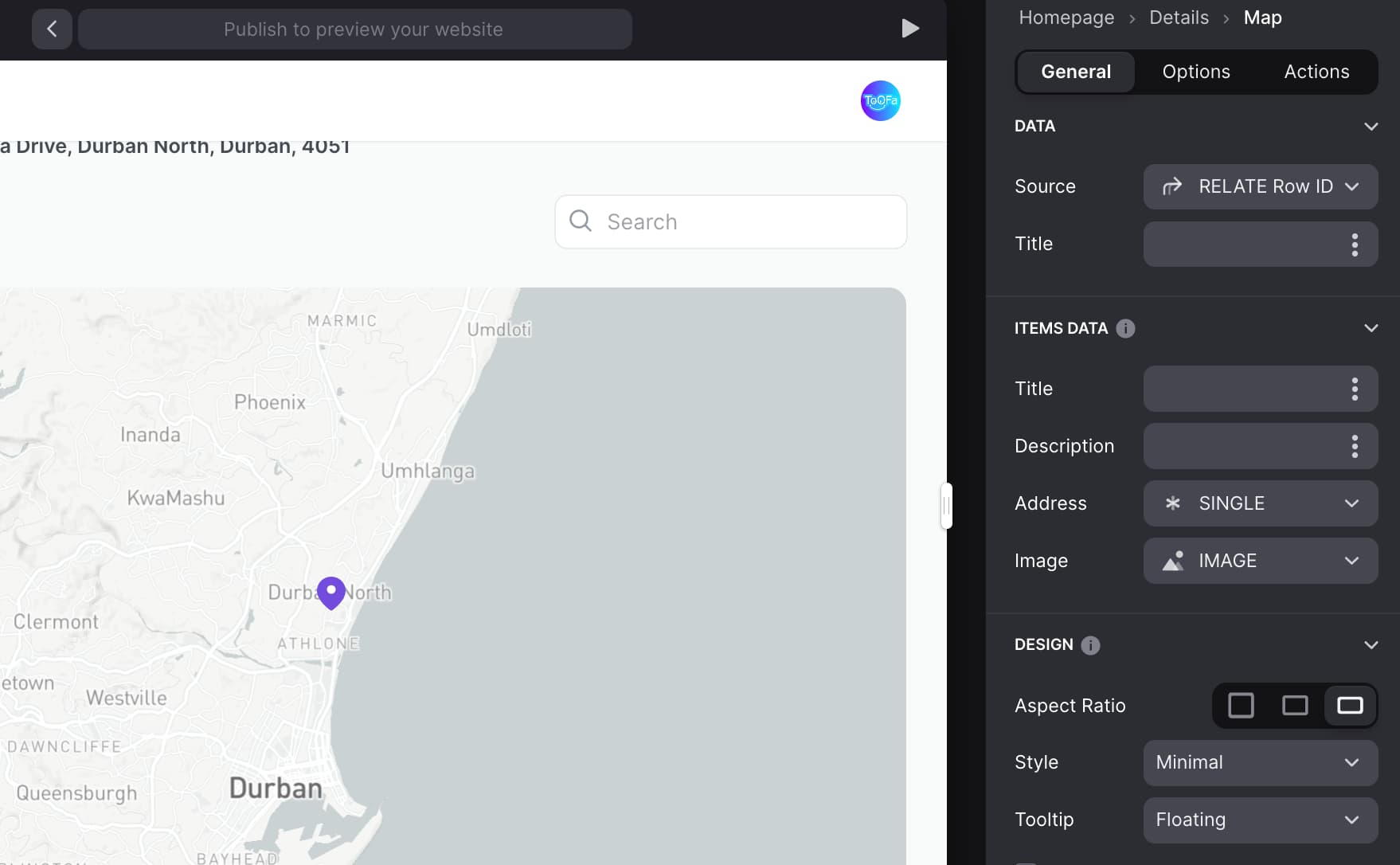
Typically you could pull directly from the address column which works for Apps, but this map on pages offers more features and works better if you pull from the Single column.
The app centres nicely and is positioned at the correct zoom distance - thats the feature they recently fixed.
If your map is showing the default san francisco valley then try using the method above.
If your addresses are on a different table then relate similar columns in both tables, lookup the relation, then single column off that for the address.
Still use Relate Row ID column as source and single column as the address.
I’m sure there’s other ways to do it, this method works for me.
* * *
If you need multiple locations its more straight forward
First just note that i added multiple different addresses in the address column (this can be done to the first example too - i was just being lazy)

Use the same list set up as before

Th first map on the left is for single locations (note that the source is pulling from the Relate Row ID to Row ID Column)

The Second map on the right - Source is pulling directly from the Table (named Empty Table) and the Address just pulls directly from the address column

It’s the same setup if you need the map to show on the top screen of the Tab (where i put the inline list)

---
### Author:  [@Tim\_Gestels](https://community.glideapps.com/u/Tim_Gestels)
#### Post date: [January 17, 2023, 9:24am UTC](https://community.glideapps.com/t/glide-pages-maps-wont-show-all-locations/50594/19 "2023-01-17T09:24:10Z")
Thanks!
It seems like a complex process but at least it’s working. I’ll try it out one of the next days and keep you posted.
---
### Author:  [@ToOFa\_Apps](https://community.glideapps.com/u/ToOFa_Apps)
#### Post date: [January 17, 2023, 11:19am UTC](https://community.glideapps.com/t/glide-pages-maps-wont-show-all-locations/50594/20 "2023-01-17T11:19:12Z")
No, it’s very quick to do. Less than a minute. Here is a video.
Let me know if you need a video for a single location on a map (on details screen of list item)
[Next page](https://community.glideapps.com/t/glide-pages-maps-wont-show-all-locations/50594.md?page=2)