# Glide Apps and Chrome
**URL:** https://community.glideapps.com/t/glide-apps-and-chrome/31837
**Category:** Ask for Help
**Created:** [September 16, 2021, 1:57am UTC](https://community.glideapps.com/t/glide-apps-and-chrome/31837 "2021-09-16T01:57:07Z")
**Posts on this page:** 20
**Page:** 1
### Author:  [@prettyflyers11](https://community.glideapps.com/u/prettyflyers11)
#### Post date: [September 16, 2021, 1:57am UTC](https://community.glideapps.com/t/glide-apps-and-chrome/31837/1 "2021-09-16T01:57:08Z")
Hello,
Is anyone experiencing issues getting Glide Apps site to load in Google Chrome? I am using an updated version of Chrome and have noticed, the page does not load and I cannot work on my app unless I go to Safari.
---
### Author:  [@ThinhDinh](https://community.glideapps.com/u/ThinhDinh)
#### Post date: [September 16, 2021, 3:13am UTC](https://community.glideapps.com/t/glide-apps-and-chrome/31837/2 "2021-09-16T03:13:41Z")
Can you send us your app’s link so we can test? I’m on Chrome - MacOS Big Sur.
---
### Author:  [@prettyflyers11](https://community.glideapps.com/u/prettyflyers11)
#### Post date: [September 16, 2021, 3:45am UTC](https://community.glideapps.com/t/glide-apps-and-chrome/31837/3 "2021-09-16T03:45:01Z")
Thanks for responding. It’s actually the builder interface. It won’t load all my work, so that I can get in to edit. See screenshot.

---
### Author:  [@ThinhDinh](https://community.glideapps.com/u/ThinhDinh)
#### Post date: [September 16, 2021, 3:45am UTC](https://community.glideapps.com/t/glide-apps-and-chrome/31837/4 "2021-09-16T03:45:23Z")
That’s weird. Have you tried clearing your browser’s cache/history?
---
### Author:  [@prettyflyers11](https://community.glideapps.com/u/prettyflyers11)
#### Post date: [September 16, 2021, 3:46am UTC](https://community.glideapps.com/t/glide-apps-and-chrome/31837/5 "2021-09-16T03:46:22Z")
Yep, that’s what’s interesting. My only workaround is working in Safari, which I prefer Chrome over Safari.
---
### Author:  [@ThinhDinh](https://community.glideapps.com/u/ThinhDinh)
#### Post date: [September 16, 2021, 3:47am UTC](https://community.glideapps.com/t/glide-apps-and-chrome/31837/6 "2021-09-16T03:47:07Z")
Please try clearing your browser’s cache/history and disable any extensions that may affect Glide, then tell us if it solves the problem.
---
### Author:  [@prettyflyers11](https://community.glideapps.com/u/prettyflyers11)
#### Post date: [September 16, 2021, 3:48am UTC](https://community.glideapps.com/t/glide-apps-and-chrome/31837/7 "2021-09-16T03:48:29Z")
Will do. Thanks.
---
### Author:  [@Darren\_Murphy](https://community.glideapps.com/u/Darren_Murphy)
#### Post date: [September 16, 2021, 3:56am UTC](https://community.glideapps.com/t/glide-apps-and-chrome/31837/8 "2021-09-16T03:56:45Z")
Also delete any Glide related cookies.
---
### Author:  [@prettyflyers11](https://community.glideapps.com/u/prettyflyers11)
#### Post date: [September 16, 2021, 4:10am UTC](https://community.glideapps.com/t/glide-apps-and-chrome/31837/9 "2021-09-16T04:10:04Z")
Okay, so I deleted cache/cookies and disabled most of my extensions and it is still not loading.
---
### Author:  [@Darren\_Murphy](https://community.glideapps.com/u/Darren_Murphy)
#### Post date: [September 16, 2021, 4:22am UTC](https://community.glideapps.com/t/glide-apps-and-chrome/31837/10 "2021-09-16T04:22:20Z")
Only other thing I can suggest would be to try it in an incognito window.
---
### Author:  [@prettyflyers11](https://community.glideapps.com/u/prettyflyers11)
#### Post date: [September 16, 2021, 4:27am UTC](https://community.glideapps.com/t/glide-apps-and-chrome/31837/11 "2021-09-16T04:27:39Z")
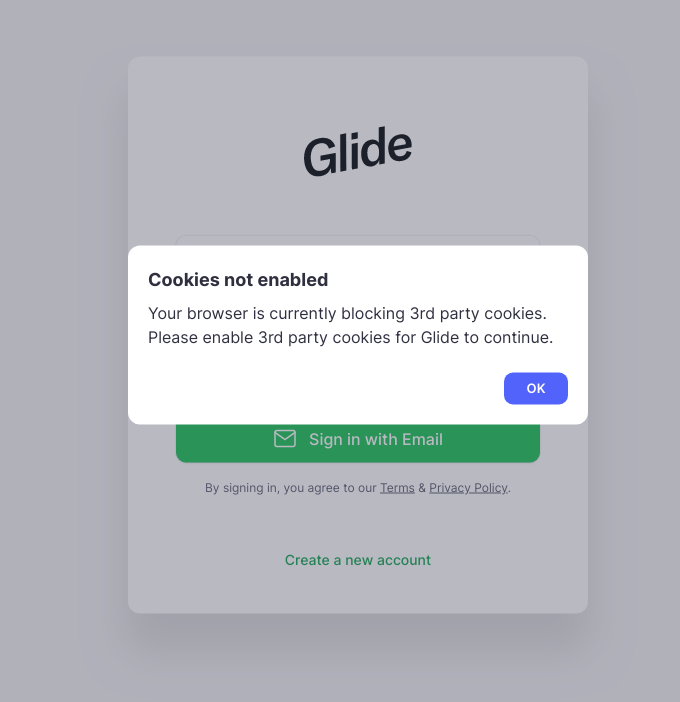
Okay, this is what pops up.
---
### Author:  [@Darren\_Murphy](https://community.glideapps.com/u/Darren_Murphy)
#### Post date: [September 16, 2021, 4:37am UTC](https://community.glideapps.com/t/glide-apps-and-chrome/31837/12 "2021-09-16T04:37:58Z")
Open a new tab in the same window, disable the third party cookie block, then reload your Glide tab.

You’ll need to sign in to your Google account again.
---
### Author:  [@prettyflyers11](https://community.glideapps.com/u/prettyflyers11)
#### Post date: [September 16, 2021, 4:55am UTC](https://community.glideapps.com/t/glide-apps-and-chrome/31837/13 "2021-09-16T04:55:54Z")
That worked. Thank you.
---
### Author:  [@Darren\_Murphy](https://community.glideapps.com/u/Darren_Murphy)
#### Post date: [September 16, 2021, 7:38am UTC](https://community.glideapps.com/t/glide-apps-and-chrome/31837/14 "2021-09-16T07:38:23Z")
Note that the fact that worked would suggest that there was something cached within your browser that was causing the problem. So I’m a little surprised that emptying your cache and clearing cookies didn’t resolve it. Could also have been that being forced to log back into your Google account did the trick, but I’m just guessing.
---
### Author:  [@Luther](https://community.glideapps.com/u/Luther)
#### Post date: [September 16, 2021, 7:51am UTC](https://community.glideapps.com/t/glide-apps-and-chrome/31837/15 "2021-09-16T07:51:56Z")
I also experienced the same issue.
At first I tried clearing the cache and it worked a few times until that didn’t work. At the moment I am using incognito mode and it seems to do the trick.
I think the issue is with the updated version of Chrome browser.
Even my google Account, I have to constantly login when opening the browser otherwise it goes to “Paused” status and it does not sync.
---
### Author:  [@prettyflyers11](https://community.glideapps.com/u/prettyflyers11)
#### Post date: [September 16, 2021, 4:56pm UTC](https://community.glideapps.com/t/glide-apps-and-chrome/31837/16 "2021-09-16T16:56:27Z")
Thanks for your feedback. That could be true with the updated Chrome, because it worked fine before, to my recollection.
---
### Author:  [@BlakeWS](https://community.glideapps.com/u/BlakeWS)
#### Post date: [September 16, 2021, 7:04pm UTC](https://community.glideapps.com/t/glide-apps-and-chrome/31837/17 "2021-09-16T19:04:35Z")
I have the Privacy Badger and uBlock Origin Chrome extensions, they often force behaviour like this on a webpage if I don’t disable them for the site. I just got a new computer, so it’s happening to me regularly across the web. Kind-of defeats the purpose of it all LOL.
---
### Author:  [@Luther](https://community.glideapps.com/u/Luther)
#### Post date: [September 17, 2021, 1:46pm UTC](https://community.glideapps.com/t/glide-apps-and-chrome/31837/18 "2021-09-17T13:46:44Z")
I don’t know if this will work for you as well but I just went to settings and “allowed all pop-ups” from websites.
and then I manually entered the address:
[https://go.glideapps.com/o/0](https://go.glideapps.com/o/0)
This forced the browser to prompt the login screen and then I was able to log in. I hope this works for you as well.
---
### Author:  [@Herbert\_Coleman](https://community.glideapps.com/u/Herbert_Coleman)
#### Post date: [July 3, 2023, 6:52pm UTC](https://community.glideapps.com/t/glide-apps-and-chrome/31837/19 "2023-07-03T18:52:31Z")
I had this happen with my student in a computer lab as well. On my home computer it worked on the Incognito tab but not in my main tab. In the Lab, it didn’t work in either. We had to use Firefox or an Ipad.
---
### Author:  [@Herbert\_Coleman](https://community.glideapps.com/u/Herbert_Coleman)
#### Post date: [July 3, 2023, 9:30pm UTC](https://community.glideapps.com/t/glide-apps-and-chrome/31837/20 "2023-07-03T21:30:39Z")
This one worked for my students in the lab.
[Next page](https://community.glideapps.com/t/glide-apps-and-chrome/31837.md?page=2)