# Generating a PDF Report from Glide
**URL:** https://community.glideapps.com/t/generating-a-pdf-report-from-glide/57379
**Category:** Ask for Help
**Created:** [February 1, 2023, 5:43pm UTC](https://community.glideapps.com/t/generating-a-pdf-report-from-glide/57379 "2023-02-01T17:43:31Z")
**Posts on this page:** 18
**Page:** 1
### Author:  [@Chuntyboy123](https://community.glideapps.com/u/Chuntyboy123)
#### Post date: [February 1, 2023, 5:43pm UTC](https://community.glideapps.com/t/generating-a-pdf-report-from-glide/57379/1 "2023-02-01T17:43:31Z")
I need to generate a monthy report from Glide.
The App enters a daily task based on activity performed. At the end of the month, I will like to have a PDF report with all these tasks captured in a report.
Is there a way in Glide to do this or I will need API ?
Thanks in advance.
---
### Author:  [@ThinhDinh](https://community.glideapps.com/u/ThinhDinh)
#### Post date: [February 1, 2023, 11:56pm UTC](https://community.glideapps.com/t/generating-a-pdf-report-from-glide/57379/3 "2023-02-01T23:56:11Z")
Do you store your data in Google Sheets, Glide Tables or somewhere else?
---
### Author:  [@M.V\_Consulting\_SRL](https://community.glideapps.com/u/M.V_Consulting_SRL)
#### Post date: [February 2, 2023, 9:17am UTC](https://community.glideapps.com/t/generating-a-pdf-report-from-glide/57379/4 "2023-02-02T09:17:34Z")
Hi,
I was about to post same question.
I’m using Glide Tables and I cannot figure how to export all the items to Make and how to generate a new document (report) with all the fields, based on a template.
I will follow your post.
Thank you
---
### Author:  [@Andrew\_Davies](https://community.glideapps.com/u/Andrew_Davies)
#### Post date: [February 2, 2023, 12:25pm UTC](https://community.glideapps.com/t/generating-a-pdf-report-from-glide/57379/5 "2023-02-02T12:25:58Z")
This may help (or May not) but I generate a lot of reports using on2air (very helpful developer too)
However - it only works with Airtable so your data needs to be stored there (which mine is)
Here’s a link to the specific product [https://on2air.com/documents/](https://on2air.com/documents/)
---
### Author:  [@ThinhDinh](https://community.glideapps.com/u/ThinhDinh)
#### Post date: [February 2, 2023, 11:45pm UTC](https://community.glideapps.com/t/generating-a-pdf-report-from-glide/57379/6 "2023-02-02T23:45:25Z")
I usually construct a HTML/CSS template in [PDFMonkey](https://www.pdfmonkey.io/) beforehand.
In that template, I define my variables and have a plan on structuring the data accordingly in Glide.
Then, in Glide, I create a button to trigger a webhook in Make. That webhook payload will contain all the variables I have constructed in PDFMonkey.
Then, in Make, I add a PDFMonkey node to generate the PDF based on the input data. I get the resulting document URL, use a HTTP module to download it and upload it to Google Drive.
Finally, I get the Google Drive link back to Glide using Glide’s API.
---
### Author:  [@FV.io](https://community.glideapps.com/u/FV.io)
#### Post date: [February 2, 2023, 11:46pm UTC](https://community.glideapps.com/t/generating-a-pdf-report-from-glide/57379/7 "2023-02-02T23:46:54Z")
Do you know if its possible to export glide-generated QR-codes and images to PDFMonkey?
---
### Author:  [@ThinhDinh](https://community.glideapps.com/u/ThinhDinh)
#### Post date: [February 2, 2023, 11:58pm UTC](https://community.glideapps.com/t/generating-a-pdf-report-from-glide/57379/8 "2023-02-02T23:58:40Z")
I imagine if you use a service like this:
[https://goqr.me/api/](https://goqr.me/api/)
You would be able to send the URL of the QR code to PDFMonkey and load it in an img HTML tag.
---
### Author:  [@FV.io](https://community.glideapps.com/u/FV.io)
#### Post date: [February 3, 2023, 12:02am UTC](https://community.glideapps.com/t/generating-a-pdf-report-from-glide/57379/9 "2023-02-03T00:02:22Z")
I’ll try that - Thank you!
---
### Author:  [@ThinhDinh](https://community.glideapps.com/u/ThinhDinh)
#### Post date: [February 3, 2023, 12:02am UTC](https://community.glideapps.com/t/generating-a-pdf-report-from-glide/57379/10 "2023-02-03T00:02:46Z")
Please let me know in this thread if I can help with anything. Thank you!
---
### Author:  [@Chuntyboy123](https://community.glideapps.com/u/Chuntyboy123)
#### Post date: [February 3, 2023, 2:26pm UTC](https://community.glideapps.com/t/generating-a-pdf-report-from-glide/57379/11 "2023-02-03T14:26:44Z")
Data is stored in Google Sheets.
---
### Author:  [@ThinhDinh](https://community.glideapps.com/u/ThinhDinh)
#### Post date: [February 3, 2023, 2:31pm UTC](https://community.glideapps.com/t/generating-a-pdf-report-from-glide/57379/12 "2023-02-03T14:31:38Z")
Might be the same concept as I mentioned above.
> [@Generating a PDF Report from Glide](https://community.glideapps.com/t/generating-a-pdf-report-from-glide/57379/6):
>
> I usually construct a HTML/CSS template in [PDFMonkey](https://www.pdfmonkey.io/) beforehand. In that template, I define my variables and have a plan on structuring the data accordingly in Glide. Then, in Glide, I create a button to trigger a webhook in Make. That webhook payload will contain all the variables I have constructed in PDFMonkey. Then, in Make, I add a PDFMonkey node to generate the PDF based on the input data. I get the resulting document URL, use a HTTP module to download it and upload it to Google Drive. …
I was asking because I think you can get away from relying on a button click in the app, and instead using Make to search the Sheet rows you want to send to the report, but gotta take into account that I don’t know about your data structure.
---
### Author:  [@M.V\_Consulting\_SRL](https://community.glideapps.com/u/M.V_Consulting_SRL)
#### Post date: [February 3, 2023, 4:32pm UTC](https://community.glideapps.com/t/generating-a-pdf-report-from-glide/57379/13 "2023-02-03T16:32:20Z")
As for me, this is a little bit complicated 🤔
My ideea is to export in Make with a Webhook all the records as a Joined List.
Then, with an Iterrator to split that Joined List into ‘X’ records.
An then, in some way, to write all those separated records into a single Google Doc Template (each record as a row) … but i don’t know how to do this last part of the scenario 🤨
---
### Author:  [@ThinhDinh](https://community.glideapps.com/u/ThinhDinh)
#### Post date: [February 3, 2023, 11:31pm UTC](https://community.glideapps.com/t/generating-a-pdf-report-from-glide/57379/14 "2023-02-03T23:31:55Z")
@Robert_Petitto @Darren_Murphy are you aware of an easy way to have a “joined list” of records as a variable value in Google Docs Templates?
What I usually do in PDFMonkey is pass a JSON object containing multiple rows’ info, and then use the loop feature in PDFMonkey.
---
### Author:  [@Robert\_Petitto](https://community.glideapps.com/u/Robert_Petitto)
#### Post date: [February 3, 2023, 11:47pm UTC](https://community.glideapps.com/t/generating-a-pdf-report-from-glide/57379/15 "2023-02-03T23:47:56Z")
Not to my knowledge. Looking to dynamically fill a space in a Google Doc with an iteration of sorts?
---
### Author:  [@Darren\_Murphy](https://community.glideapps.com/u/Darren_Murphy)
#### Post date: [February 4, 2023, 2:09am UTC](https://community.glideapps.com/t/generating-a-pdf-report-from-glide/57379/16 "2023-02-04T02:09:25Z")
> [@ThinhDinh](#):
>
> @Robert_Petitto @Darren_Murphy are you aware of an easy way to have a “joined list” of records as a variable value in Google Docs Templates?
Not something that I’ve tried. Until now, I’ve always used Apps Script to generate PDF from a GDoc template, so anything like that I’ll do programmatically.
I wonder if this use case could be a good candidate for the pure Glide method that we’ve been discussing with Jeff?
---
### Author:  [@M.V\_Consulting\_SRL](https://community.glideapps.com/u/M.V_Consulting_SRL)
#### Post date: [February 4, 2023, 8:04am UTC](https://community.glideapps.com/t/generating-a-pdf-report-from-glide/57379/17 "2023-02-04T08:04:19Z")
I have a solution for my pdf report:
In my glide table, I have a template column, with all the information i need for my report. And those info are already spaced as a row for my report. Then i used a joined list in order to be able to export the info with a webhook to Make.
Once there, I used an Itterator in order to split the info and obtain my future report rows

then i used a table aggregator

I used the value from Table aggregator in my Doc Template together with several info from Webhook
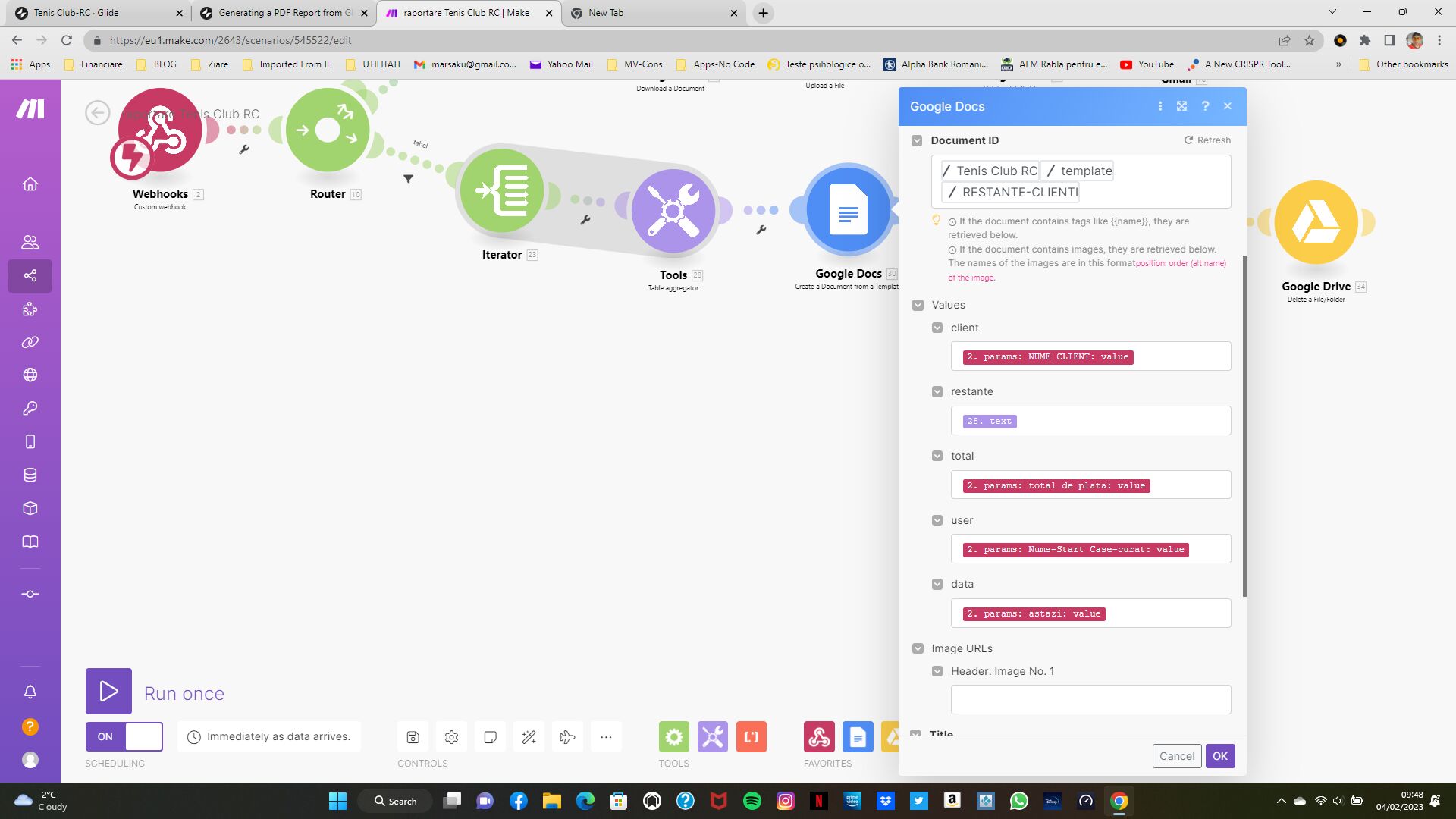
then I download this doc as a pdf, using Make again

This is the Report resulted:

Is not a simple solution, but i was interested to have one in a very short time 🙂
---
### Author:  [@Andrew\_Davies](https://community.glideapps.com/u/Andrew_Davies)
#### Post date: [February 4, 2023, 9:43am UTC](https://community.glideapps.com/t/generating-a-pdf-report-from-glide/57379/18 "2023-02-04T09:43:13Z")
Great!
This looks fabulous. Thanks for posting
---
### Author:  [@Drearystate](https://community.glideapps.com/u/Drearystate)
#### Post date: [March 6, 2024, 3:20pm UTC](https://community.glideapps.com/t/generating-a-pdf-report-from-glide/57379/19 "2024-03-06T15:20:17Z")
Imagine if they just added a feature that allowed you to export as pdf…would save so much time…