# Filter for several attributes
**URL:** https://community.glideapps.com/t/filter-for-several-attributes/84430
**Category:** Ask for Help
**Created:** [September 17, 2025, 8:18am UTC](https://community.glideapps.com/t/filter-for-several-attributes/84430 "2025-09-17T08:18:03Z")
**Posts on this page:** 7
**Page:** 1
### Author:  [@Weingut\_Mathy-Schanz](https://community.glideapps.com/u/Weingut_Mathy-Schanz)
#### Post date: [September 17, 2025, 8:18am UTC](https://community.glideapps.com/t/filter-for-several-attributes/84430/1 "2025-09-17T08:18:03Z")
Hey there 👋,
For my little event app I would like to build a feature with the following logic:
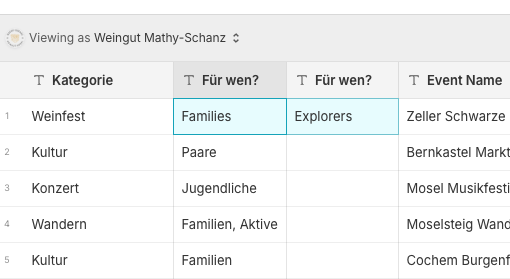
I want to let events appear based on a filter which is essentially not a problem. However, I am not able to make it work if I want to filter for several attributes e.g. filtering for an event that is suitable for families and explorers as in the attached example.
Could someone help me setting this up properly? Thanks a lot 🙏
---
### Author:  [@DarrenHumphries](https://community.glideapps.com/u/DarrenHumphries)
#### Post date: [September 17, 2025, 5:37pm UTC](https://community.glideapps.com/t/filter-for-several-attributes/84430/2 "2025-09-17T17:37:07Z")
You can add many columns to filter by in the collection’s Options screen.
You can also create customer filters but creating a helper table and add a query column to your data. You then add user-specific columns and add those as part of the query you created. In the UI, add choice components for those user-specific columns and and then a collection that points to your query column.
---
### Author:  [@ThinhDinh](https://community.glideapps.com/u/ThinhDinh)
#### Post date: [September 18, 2025, 12:22am UTC](https://community.glideapps.com/t/filter-for-several-attributes/84430/3 "2025-09-18T00:22:47Z")
For your case, is the filter we’re talking about here a native filter in a collection?
When you say “Families and Explorers”, would the filter work as an OR, or would it be an AND (both choices must exist in the entry’s record).
---
### Author:  [@Weingut\_Mathy-Schanz](https://community.glideapps.com/u/Weingut_Mathy-Schanz)
#### Post date: [September 18, 2025, 7:10am UTC](https://community.glideapps.com/t/filter-for-several-attributes/84430/4 "2025-09-18T07:10:40Z")
It should work as an AND e.g. someone should be able to search for an event that is “indoor” and for “families”
---
### Author:  [@ThinhDinh](https://community.glideapps.com/u/ThinhDinh)
#### Post date: [September 18, 2025, 1:46pm UTC](https://community.glideapps.com/t/filter-for-several-attributes/84430/5 "2025-09-18T13:46:30Z")
Are “indoor” and “families” considered two different attributes, in different columns, for each record?
Also, can you answer this?
> [@ThinhDinh](#):
>
> For your case, is the filter we’re talking about here a native filter in a collection?
Or is it a different kind of “filter”?
---
### Author:  [@Weingut\_Mathy-Schanz](https://community.glideapps.com/u/Weingut_Mathy-Schanz)
#### Post date: [September 19, 2025, 6:36am UTC](https://community.glideapps.com/t/filter-for-several-attributes/84430/6 "2025-09-19T06:36:13Z")
To your first question:
Yes, two different attributes in two columns
2nd question: I think I solved half of the problem by simply adding two in app filters. However, if I choose several attributes from one filter all events are shown that match at least on attribute. I am looking for a solution where the event would just be shown if it matches all attributes.

---
### Author:  [@ThinhDinh](https://community.glideapps.com/u/ThinhDinh)
#### Post date: [September 20, 2025, 12:43am UTC](https://community.glideapps.com/t/filter-for-several-attributes/84430/7 "2025-09-20T00:43:42Z")
> [@Weingut\_Mathy-Schanz](#):
>
> I think I solved half of the problem by simply adding two in app filters.
Yeah, that’s why I asked you if you are using a “native” filter.
In this case though, native filters won’t be enough as you have found out.
> [@Question: Choice Component (allow selecting multiple)](https://community.glideapps.com/t/question-choice-component-allow-selecting-multiple/62026/8):
>
> It’s been quite a while since I made this one, so I had to go back and look to see how I set it up. What I did is as follows: Convert the selected tags to an array with a split text column Do the same with each items tags Use a remove elements column to remove the selected tags array from the item tags array Do a rollup-\>count on the resultant array If the count is zero, then the item matches all selections If the count is less than the total number of tags, but greater than zero, then you hav…
You would have to use a variant of this to match it that way, using user-specific columns to store your “filter” values.