# Different versions of detail screen for different tabs
**URL:** https://community.glideapps.com/t/different-versions-of-detail-screen-for-different-tabs/44782
**Category:** Ask for Help
**Created:** [July 19, 2022, 1:18pm UTC](https://community.glideapps.com/t/different-versions-of-detail-screen-for-different-tabs/44782 "2022-07-19T13:18:33Z")
**Posts on this page:** 11
**Page:** 1
### Author:  [@ryanaspire](https://community.glideapps.com/u/ryanaspire)
#### Post date: [July 19, 2022, 1:18pm UTC](https://community.glideapps.com/t/different-versions-of-detail-screen-for-different-tabs/44782/1 "2022-07-19T13:18:33Z")
I have a workflow where inventory needs to be Checked In and Checked Out.
I have a single table that contains Checked In and Checked Out Quantities.
I have two tabs, each with a list with the same data source.
When the user taps through to the inventory item to the final details screen, I want the screen to show different fields for the Checked In tab and different for the Checked Out tab.
I’ve tried searching the forums for different solutions but none seem to fit this use case.
Here’s a video walk-thru of the app: [Screen Recording 2022-07-19 at 10.37.37 pm](http://s.ryand.co/NBrIRRb)
---
### Author:  [@Darren\_Murphy](https://community.glideapps.com/u/Darren_Murphy)
#### Post date: [July 19, 2022, 1:35pm UTC](https://community.glideapps.com/t/different-versions-of-detail-screen-for-different-tabs/44782/2 "2022-07-19T13:35:49Z")
Change the action on one of your Inline Lists to Show New Screen-\>This Item.
This will allow you have a separate details screen for items in that list.
> **[Show New Screen](https://docs.glideapps.com/all/topics/actions/single-actions/navigation/link-to-screen#linking-to-the-current-item)**
>
> Tap to navigate to another screen
---
### Author:  [@ryanaspire](https://community.glideapps.com/u/ryanaspire)
#### Post date: [July 19, 2022, 2:06pm UTC](https://community.glideapps.com/t/different-versions-of-detail-screen-for-different-tabs/44782/3 "2022-07-19T14:06:43Z")
If I understand you correctly, I should have one tab’s list set to Show Detail and the other set to Show New Screen?
And with this approach I couldn’t have a third tab with a different layout?
---
### Author:  [@Darren\_Murphy](https://community.glideapps.com/u/Darren_Murphy)
#### Post date: [July 19, 2022, 2:10pm UTC](https://community.glideapps.com/t/different-versions-of-detail-screen-for-different-tabs/44782/4 "2022-07-19T14:10:44Z")
> [@ryanaspire](#):
>
> If I understand you correctly, I should have one tab’s list set to Show Detail and the other set to Show New Screen?
Yes, correct. Just be sure to use `This Item` as the source, otherwise you’ll wind up on the wrong row.
> [@ryanaspire](#):
>
> And with this approach I couldn’t have a third tab with a different layout?
Yes, you could. In fact, you could have as many as you like. Every time you use Show New Screen-\>This Item, you essentially get a new details screen to work with. If it’s done as an action attached to a list, then every item in the list will share that same layout.
---
### Author:  [@ryanaspire](https://community.glideapps.com/u/ryanaspire)
#### Post date: [July 19, 2022, 2:30pm UTC](https://community.glideapps.com/t/different-versions-of-detail-screen-for-different-tabs/44782/5 "2022-07-19T14:30:11Z")
Hmm I think that’s how I have it setup but if I make a change to the Details screen, it affects both tabs: [Screen Recording 2022-07-19 at 11.58.11 pm](http://s.ryand.co/UAsuFks)
---
### Author:  [@Darren\_Murphy](https://community.glideapps.com/u/Darren_Murphy)
#### Post date: [July 19, 2022, 2:54pm UTC](https://community.glideapps.com/t/different-versions-of-detail-screen-for-different-tabs/44782/6 "2022-07-19T14:54:56Z")
Your video is a little difficult to follow (a voiceover describing what you are doing would be really helpful), but I think the problem is that you are applying the change at the wrong level.
What I mean is that as far as I can see, you are starting with a screen that has a list layout, and then on the details screen of that you have an inline list, and it’s that inline list that you have configured with the show new screen action. The problem with that is that you’re already working in the details screen for the parent list, so any change you make will be universal.
What you need to do is change the action one level up, on the parent list. Give that a try.
Update: @ryanaspire Here’s a short video that might explain it a bit better.
> **[VicJD - 19 July 2022](https://www.loom.com/share/b85375f26d374696baf2da19dd57ab73)**
---
### Author:  [@ryanaspire](https://community.glideapps.com/u/ryanaspire)
#### Post date: [July 20, 2022, 3:45am UTC](https://community.glideapps.com/t/different-versions-of-detail-screen-for-different-tabs/44782/7 "2022-07-20T03:45:41Z")
Thank you so much Darren, I’ve got it working 🙂
I can’t seem to make the second screen/list a Details screen once I switch the first Screen/List to an Inline List + Show New Screen but that doesn’t matter for my use case right now.
---
### Author:  [@Wim\_De\_Coninck](https://community.glideapps.com/u/Wim_De_Coninck)
#### Post date: [July 21, 2022, 5:58am UTC](https://community.glideapps.com/t/different-versions-of-detail-screen-for-different-tabs/44782/8 "2022-07-21T05:58:52Z")
Hi, maybe I’m missing something.
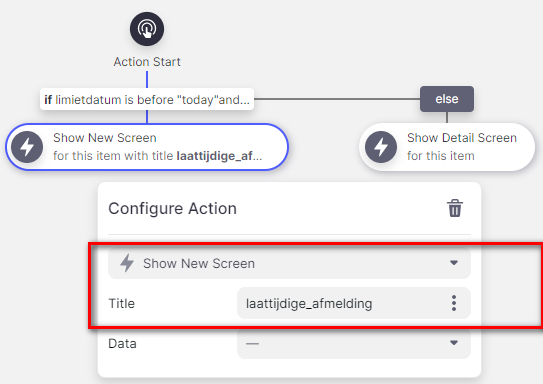
I use “open new screen” as action in several apps (mostly within a IF THEN ELSE), but it’s always as struggle to edit such a new screen as I have to change the condition (if then else) to see the new screen.
It would be a nice feature if “custom screens” are displayed in the navigation on the left (under “Tabs” / “Menu”). Each new screen has its title, but I can’t find how to edit those screens.

---
### Author:  [@Darren\_Murphy](https://community.glideapps.com/u/Darren_Murphy)
#### Post date: [July 21, 2022, 6:19am UTC](https://community.glideapps.com/t/different-versions-of-detail-screen-for-different-tabs/44782/9 "2022-07-21T06:19:23Z")
Yes, I know what you mean.
There is a trick that you can use to get to those screens. What you need to do is go to a column in the Data Editor that you know is used in the screen that you’re looking for. Do a find all uses on that column, and then you can navigate directly to it from the Find All Uses result set.
---
### Author:  [@Wim\_De\_Coninck](https://community.glideapps.com/u/Wim_De_Coninck)
#### Post date: [July 21, 2022, 6:32am UTC](https://community.glideapps.com/t/different-versions-of-detail-screen-for-different-tabs/44782/10 "2022-07-21T06:32:05Z")
Thanks for the trick, but… in the result set, I can see the action where I use that new screen, but I can only navigate to that action, not to the custom screen.
What am I doing wrong?
---
### Author:  [@Darren\_Murphy](https://community.glideapps.com/u/Darren_Murphy)
#### Post date: [July 21, 2022, 7:06am UTC](https://community.glideapps.com/t/different-versions-of-detail-screen-for-different-tabs/44782/11 "2022-07-21T07:06:17Z")
Instead of navigating to an Action from the result set, navigate to a Component. As long as you’ve picked the correct column, this should take you to the screen.