# Custom Sort
**URL:** https://community.glideapps.com/t/custom-sort/11320
**Category:** Ask for Help
**Created:** [June 23, 2020, 1:07pm UTC](https://community.glideapps.com/t/custom-sort/11320 "2020-06-23T13:07:42Z")
**Posts on this page:** 20
**Page:** 1
### Author:  [@Shannon\_Joseph](https://community.glideapps.com/u/Shannon_Joseph)
#### Post date: [June 23, 2020, 1:07pm UTC](https://community.glideapps.com/t/custom-sort/11320/1 "2020-06-23T13:07:43Z")
I have 4 menu categories that I want to show sorted in the following order. I have tried to sort by a number of options, but nothing works.
1. Appetizer/Starter
2. Entree,Sides
3. Drinks & Beverage
4. Deserts/Sweets
How and where would I set up a custom sort to make sure it shows up in the above order?
---
### Author:  [@sardamit](https://community.glideapps.com/u/sardamit)
#### Post date: [June 23, 2020, 1:12pm UTC](https://community.glideapps.com/t/custom-sort/11320/2 "2020-06-23T13:12:22Z")
Create a helper column with these numbers and sort using this column in the ascending order.
---
### Author:  [@Robert\_Petitto](https://community.glideapps.com/u/Robert_Petitto)
#### Post date: [June 23, 2020, 1:12pm UTC](https://community.glideapps.com/t/custom-sort/11320/3 "2020-06-23T13:12:33Z")
Create a second column called Sort and enter 1-4 respectively.
---
### Author:  [@Shannon\_Joseph](https://community.glideapps.com/u/Shannon_Joseph)
#### Post date: [June 23, 2020, 1:17pm UTC](https://community.glideapps.com/t/custom-sort/11320/4 "2020-06-23T13:17:39Z")
This is an inline relation list, so where would I add the column?
---
### Author:  [@Robert\_Petitto](https://community.glideapps.com/u/Robert_Petitto)
#### Post date: [June 23, 2020, 1:19pm UTC](https://community.glideapps.com/t/custom-sort/11320/5 "2020-06-23T13:19:03Z")
In the sheet containing those 4 categories.
---
### Author:  [@Shannon\_Joseph](https://community.glideapps.com/u/Shannon_Joseph)
#### Post date: [June 23, 2020, 1:21pm UTC](https://community.glideapps.com/t/custom-sort/11320/6 "2020-06-23T13:21:21Z")
I did it there, but I column does not show in the sort options.
---
### Author:  [@Robert\_Petitto](https://community.glideapps.com/u/Robert_Petitto)
#### Post date: [June 23, 2020, 1:22pm UTC](https://community.glideapps.com/t/custom-sort/11320/7 "2020-06-23T13:22:52Z")
Screenshots would help 🙃
---
### Author:  [@Shannon\_Joseph](https://community.glideapps.com/u/Shannon_Joseph)
#### Post date: [June 23, 2020, 1:25pm UTC](https://community.glideapps.com/t/custom-sort/11320/8 "2020-06-23T13:25:46Z")


---
### Author:  [@Robert\_Petitto](https://community.glideapps.com/u/Robert_Petitto)
#### Post date: [June 23, 2020, 1:28pm UTC](https://community.glideapps.com/t/custom-sort/11320/9 "2020-06-23T13:28:02Z")
In the first image you have a “New Column” that’s the relation. Is this the same relation you are trying to sort and the same relation labeled “Menu Relations” in the second image?
---
### Author:  [@Shannon\_Joseph](https://community.glideapps.com/u/Shannon_Joseph)
#### Post date: [June 23, 2020, 1:28pm UTC](https://community.glideapps.com/t/custom-sort/11320/10 "2020-06-23T13:28:52Z")
Yes.
---
### Author:  [@Robert\_Petitto](https://community.glideapps.com/u/Robert_Petitto)
#### Post date: [June 23, 2020, 1:32pm UTC](https://community.glideapps.com/t/custom-sort/11320/11 "2020-06-23T13:32:48Z")
You’ll need to do one of two things, then:
1. Do an inline list of the “Menu Category” sheet, not the relation
OR
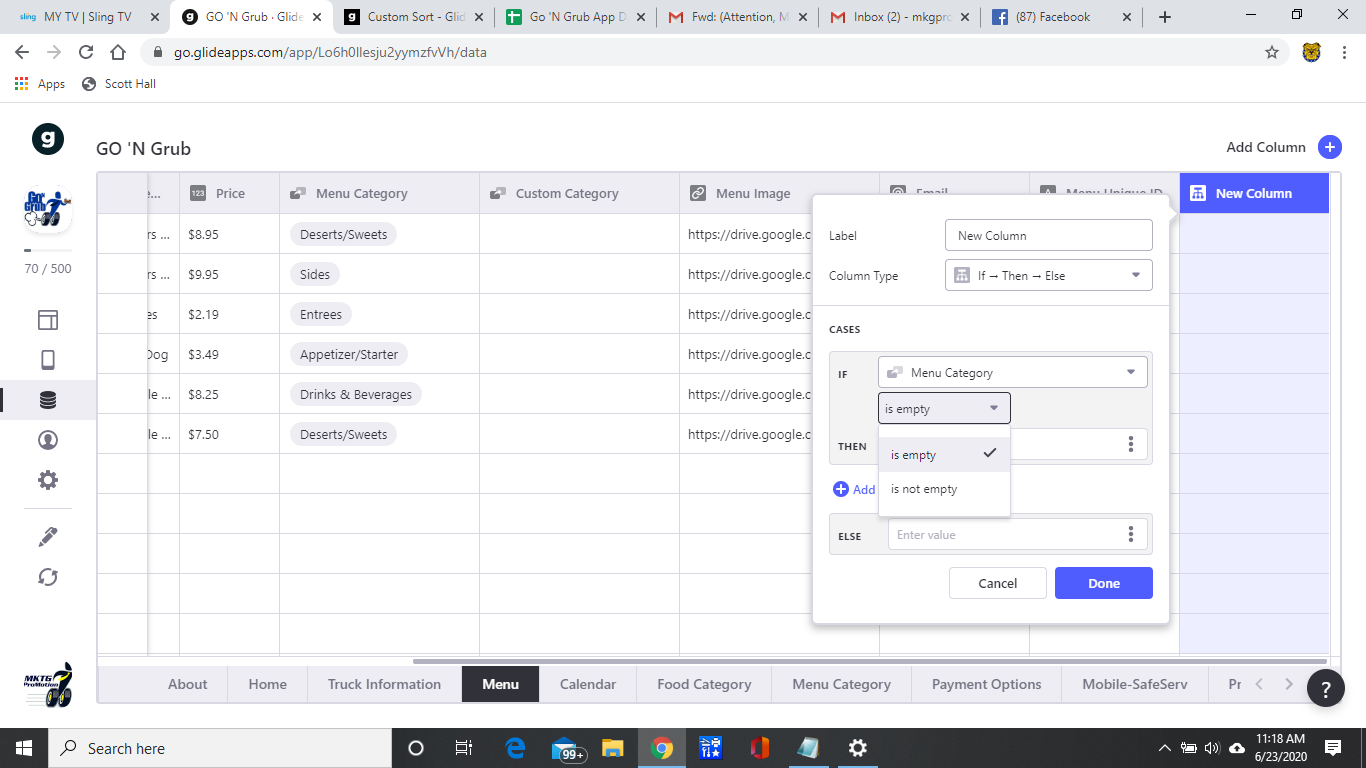
2. If you want to use the relation, you’ll need to insert the sort numbers (via formula) dynamically in the menu items sheet ("If category is appetizer then 1…etc.)
---
### Author:  [@Shannon\_Joseph](https://community.glideapps.com/u/Shannon_Joseph)
#### Post date: [June 23, 2020, 1:39pm UTC](https://community.glideapps.com/t/custom-sort/11320/12 "2020-06-23T13:39:57Z")
Here is the menu sheet, so which sheet should I add the formula?

---
### Author:  [@Robert\_Petitto](https://community.glideapps.com/u/Robert_Petitto)
#### Post date: [June 23, 2020, 1:42pm UTC](https://community.glideapps.com/t/custom-sort/11320/13 "2020-06-23T13:42:59Z")
Depends. Are you organizing just the 5 categories in that order or are you organizing all the menu items in that order?
---
### Author:  [@Shannon\_Joseph](https://community.glideapps.com/u/Shannon_Joseph)
#### Post date: [June 23, 2020, 1:45pm UTC](https://community.glideapps.com/t/custom-sort/11320/14 "2020-06-23T13:45:21Z")
I want each truck ment to be categorized in this order, so no matter which truck the user clicks on, the menu will sort in this order.
---
### Author:  [@Robert\_Petitto](https://community.glideapps.com/u/Robert_Petitto)
#### Post date: [June 23, 2020, 1:48pm UTC](https://community.glideapps.com/t/custom-sort/11320/15 "2020-06-23T13:48:39Z")
To sort the menu _items_ in this order, you’ll need to add the if-then-else column to the menu sheet (last photo you shared).
---
### Author:  [@Rik\_Ahlberg](https://community.glideapps.com/u/Rik_Ahlberg)
#### Post date: [June 23, 2020, 2:44pm UTC](https://community.glideapps.com/t/custom-sort/11320/16 "2020-06-23T14:44:15Z")
The Sort filter also has a “Sheet order” option - are you seeing that? It shows up at the top of the list so you have to scroll up. I use it in a lot of my inline lists where the sequence I want isn’t alphabetical (see the list that starts with “Indoor seating” in the screenshot):

---
### Author:  [@Robert\_Petitto](https://community.glideapps.com/u/Robert_Petitto)
#### Post date: [June 23, 2020, 3:04pm UTC](https://community.glideapps.com/t/custom-sort/11320/17 "2020-06-23T15:04:20Z")
Right…problem is, as I’m guessing, is that the Menu Items are submitted via form entry and thus the app owner has no control over the sheet order. Having an if-then-else to assign a 1-5 number will solve this.
I do this with Dates, too. Sometimes I want to sort user-submitted posts by date, but I also want “pinned/featured” posts on the top. So, I create an if-then-else column called “Sort”. If I’m sorting by date with oldest on top, I do an “if Featured then -1 else date” if I want descending with newest on top then I do “if Featured then 99999 else date”.
Then I sort by “Sort”. Here’s the result:


---
### Author:  [@Shannon\_Joseph](https://community.glideapps.com/u/Shannon_Joseph)
#### Post date: [June 23, 2020, 3:16pm UTC](https://community.glideapps.com/t/custom-sort/11320/18 "2020-06-23T15:16:58Z")
Entry will be by a choice list (via another app using the same sheet) of the items mentioned previously, and no control over the sheet order.
I am still confused on what data to use for the if-then-else function.
---
### Author:  [@Shannon\_Joseph](https://community.glideapps.com/u/Shannon_Joseph)
#### Post date: [June 23, 2020, 3:19pm UTC](https://community.glideapps.com/t/custom-sort/11320/19 "2020-06-23T15:19:30Z")
It seems I am getting limited optins for the if-then
---
### Author:  [@Robert\_Petitto](https://community.glideapps.com/u/Robert_Petitto)
#### Post date: [June 23, 2020, 3:21pm UTC](https://community.glideapps.com/t/custom-sort/11320/20 "2020-06-23T15:21:03Z")
Is your “Menu Category” an array column?
[Next page](https://community.glideapps.com/t/custom-sort/11320.md?page=2)