# Creating a root menu to lead to departments
**URL:** https://community.glideapps.com/t/creating-a-root-menu-to-lead-to-departments/12250
**Category:** Ask for Help
**Created:** [July 10, 2020, 7:16am UTC](https://community.glideapps.com/t/creating-a-root-menu-to-lead-to-departments/12250 "2020-07-10T07:16:29Z")
**Posts on this page:** 10
**Page:** 1
### Author:  [@mrlockyer](https://community.glideapps.com/u/mrlockyer)
#### Post date: [July 10, 2020, 7:16am UTC](https://community.glideapps.com/t/creating-a-root-menu-to-lead-to-departments/12250/1 "2020-07-10T07:16:29Z")
Hello all. I’m trying to create a hint tool for a puzzle book with departments.
I have created a root menu:

Which I’d like a user to press each department to lead them to the next page.
However, whatever I seem to try, it always goes to the same department. I can’t seem to figure out how the relational works for this.
In my base spreadsheet, each spreadsheet tab leads to department info, and I made a tab with the root menu.
Each department is also a tab in Glide.
Can anyone point me toward what I need to do here please? I feel like I’m going around in circles!
---
### Author:  [@ThinhDinh](https://community.glideapps.com/u/ThinhDinh)
#### Post date: [July 10, 2020, 8:09am UTC](https://community.glideapps.com/t/creating-a-root-menu-to-lead-to-departments/12250/2 "2020-07-10T08:09:14Z")
If you haven’t done something like this, try to structure the database like the points below:
- Have a “Departments” sheet to store the departments and their image.
- Have a “Items” sheet to store the items of the department, which must have the “parent” department column in there, with the same name as they have in the “Departments” sheet.
- Go back to the “Departments” sheet, make a relation matching the Departments’ name column to the same column in the “Items” sheet and set it to match multiple.
- In the screen that you show the “Departments” like you have above, set the action to “Link to screen” with the value being the relation you created.
---
### Author:  [@mrlockyer](https://community.glideapps.com/u/mrlockyer)
#### Post date: [July 10, 2020, 12:53pm UTC](https://community.glideapps.com/t/creating-a-root-menu-to-lead-to-departments/12250/3 "2020-07-10T12:53:31Z")
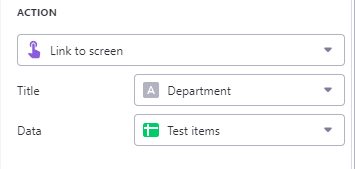
Thank you so much! I’ve got the root menu working now, but when you click through, it still shows all items. I’ve followed your fourth instruction, as shown below:
Any thoughts? Thanks in advance!
---
### Author:  [@Jeff\_Hager](https://community.glideapps.com/u/Jeff_Hager)
#### Post date: [July 10, 2020, 1:00pm UTC](https://community.glideapps.com/t/creating-a-root-menu-to-lead-to-departments/12250/4 "2020-07-10T13:00:53Z")
Make sure your link to screen is using the relation instead of pointing to the whole sheet.
---
### Author:  [@ThinhDinh](https://community.glideapps.com/u/ThinhDinh)
#### Post date: [July 10, 2020, 1:09pm UTC](https://community.glideapps.com/t/creating-a-root-menu-to-lead-to-departments/12250/5 "2020-07-10T13:09:45Z")
Have you made the relation as I said? As Jeff said, use that relation as the value here.
---
### Author:  [@mrlockyer](https://community.glideapps.com/u/mrlockyer)
#### Post date: [July 10, 2020, 2:23pm UTC](https://community.glideapps.com/t/creating-a-root-menu-to-lead-to-departments/12250/6 "2020-07-10T14:23:47Z")
That appears to be working right (from the right hand tags), but isn’t for the next page - it just shows all of the items from the first department for some reason. Problem with the second page?

---
### Author:  [@mrlockyer](https://community.glideapps.com/u/mrlockyer)
#### Post date: [July 10, 2020, 2:25pm UTC](https://community.glideapps.com/t/creating-a-root-menu-to-lead-to-departments/12250/7 "2020-07-10T14:25:03Z")
Could this be the issue?

---
### Author:  [@ThinhDinh](https://community.glideapps.com/u/ThinhDinh)
#### Post date: [July 10, 2020, 2:28pm UTC](https://community.glideapps.com/t/creating-a-root-menu-to-lead-to-departments/12250/8 "2020-07-10T14:28:10Z")
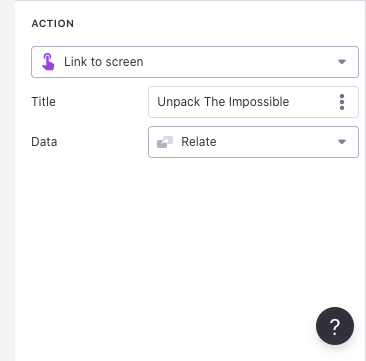
The “data” must be that “related” column.
---
### Author:  [@mrlockyer](https://community.glideapps.com/u/mrlockyer)
#### Post date: [July 11, 2020, 12:50pm UTC](https://community.glideapps.com/t/creating-a-root-menu-to-lead-to-departments/12250/9 "2020-07-11T12:50:19Z")
I’ve tried choosing the Relate column I created, but it isn’t available. I tried typing it in, to no luck. I even created a text column called ‘bob’, which came up as choice straight away!

I can’t work out where I’m going wrong, and know I’m soooo close!
---
### Author:  [@mrlockyer](https://community.glideapps.com/u/mrlockyer)
#### Post date: [July 11, 2020, 12:52pm UTC](https://community.glideapps.com/t/creating-a-root-menu-to-lead-to-departments/12250/10 "2020-07-11T12:52:45Z")
Solved it! Wrong link!
Thanks for your help! Now to solve my hints reveal problem!