# Copy collection data grid to clipboard
**URL:** https://community.glideapps.com/t/copy-collection-data-grid-to-clipboard/83933
**Category:** Ask for Help
**Created:** [August 20, 2025, 1:27pm UTC](https://community.glideapps.com/t/copy-collection-data-grid-to-clipboard/83933 "2025-08-20T13:27:00Z")
**Posts on this page:** 12
**Page:** 1
### Author:  [@Gilbatron-3000](https://community.glideapps.com/u/Gilbatron-3000)
#### Post date: [August 20, 2025, 1:27pm UTC](https://community.glideapps.com/t/copy-collection-data-grid-to-clipboard/83933/1 "2025-08-20T13:27:00Z")
Hi there, I have a collection data grid on the screen that has 2 columns and usually up to a max of 10 rows, and looks a bit like this
| Column 1 | Column 2 |
| --- | --- |
| Company Type A | @company1 |
| Company Type A | @company2 |
| Company Type C | @company3 |
| Company Type C | @company4 |
| Company Type A | @company5 |
| Company Type B | @company6 |
I can put an action on each row to copy the @compny of each row but what I really want the user to be able to do is copy the entire table to their clipboard for pasting elsewhere
Anyone got any ideas on how I can achieve this - I can add a title bar action to the data grid but copy to clipboard only allows me to pick a single data item
---
### Author:  [@Jeff\_Hager](https://community.glideapps.com/u/Jeff_Hager)
#### Post date: [August 20, 2025, 3:10pm UTC](https://community.glideapps.com/t/copy-collection-data-grid-to-clipboard/83933/2 "2025-08-20T15:10:45Z")
Are you just wanting the company column, or be able to copy both columns? Are you expecting to copy and paste in grid form into something like Excel, or are you just looking for a block of text that contains all the data?
---
### Author:  [@Gilbatron-3000](https://community.glideapps.com/u/Gilbatron-3000)
#### Post date: [August 20, 2025, 3:32pm UTC](https://community.glideapps.com/t/copy-collection-data-grid-to-clipboard/83933/3 "2025-08-20T15:32:46Z")
Ideally both columns and a block of text with line breaks would be nice.
I The end place for the paste is Instagram - so it’s copying all the company type and company @ handles into an instagram post. I could do them one at a time but ideally i’d like the user to be able to copy all the data in the table (unless there’s a better component to use) and paste it in instagram so the post ends up looking like
We’d like to thank the following companies -
| Company Type A | @company1 |
| --- | --- |
| Company Type A | @company2 |
| Company Type C | @company3 |
| Company Type C | @company4 |
| Company Type A | @company5 |
| Company Type B | @company6 |
---
### Author:  [@Jeff\_Hager](https://community.glideapps.com/u/Jeff_Hager)
#### Post date: [August 20, 2025, 4:20pm UTC](https://community.glideapps.com/t/copy-collection-data-grid-to-clipboard/83933/4 "2025-08-20T16:20:04Z")
Ok, that should make it relatively easy. What I would do is create a template column that joins both column values together however you want each line to look. Then create a Joined List column that grabs the template column in the table. Use a carriage return as the separator (Enter key) instead of a comma. That should be it. You should be able to add a button with a copy to clipboard action that grabs the joined list, which should contain everything.
---
### Author:  [@Gilbatron-3000](https://community.glideapps.com/u/Gilbatron-3000)
#### Post date: [August 20, 2025, 4:59pm UTC](https://community.glideapps.com/t/copy-collection-data-grid-to-clipboard/83933/5 "2025-08-20T16:59:37Z")
> [@Jeff\_Hager](#):
>
> umn values together however you want each line to loo
Ah - so this can’t be done on the layout it has to be data.
So I created the template column no problem but where creating the joined list i get an error
“ **This column cannot be saved**
This computed column is not supported on this data source.”
My data is in different tables with relations and lookups - I guess glide doesn’t like that for Joined List columns.
Any suggestions?
---
### Author:  [@Jeff\_Hager](https://community.glideapps.com/u/Jeff_Hager)
#### Post date: [August 20, 2025, 5:12pm UTC](https://community.glideapps.com/t/copy-collection-data-grid-to-clipboard/83933/6 "2025-08-20T17:12:05Z")
Are you using Big Tables, and if so, any reason you are using them instead of Glide Tables? Or are you using some other data source?
---
### Author:  [@Gilbatron-3000](https://community.glideapps.com/u/Gilbatron-3000)
#### Post date: [August 21, 2025, 5:46am UTC](https://community.glideapps.com/t/copy-collection-data-grid-to-clipboard/83933/7 "2025-08-21T05:46:58Z")
I’m just using the built in Glide tables 🙌
---
### Author:  [@Jeff\_Hager](https://community.glideapps.com/u/Jeff_Hager)
#### Post date: [August 21, 2025, 11:45am UTC](https://community.glideapps.com/t/copy-collection-data-grid-to-clipboard/83933/8 "2025-08-21T11:45:23Z")
The issue with being unable to save the column seems to suggest that you are using Glide Big Tables, which have some restrictions, unlike regular Glide Tables. Please share a screenshot of your list of tables so that I can confirm.
---
### Author:  [@Gilbatron-3000](https://community.glideapps.com/u/Gilbatron-3000)
#### Post date: [August 21, 2025, 3:22pm UTC](https://community.glideapps.com/t/copy-collection-data-grid-to-clipboard/83933/9 "2025-08-21T15:22:24Z")
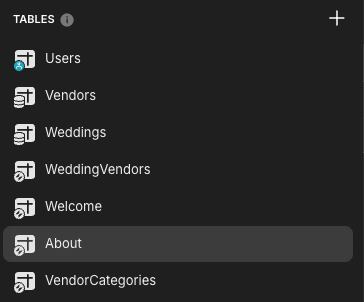
So based on this screenshot - I believe I have a mix of standard and big tables (my bad, i hadn’t realised the difference)
Vendors = big table
About = normal table
I think that’s correct - so i’d be better recreating the two big tables as standard tables? I don’t think at this point (i’m building a POC) i need the scale of what big tables can offer
---
### Author:  [@Jeff\_Hager](https://community.glideapps.com/u/Jeff_Hager)
#### Post date: [August 21, 2025, 3:24pm UTC](https://community.glideapps.com/t/copy-collection-data-grid-to-clipboard/83933/10 "2025-08-21T15:24:47Z")
If you don’t need the scale or anything more that 25k rows in your project, then I would stick with Glide Tables for now. There’s a lot of gotchas with big tables and computed columns that you would be better off avoiding if you don’t need the scale.
---
### Author:  [@Gilbatron-3000](https://community.glideapps.com/u/Gilbatron-3000)
#### Post date: [August 22, 2025, 9:53am UTC](https://community.glideapps.com/t/copy-collection-data-grid-to-clipboard/83933/11 "2025-08-22T09:53:37Z")
> [@Jeff\_Hager](#):
>
> column that grabs the
I changed back to glide table and this solution worked like a charm - thank you for your help and guidance..!!
---
### Author:  [@system](https://community.glideapps.com/u/system)
#### Post date: [August 29, 2025, 9:54am UTC](https://community.glideapps.com/t/copy-collection-data-grid-to-clipboard/83933/12 "2025-08-29T09:54:21Z")
This topic was automatically closed 7 days after the last reply. New replies are no longer allowed.