# Choice component appearance
**URL:** https://community.glideapps.com/t/choice-component-appearance/57142
**Category:** Ask for Help
**Created:** [January 26, 2023, 4:10pm UTC](https://community.glideapps.com/t/choice-component-appearance/57142 "2023-01-26T16:10:47Z")
**Posts on this page:** 8
**Page:** 1
### Author:  [@saucy](https://community.glideapps.com/u/saucy)
#### Post date: [January 26, 2023, 4:10pm UTC](https://community.glideapps.com/t/choice-component-appearance/57142/1 "2023-01-26T16:10:47Z")
Hi All, Is there a way to get the choice component to appear as it does when it’s being selected.
See below for explanation of how choice appears when it’s being Selected vs how it appears once live.


---
### Author:  [@Robert\_Petitto](https://community.glideapps.com/u/Robert_Petitto)
#### Post date: [January 26, 2023, 4:43pm UTC](https://community.glideapps.com/t/choice-component-appearance/57142/3 "2023-01-26T16:43:36Z")
I understand you’re saying…ultimately, you’d like a read-only (clickable?), “chip” style display of what was chosen… very popular in commerce websites like Best Buy:
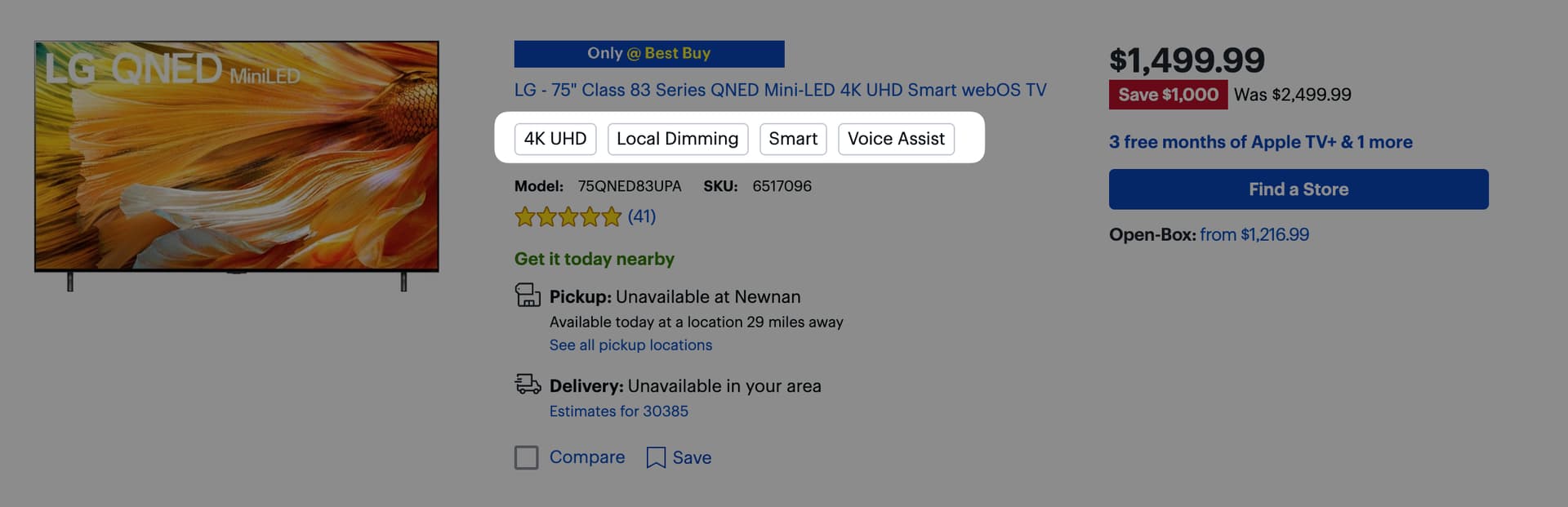
This would be awesome. There’s no great way to do this in Pages yet (@Ivo_Elbert we need this), but in Apps, you can get away with something like this:
[ ](https://www.youtube.com/watch?v=yBm6UDCCQ84)
---
### Author:  [@saucy](https://community.glideapps.com/u/saucy)
#### Post date: [January 26, 2023, 5:02pm UTC](https://community.glideapps.com/t/choice-component-appearance/57142/4 "2023-01-26T17:02:08Z")
This is exactly what I need for apps Robert, thank you! I was looking on Youtube but missed this before somehow.
---
### Author:  [@Robert\_Petitto](https://community.glideapps.com/u/Robert_Petitto)
#### Post date: [January 26, 2023, 5:04pm UTC](https://community.glideapps.com/t/choice-component-appearance/57142/5 "2023-01-26T17:04:20Z")
Just know that this solution leverages a spreadsheet formula and is not the most efficient way to do this nowadays (I need to recreate the video I guess), but it will at least get you up and running!
---
### Author:  [@Robert\_Petitto](https://community.glideapps.com/u/Robert_Petitto)
#### Post date: [January 26, 2023, 6:24pm UTC](https://community.glideapps.com/t/choice-component-appearance/57142/6 "2023-01-26T18:24:31Z")
Best I can do in Glide Pages:

---
### Author:  [@Jeff\_Hager](https://community.glideapps.com/u/Jeff_Hager)
#### Post date: [January 26, 2023, 7:19pm UTC](https://community.glideapps.com/t/choice-component-appearance/57142/7 "2023-01-26T19:19:07Z")
Working on something. Top is CSS styled DIV tags created from a joined list column. Bottom is a choice component. Not overly complicated, but edging on overkill. Might end up making a single javascript column do handle it.
Also, these are not clickable, so only useful if you just want a bunch of tags generated from a comma delimited list.

---
### Author:  [@Robert\_Petitto](https://community.glideapps.com/u/Robert_Petitto)
#### Post date: [January 26, 2023, 7:20pm UTC](https://community.glideapps.com/t/choice-component-appearance/57142/8 "2023-01-26T19:20:54Z")
Nice for static display! Clickable would be awesome…but not possible with CSS alone.
---
### Author:  [@system](https://community.glideapps.com/u/system)
#### Post date: [January 27, 2023, 7:21pm UTC](https://community.glideapps.com/t/choice-component-appearance/57142/9 "2023-01-27T19:21:18Z")
This topic was automatically closed 24 hours after the last reply. New replies are no longer allowed.