# Building user context into chat prompt
**URL:** https://community.glideapps.com/t/building-user-context-into-chat-prompt/85588
**Category:** Ask for Help
**Tags:** api, actions
**Created:** [November 28, 2025, 11:04am UTC](https://community.glideapps.com/t/building-user-context-into-chat-prompt/85588 "2025-11-28T11:04:08Z")
**Posts on this page:** 3
**Page:** 1
### Author:  [@Andre75](https://community.glideapps.com/u/Andre75)
#### Post date: [November 28, 2025, 11:04am UTC](https://community.glideapps.com/t/building-user-context-into-chat-prompt/85588/1 "2025-11-28T11:04:08Z")
Hi There,
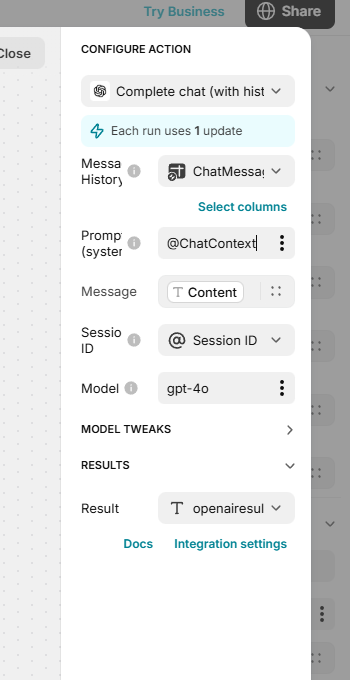
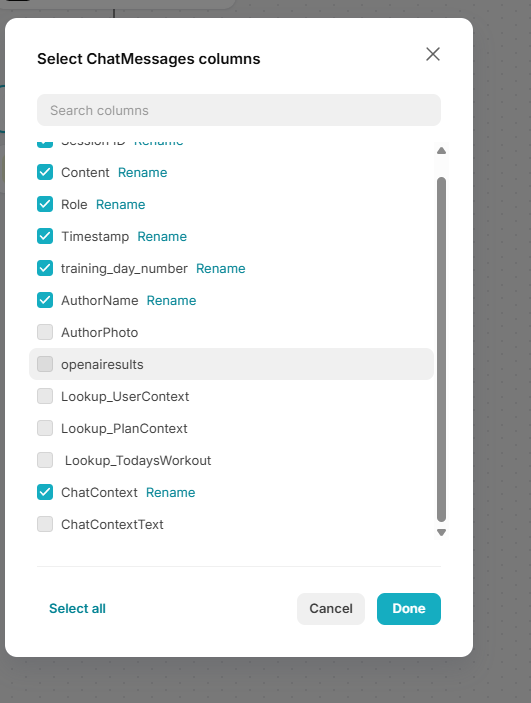
I am building a chat bot and trying to set up some user context into the prompt in the Complete Chat with history action. I want to reference a Template column which is made up of multiple user data fields to create a functioning prompt. My question is , what is the best way to integrate this prompt into the API call . Do I simply reference my ChatContext column by selecting the check box in Chat set up,or do I reference the Template column using @ChatContext in the prompt field itself? See both screen shots for different methods. I had been trying both methods simultaneously but I think I may have been overloading my prompt and API call.
Thanks in advance!
---
### Author:  [@Federico\_Fleitas](https://community.glideapps.com/u/Federico_Fleitas)
#### Post date: [November 28, 2025, 1:11pm UTC](https://community.glideapps.com/t/building-user-context-into-chat-prompt/85588/2 "2025-11-28T13:11:58Z")
HI,
I recommend you watch the following video so that you understand how the OpenAi integration works, once you understand it you will be able to perform the task you want.
Credits: @grumo
[ ](https://www.youtube.com/watch?v=rnz4YEf97os)
---
### Author:  [@ThinhDinh](https://community.glideapps.com/u/ThinhDinh)
#### Post date: [November 28, 2025, 11:48pm UTC](https://community.glideapps.com/t/building-user-context-into-chat-prompt/85588/3 "2025-11-28T23:48:52Z")
Explaining a bit with the video above as context.
* * *
### **The Short Answer**
You should use **@ChatContext** in the **Prompt (system)** field itself (as seen in your first screenshot). You should **uncheck** the box for ChatContext inside the “Message History” setup.
Here is the breakdown of why and how to do this, including the specific timestamps from the tutorial where this configuration happens.
### **1. The Difference: System Prompt vs. Message History**
To understand the setup, it helps to distinguish between the “Identity” of the bot and the “Conversation” log.
- **The System Prompt (The Identity)**
- **The Message History (The Log)**
### **2. Configuration Steps & Timestamps**
**Timestamp: 24:46 - 25:05**
This is the specific section where the narrator configures the final Complete chat action with the correct data sources.
- **Step 1: Configure Message History**
- **Step 2: Configure System Prompt**
### **Summary Checklist**
1. **Prompt (system) field:** ✅ **DO** put your @ChatContext here.
2. **Message History settings:** ❌ **UNCHECK** ChatContext. Only check the message content, role, and timestamp.
> **[OpenAI and Glide | Glide Docs](https://www.glideapps.com/docs/automation/integrations/openai-and-glide#complete-chat-(with-history))**
>
> Leverage artificial intelligence to generate prompt-based text and images.