# Advice on best approach
**URL:** https://community.glideapps.com/t/advice-on-best-approach/30742
**Category:** Ask for Help
**Created:** [August 21, 2021, 12:40am UTC](https://community.glideapps.com/t/advice-on-best-approach/30742 "2021-08-21T00:40:52Z")
**Posts on this page:** 17
**Page:** 1
### Author:  [@danstrongin](https://community.glideapps.com/u/danstrongin)
#### Post date: [August 21, 2021, 12:40am UTC](https://community.glideapps.com/t/advice-on-best-approach/30742/1 "2021-08-21T00:40:52Z")
I have input fields with costs and prices. I want to be able to use them in a calculation, then show the result, And generate a historical list of all results for the user to track their history. I have added number input fields.
What is the recommended way to use the data in formulas, show the results, then save the results in a list for them?
---
### Author:  [@Uzo](https://community.glideapps.com/u/Uzo)
#### Post date: [August 21, 2021, 12:47am UTC](https://community.glideapps.com/t/advice-on-best-approach/30742/2 "2021-08-21T00:47:57Z")
you can add a button, with acton to add row, and set values with results to a data sheet…
to do this automatically… you need a help of scripts
---
### Author:  [@Jeff\_Hager](https://community.glideapps.com/u/Jeff_Hager)
#### Post date: [August 21, 2021, 1:32am UTC](https://community.glideapps.com/t/advice-on-best-approach/30742/3 "2021-08-21T01:32:12Z")
Read through this thread. I have a sample app in there as well. You shouldn’t need any scripting. All you need is some user specific columns and some math columns to perform your calculations.
> [@Time delay clearing fields](https://community.glideapps.com/t/time-delay-clearing-fields/30052):
>
> I’m looking for a way to delay the clear fields action. The app shows the user the results of the ratio calculation from the top row of the GSheet. I have an onchange trigger which clears those results when a new row containing user email, timestamp, amount of “A” and amount of “B” is added. This also clears the results from the UI. I need those results to “stick” in the UI for some amount of time as the operation the user is performing will take, lets say, 5 minutes and the user may need to re…
---
### Author:  [@danstrongin](https://community.glideapps.com/u/danstrongin)
#### Post date: [August 22, 2021, 4:09pm UTC](https://community.glideapps.com/t/advice-on-best-approach/30742/4 "2021-08-22T16:09:03Z")
Thanks
---
### Author:  [@danstrongin](https://community.glideapps.com/u/danstrongin)
#### Post date: [August 23, 2021, 2:37pm UTC](https://community.glideapps.com/t/advice-on-best-approach/30742/5 "2021-08-23T14:37:36Z")
@Jeff_Hager I can get everything to work BUt
1. I am stymied by how to show the result of the calculation on the screen so it updates in real time before saving.
2. I can´t find the template column choice for the screen. they have to be able to play with a few scenarios until the find the one they like, and then hit the button to save to a log sheet, with a user specific column of the result to track history in a table.
Not sure why it is so hard for me to figure out considering you did the app and I can look at the darn thing, but I find no choice to show what I think is the template field on the screen
---
### Author:  [@Jeff\_Hager](https://community.glideapps.com/u/Jeff_Hager)
#### Post date: [August 23, 2021, 2:45pm UTC](https://community.glideapps.com/t/advice-on-best-approach/30742/6 "2021-08-23T14:45:12Z")
Can you share your app or some screenshots showing how you have everything set up? Are you trying to do this on a form or on a detail screen?
---
### Author:  [@danstrongin](https://community.glideapps.com/u/danstrongin)
#### Post date: [August 23, 2021, 4:12pm UTC](https://community.glideapps.com/t/advice-on-best-approach/30742/7 "2021-08-23T16:12:08Z")
detail screen…

they fill in the info and the app shows how much they need to sell to keep at least the same profit as when not promoting. I want to show the results in real time until the click the button and the row is created, and the log table updated just below the button.
---
### Author:  [@Jeff\_Hager](https://community.glideapps.com/u/Jeff_Hager)
#### Post date: [August 23, 2021, 4:15pm UTC](https://community.glideapps.com/t/advice-on-best-approach/30742/8 "2021-08-23T16:15:11Z")
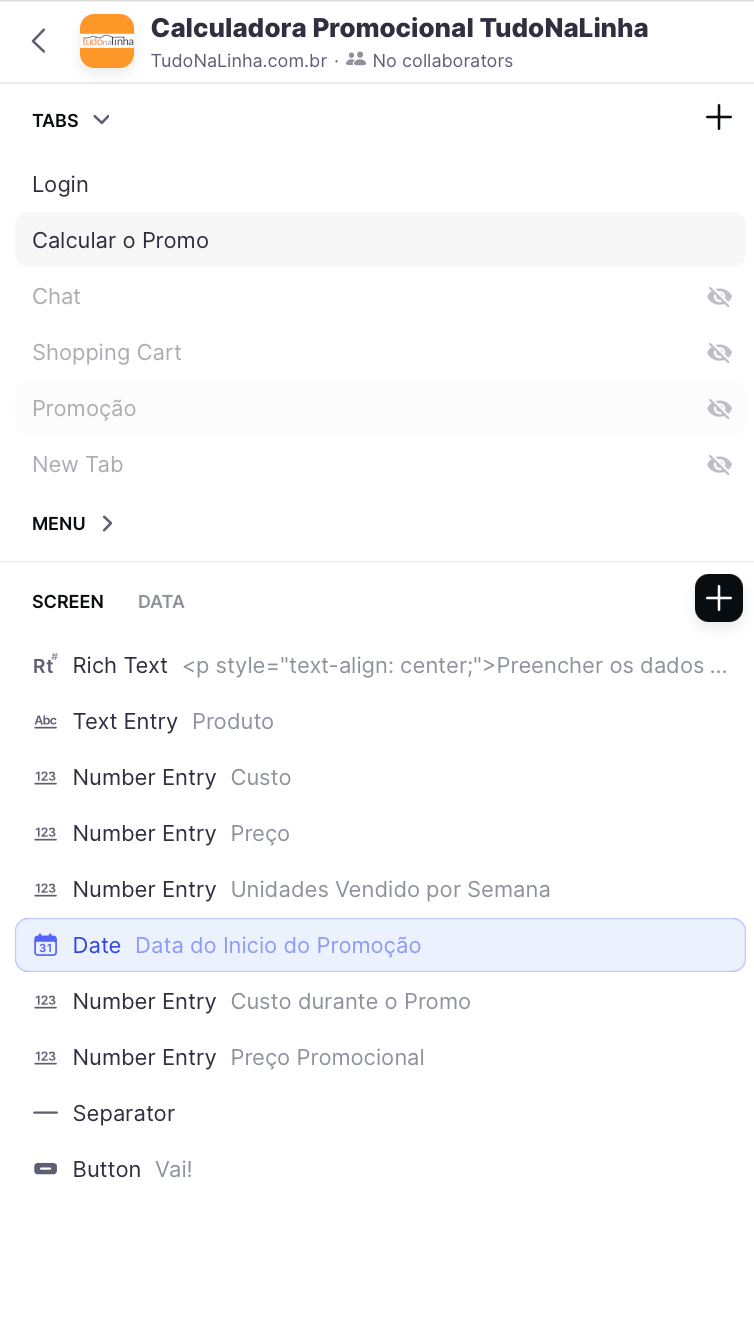
It looks like you don’t have any text components to display a template or math value. Are you trying to show the result in one of your entry components? That would explain why you can’t select a template column.
---
### Author:  [@danstrongin](https://community.glideapps.com/u/danstrongin)
#### Post date: [August 23, 2021, 4:15pm UTC](https://community.glideapps.com/t/advice-on-best-approach/30742/9 "2021-08-23T16:15:33Z")
the fields:
---
### Author:  [@danstrongin](https://community.glideapps.com/u/danstrongin)
#### Post date: [August 23, 2021, 4:17pm UTC](https://community.glideapps.com/t/advice-on-best-approach/30742/10 "2021-08-23T16:17:29Z")
no, I want them in a seperate component to show while they play around with the data to find the right price volume they want. then after using the button, to show up in a historical list tied to their unique email.
---
### Author:  [@Jeff\_Hager](https://community.glideapps.com/u/Jeff_Hager)
#### Post date: [August 23, 2021, 4:20pm UTC](https://community.glideapps.com/t/advice-on-best-approach/30742/11 "2021-08-23T16:20:36Z")
Right, but have you tried to add a text component to display the result? I don’t see any components to display the result on your screen.

---
### Author:  [@danstrongin](https://community.glideapps.com/u/danstrongin)
#### Post date: [August 23, 2021, 4:25pm UTC](https://community.glideapps.com/t/advice-on-best-approach/30742/12 "2021-08-23T16:25:07Z")
not yet but I will
---
### Author:  [@danstrongin](https://community.glideapps.com/u/danstrongin)
#### Post date: [August 23, 2021, 4:35pm UTC](https://community.glideapps.com/t/advice-on-best-approach/30742/13 "2021-08-23T16:35:10Z")

---
### Author:  [@danstrongin](https://community.glideapps.com/u/danstrongin)
#### Post date: [August 23, 2021, 4:37pm UTC](https://community.glideapps.com/t/advice-on-best-approach/30742/14 "2021-08-23T16:37:55Z")
for some reason the app will not let me input text to test the input fields,
and the action text field needs to be tied to the temporary input, before I press the button and save to a line, so I am pretty sure the math column is not goint to work without the data already being saved. Obviously I am missing something obvious
---
### Author:  [@danstrongin](https://community.glideapps.com/u/danstrongin)
#### Post date: [August 23, 2021, 4:57pm UTC](https://community.glideapps.com/t/advice-on-best-approach/30742/15 "2021-08-23T16:57:54Z")
the problem lies in knowing how to link the template column to a calculation using the temporary numbers to define the quantity to sell, like a copy of the math column but to use with the numbers not yet saved and show the result in real time so they can decide if they need to adjust before saving.
how to use the numbers in the number input field before saving them to perform the calculation of quantity to display, If there is a document on how to do this you can direct me there, I hate bothering you. But I cannot find help on the site using search.
---
### Author:  [@Jeff\_Hager](https://community.glideapps.com/u/Jeff_Hager)
#### Post date: [August 23, 2021, 5:33pm UTC](https://community.glideapps.com/t/advice-on-best-approach/30742/16 "2021-08-23T17:33:07Z")
The Action Text column won’t show if there is no value.
Also, if you can’t edit anything, that means that your screen isn’t attached to a row…meaning that you either don’t have any rows in the table, or you have a filter on the screen that filtered out any valid rows. In my example, I have a single row, so the screen can attach to that row and my entry components will update those columns in real time. That’s why I have the one row with an ‘x’ in my example. That was just to generate a row so that I can edit it with the entry components.
The rest should just work since you aren’t using a form. The math and template column will dynamically update as you enter values. Once you have everything entered as you like, then the button will perform an Add Row action which will take all of those entered values and the calculated result and you can write them to a log sheet.
I’d also like to mention that the columns that you fill with the entry components should ideally be User Specific columns. That way multiple people can use the app and update the values without interfering with any other user that may be using the app at the same time.
---
### Author:  [@danstrongin](https://community.glideapps.com/u/danstrongin)
#### Post date: [August 23, 2021, 6:19pm UTC](https://community.glideapps.com/t/advice-on-best-approach/30742/17 "2021-08-23T18:19:46Z")
Great, thanks!