# Add Row action then Show Details Stuck
**URL:** https://community.glideapps.com/t/add-row-action-then-show-details-stuck/85637
**Category:** Ask for Help
**Created:** [December 5, 2025, 2:54am UTC](https://community.glideapps.com/t/add-row-action-then-show-details-stuck/85637 "2025-12-05T02:54:16Z")
**Posts on this page:** 6
**Page:** 1
### Author:  [@lemonhead](https://community.glideapps.com/u/lemonhead)
#### Post date: [December 5, 2025, 2:54am UTC](https://community.glideapps.com/t/add-row-action-then-show-details-stuck/85637/1 "2025-12-05T02:54:16Z")
I am new to App Building but picking it up. I own a pest company. I have a customer table then attach structures to customer using an inline list . A customer cal have one or more structures. I select the structure and it goes to a structure DETAILS page. I then want to create a workflow to “add row” to a service ticket table. Then next action in the flow is to open the Service Ticket details page.
The put a action button on the structure details screen (NOT THE INLINE LIST OF STRUCTURES) I choose a structure.
I build a customer workflow like Zapier.
1. Start Structure Details
2. Action - Add Row in Service Ticket Table
3. I map all the column
4. Then I add action “Show Detail Page”
The new row is added and populated in the Service Ticket BUT BUT BUT
The show details action I ONLY HAVE TWO OPTION
“This item” and a The User Table. I DO NOT HAVE THE OPTION TO remain on the service ticket row I just created.
HELP in Georgia. Jimmy
---
### Author:  [@ThinhDinh](https://community.glideapps.com/u/ThinhDinh)
#### Post date: [December 6, 2025, 3:48am UTC](https://community.glideapps.com/t/add-row-action-then-show-details-stuck/85637/2 "2025-12-06T03:48:46Z")
Let me know if this diagram sums up your problem correctly.
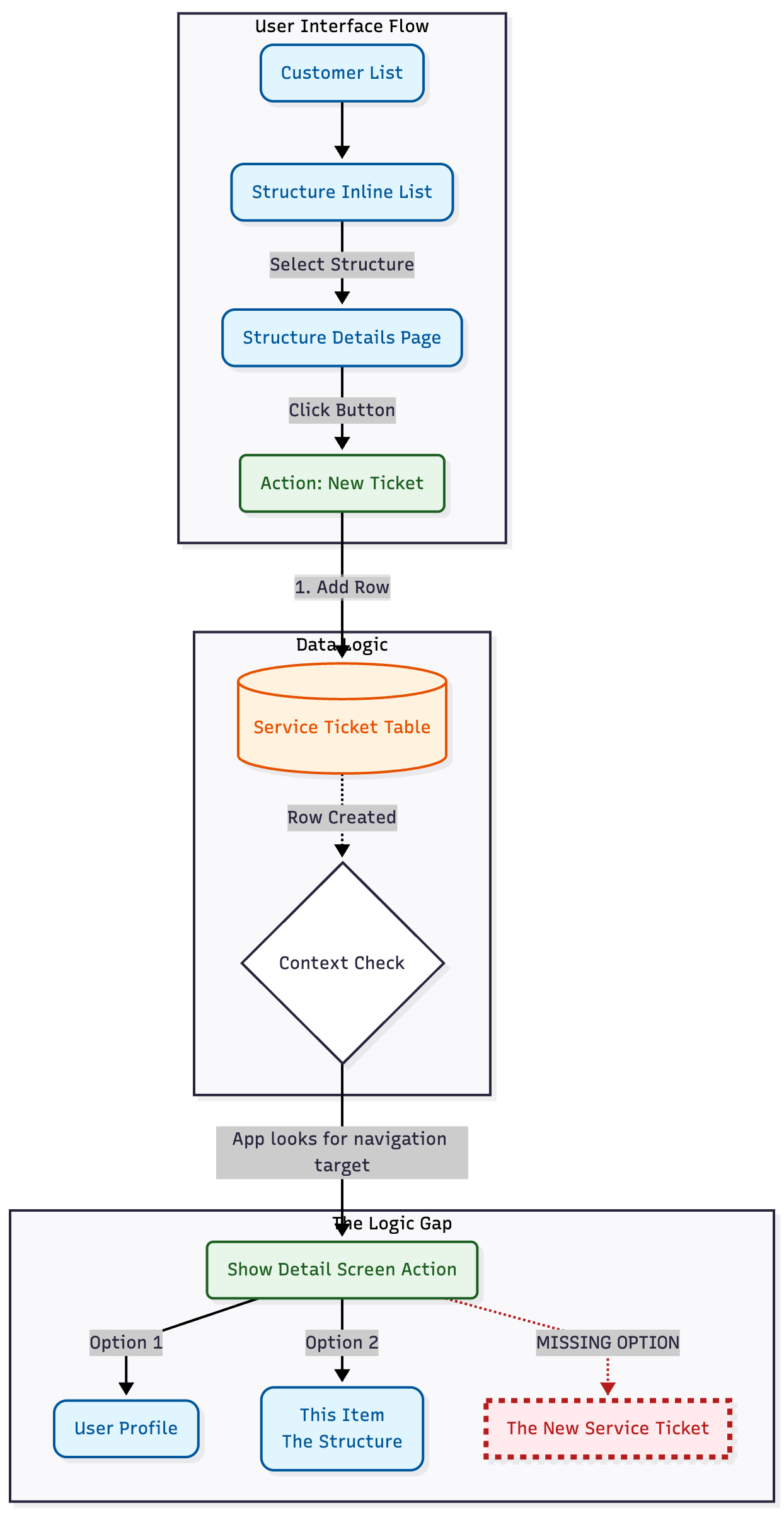
“Add Row” as a separate action does not allow you to utilize “this item” in the same way a form does. When you use a native form to write to a new table, show details \> this item would do the trick.
To do what you want here, you would have to:
- Write the newly added row’s ID somewhere in the Structure Details table.
- Use a relation to relate that ID to the Service Tickets table.
- Show details screen \> Use the relation above.
---
### Author:  [@lemonhead](https://community.glideapps.com/u/lemonhead)
#### Post date: [December 6, 2025, 12:11pm UTC](https://community.glideapps.com/t/add-row-action-then-show-details-stuck/85637/3 "2025-12-06T12:11:02Z")
Absolutely
---
### Author:  [@lemonhead](https://community.glideapps.com/u/lemonhead)
#### Post date: [December 6, 2025, 12:12pm UTC](https://community.glideapps.com/t/add-row-action-then-show-details-stuck/85637/4 "2025-12-06T12:12:24Z")
I really appreciate it! It worked! Thank you thank you thank you
---
### Author:  [@ThinhDinh](https://community.glideapps.com/u/ThinhDinh)
#### Post date: [December 6, 2025, 2:45pm UTC](https://community.glideapps.com/t/add-row-action-then-show-details-stuck/85637/5 "2025-12-06T14:45:43Z")
My pleasure to help!
---
### Author:  [@system](https://community.glideapps.com/u/system)
#### Post date: [December 13, 2025, 2:46pm UTC](https://community.glideapps.com/t/add-row-action-then-show-details-stuck/85637/6 "2025-12-13T14:46:30Z")
This topic was automatically closed 7 days after the last reply. New replies are no longer allowed.