# Activate location automatically or required
**URL:** https://community.glideapps.com/t/activate-location-automatically-or-required/77264
**Category:** Ask for Help
**Created:** [October 23, 2024, 1:44am UTC](https://community.glideapps.com/t/activate-location-automatically-or-required/77264 "2024-10-23T01:44:29Z")
**Posts on this page:** 20
**Page:** 1
### Author:  [@agung\_taufik1](https://community.glideapps.com/u/agung_taufik1)
#### Post date: [October 23, 2024, 1:44am UTC](https://community.glideapps.com/t/activate-location-automatically-or-required/77264/1 "2024-10-23T01:44:30Z")
hi, I’m trying to make an attendance application, is there a way to enable location automatically, or at least required?

---
### Author:  [@Himaladin](https://community.glideapps.com/u/Himaladin)
#### Post date: [October 23, 2024, 2:02am UTC](https://community.glideapps.com/t/activate-location-automatically-or-required/77264/2 "2024-10-23T02:02:16Z")
Learn how to hack this @agung_taufik1
> [@Exploring the Enhanced Capabilities of Glide's Native Form](https://community.glideapps.com/t/exploring-the-enhanced-capabilities-of-glides-native-form/69876):
>
> I want to share about the additional capabilities that we can achieve with Glide’s native form. What I have tested with the help of CSS is that native forms can also be applied for validation. Create your validation in the table columns and present it through messages via the “hint” component. Add the visibility conditional and the class “prevent-submit” to these hint components. Add the following CSS code: /\*Container Form\*/ #page-root:has(.prevent-submi…
---
### Author:  [@agung\_taufik1](https://community.glideapps.com/u/agung_taufik1)
#### Post date: [October 23, 2024, 3:20am UTC](https://community.glideapps.com/t/activate-location-automatically-or-required/77264/3 "2024-10-23T03:20:39Z")
thanks for the info…
because of the free version, I can’t apply CSS yet
---
### Author:  [@Himaladin](https://community.glideapps.com/u/Himaladin)
#### Post date: [October 23, 2024, 3:25am UTC](https://community.glideapps.com/t/activate-location-automatically-or-required/77264/4 "2024-10-23T03:25:58Z")
Another way is that you use a custom form with a custom action to control your submit button.
---
### Author:  [@Darren\_Murphy](https://community.glideapps.com/u/Darren_Murphy)
#### Post date: [October 23, 2024, 4:52am UTC](https://community.glideapps.com/t/activate-location-automatically-or-required/77264/5 "2024-10-23T04:52:14Z")
Just curious - what is the purpose of capturing the location upon check in?
---
### Author:  [@agung\_taufik1](https://community.glideapps.com/u/agung_taufik1)
#### Post date: [October 23, 2024, 5:10am UTC](https://community.glideapps.com/t/activate-location-automatically-or-required/77264/6 "2024-10-23T05:10:55Z")
because this is an attendance application, I want every employee who comes in to be in the office area…
and I’m developing it, if the employee who comes in is within 1km of the office, that can’t be done
---
### Author:  [@agung\_taufik1](https://community.glideapps.com/u/agung_taufik1)
#### Post date: [October 23, 2024, 5:11am UTC](https://community.glideapps.com/t/activate-location-automatically-or-required/77264/7 "2024-10-23T05:11:56Z")
> [@Himaladin](#):
>
> custom form
I’ll try…thanks
---
### Author:  [@Darren\_Murphy](https://community.glideapps.com/u/Darren_Murphy)
#### Post date: [October 23, 2024, 5:45am UTC](https://community.glideapps.com/t/activate-location-automatically-or-required/77264/8 "2024-10-23T05:45:14Z")
Okay, that’s what I thought.
So I assume you have the coordinates of the Office location?
Assuming yes, add a Distance to Location column that compares the users current location with the Office location. Then you can only allow them to Check in if that distance is less than the threshold that you set, and there is no need to ask for their location in the form. As long as the users allow location sharing when the App is opened, that will work.
---
### Author:  [@agung\_taufik1](https://community.glideapps.com/u/agung_taufik1)
#### Post date: [October 23, 2024, 5:52am UTC](https://community.glideapps.com/t/activate-location-automatically-or-required/77264/9 "2024-10-23T05:52:15Z")
> [@Darren\_Murphy](#):
>
> Distance to Location
oh great, thanks for the idea
---
### Author:  [@agung\_taufik1](https://community.glideapps.com/u/agung_taufik1)
#### Post date: [October 23, 2024, 5:55am UTC](https://community.glideapps.com/t/activate-location-automatically-or-required/77264/10 "2024-10-23T05:55:22Z")
May I ask again, how do I apply Excel formulas in GT? I wrote today but what appears is numbers

---
### Author:  [@Darren\_Murphy](https://community.glideapps.com/u/Darren_Murphy)
#### Post date: [October 23, 2024, 6:08am UTC](https://community.glideapps.com/t/activate-location-automatically-or-required/77264/11 "2024-10-23T06:08:01Z")
If you just want a column containing the current date, you should use a Math column:

---
### Author:  [@agung\_taufik1](https://community.glideapps.com/u/agung_taufik1)
#### Post date: [October 23, 2024, 6:26am UTC](https://community.glideapps.com/t/activate-location-automatically-or-required/77264/12 "2024-10-23T06:26:33Z")
ok thank you very much…
Can this date reference make the visibility of the check in button disappear?
For example, today I was absent from coming in and absent from going home, when I was absent from going home, the button will disappear, and will be available again the next day…

---
### Author:  [@Darren\_Murphy](https://community.glideapps.com/u/Darren_Murphy)
#### Post date: [October 23, 2024, 6:41am UTC](https://community.glideapps.com/t/activate-location-automatically-or-required/77264/13 "2024-10-23T06:41:30Z")
It’s possible, it’s just a matter of clearly defining the rules, and then building the logic.
Questions:
- do users also Check Out, or do they only Check In?
- if they also Check Out, do you update the existing (Check in) row, or create a new one?
---
### Author:  [@agung\_taufik1](https://community.glideapps.com/u/agung_taufik1)
#### Post date: [October 23, 2024, 6:55am UTC](https://community.glideapps.com/t/activate-location-automatically-or-required/77264/14 "2024-10-23T06:55:29Z")
> [@Darren\_Murphy](#):
>
> - do users also Check Out, or do they only Check In?
> - if they also Check Out, do you update the existing (Check in) row, or create a new one?
1. The user checks out
2. yes… I updated the existing check in line (row)
---
### Author:  [@Darren\_Murphy](https://community.glideapps.com/u/Darren_Murphy)
#### Post date: [October 23, 2024, 7:08am UTC](https://community.glideapps.com/t/activate-location-automatically-or-required/77264/15 "2024-10-23T07:08:27Z")
Okay.
So if a user Checks in on one day and then forgets to Check out, what should happen on the next day? Do you just forget about the previous day and leave the Check out empty?
Let’s assume yes. I would do something like this…
First, in your Check ins table I would have 3 columns for dates:
- Check In (Datetime column)
- Check Out (Datetime column)
- Date (Number column in the format YYYYMMDD)
- I also assume you have a column to store the users email address
Now in the table that the Check In/Check Out screen is attached to, create the following columns:
- Math column to return the current date in YYYYMMDD format:
```auto
Year(Now)*10^4
+Month(Now)*10^2
+Day(Now)
```
- Query column that targets the Check In table, with the following filters:
– Email is signed in user
– Date equals This row-\>math column
- Lookup column that fetches the first check out time via the query column
- Single Value-\>First-\>Whole row column via the query column
To decide if a user needs to check in or check out, use an if-then-else column:
- If Query column is empty, then Check In
- If Lookup column is empty, then Check Out
When a user Checks In, you will always add a new row.
When a user Checks Out, you will update the existing row via the Single Value column
---
### Author:  [@agung\_taufik1](https://community.glideapps.com/u/agung_taufik1)
#### Post date: [October 23, 2024, 8:22am UTC](https://community.glideapps.com/t/activate-location-automatically-or-required/77264/16 "2024-10-23T08:22:23Z")
wow great, thanks for the perfect explanation, I’ll try, I’ll ask for your advice again if I encounter any difficulties
---
### Author:  [@agung\_taufik1](https://community.glideapps.com/u/agung_taufik1)
#### Post date: [October 24, 2024, 1:19am UTC](https://community.glideapps.com/t/activate-location-automatically-or-required/77264/17 "2024-10-24T01:19:18Z")
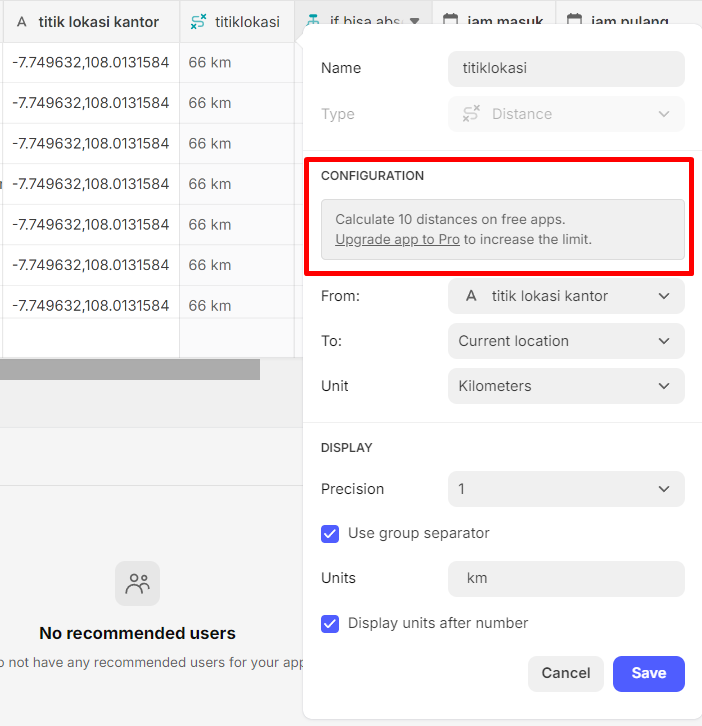
> [@Darren\_Murphy](#):
>
> add a Distance
Is there a limit to calculating distance in the free package?
---
### Author:  [@Jeff\_Hager](https://community.glideapps.com/u/Jeff_Hager)
#### Post date: [October 24, 2024, 1:22am UTC](https://community.glideapps.com/t/activate-location-automatically-or-required/77264/18 "2024-10-24T01:22:31Z")
I would think it should be fine as long as you are using coordinates. An easy test would be to add more than 10 rows.
---
### Author:  [@Himaladin](https://community.glideapps.com/u/Himaladin)
#### Post date: [October 24, 2024, 4:11am UTC](https://community.glideapps.com/t/activate-location-automatically-or-required/77264/19 "2024-10-24T04:11:36Z")
Use JavaScript to calculate the distance without being affected by this limitation. However, I’m not sure yet if there are any restrictions when using the location button in the free plan.
---
### Author:  [@system](https://community.glideapps.com/u/system)
#### Post date: [October 31, 2024, 4:12am UTC](https://community.glideapps.com/t/activate-location-automatically-or-required/77264/20 "2024-10-31T04:12:31Z")
This topic was automatically closed 7 days after the last reply. New replies are no longer allowed.