# 1-In the menu Option\>visibility, the table I want to use is not available. Two others problems
**URL:** https://community.glideapps.com/t/1-in-the-menu-option-visibility-the-table-i-want-to-use-is-not-available-two-others-problems/42392
**Category:** Ask for Help
**Created:** [May 26, 2022, 8:02am UTC](https://community.glideapps.com/t/1-in-the-menu-option-visibility-the-table-i-want-to-use-is-not-available-two-others-problems/42392 "2022-05-26T08:02:42Z")
**Posts on this page:** 6
**Page:** 1
### Author:  [@yoannh21](https://community.glideapps.com/u/yoannh21)
#### Post date: [May 26, 2022, 8:02am UTC](https://community.glideapps.com/t/1-in-the-menu-option-visibility-the-table-i-want-to-use-is-not-available-two-others-problems/42392/1 "2022-05-26T08:02:42Z")
1-In the menu Option\>visibility, the table I want to use is not available.
2-I want to make a new column in a table and put an info (in this column) of another table. The rows are joins by the same “row ID”.
3-I have events displayed in a page. I want that the initiators of the events can edit the infos. To do that I use “Edit form” and allow users to edit. Then I put my conditions. But it doesn’t work. 3.2-On the top left in “viewing as” I see only one user even if I have three users in my table.
Can you help me? Thanks, Yoann.
---
### Author:  [@David\_Gabler](https://community.glideapps.com/u/David_Gabler)
#### Post date: [May 26, 2022, 12:27pm UTC](https://community.glideapps.com/t/1-in-the-menu-option-visibility-the-table-i-want-to-use-is-not-available-two-others-problems/42392/2 "2022-05-26T12:27:35Z")
> [@yoannh21](#):
>
> 3.2-On the top left in “viewing as” I see only one user even if I have three users in my table.
On the left, click the “User Profile”

Then look on the right and make certain you have a sheet selected (it should be your user table)

This may also be why 3-1 is not working for you.
I’d need some print screens to know what you mean by “menu \> visibility” and then a screen shot of the two tables you want to join together and add a new column to.
---
### Author:  [@yoannh21](https://community.glideapps.com/u/yoannh21)
#### Post date: [May 26, 2022, 3:09pm UTC](https://community.glideapps.com/t/1-in-the-menu-option-visibility-the-table-i-want-to-use-is-not-available-two-others-problems/42392/3 "2022-05-26T15:09:53Z")
> [@David\_Gabler](#):
>
> On the left, click the “User Profile”
It’s doesn’t work , I always tested.
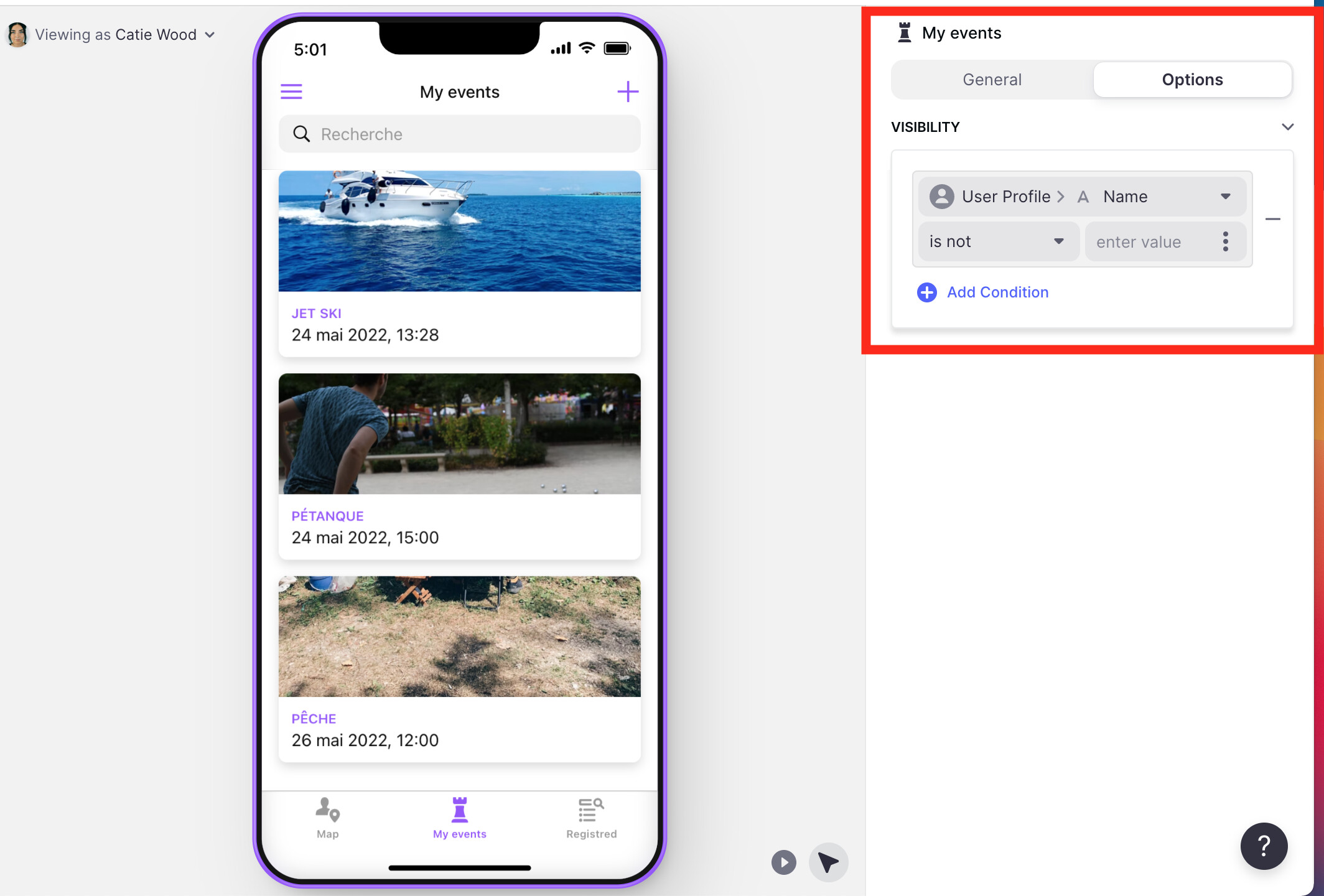
“visibility”:
Here are the two column, I want to put the “Photo Profile” in the “Initiator profile photo” where the row id is the same.


I found the solution my self to 1, it was because I didn’t selected Screen\>Card List on the bottom left. I found the solution to 3 it was because I used the Name in place of the row ID to define the visibility. I also found the solution to 3.2, it was because Yoann and Patrick don’t have email field. It stay only 1
---
### Author:  [@David\_Gabler](https://community.glideapps.com/u/David_Gabler)
#### Post date: [May 26, 2022, 3:43pm UTC](https://community.glideapps.com/t/1-in-the-menu-option-visibility-the-table-i-want-to-use-is-not-available-two-others-problems/42392/4 "2022-05-26T15:43:12Z")
OK, “Initiator profile photo” is a relation column. It should be renamed to signify that, but you can tell by the icon to the left of the name. I would call it “rel\_Initiator Profile”.
Then you can use that relation to do a lookup of the “Initiator profile photo”, similar to what I’ve done here in my app:

---
### Author:  [@yoannh21](https://community.glideapps.com/u/yoannh21)
#### Post date: [May 26, 2022, 4:26pm UTC](https://community.glideapps.com/t/1-in-the-menu-option-visibility-the-table-i-want-to-use-is-not-available-two-others-problems/42392/5 "2022-05-26T16:26:19Z")
It works! Good job. Thank you!
---
### Author:  [@system](https://community.glideapps.com/u/system)
#### Post date: [May 27, 2022, 4:26pm UTC](https://community.glideapps.com/t/1-in-the-menu-option-visibility-the-table-i-want-to-use-is-not-available-two-others-problems/42392/6 "2022-05-27T16:26:38Z")
This topic was automatically closed 24 hours after the last reply. New replies are no longer allowed.